
2. Assistant And RAG#
pycsamt.assistant is the retrieval-augmented generation (RAG)
layer used by Agent Master. It gives the conversational interface a
technical memory of the pyCSAMT codebase, documentation, recipes, project
registry, and workflow history, so that answers and generated scripts can
be grounded in real symbols instead of plausible-looking package names.
The Assistant layer is deliberately separate from pycsamt.agents.
The agent package performs geophysical workflow actions: loading surveys,
quality control, static-shift correction, phase analysis, inversion
preparation, reporting, and orchestration – each one an agent
returning a standardised AgentResult. The Assistant package supports
those actions from outside the workflow itself, by retrieving relevant
implementation context, assembling cited context for an answering model,
validating generated code, and evaluating retrieval quality.
For professionals and reproducibility, the most important design point is that the default RAG path is local and deterministic. A persisted BM25 index can be built without an API key, without a vector database, and without contacting an external LLM provider. Dense embeddings are optional and are added only when explicitly requested – every number and formula in this page describes the offline path unless stated otherwise.
2.1. What The Assistant Solves#
Agent Master must answer questions across several layers of pyCSAMT:
public geophysical APIs, such as
pycsamt.emtoolsandpycsamt.models;workflow agents in
pycsamt.agents;user documentation and examples;
assistant recipes for common workflows;
project-specific survey-line metadata;
recent session and workflow state.
Without retrieval, a chat model can easily hallucinate imports, arguments, or workflow names. The Assistant reduces that risk by making the answerer look up the relevant package evidence first. The same retrieved chunks are also used by offline answers, code-generation helpers, and evaluation suites.
2.2. High-Level Architecture#
The Assistant flow is:
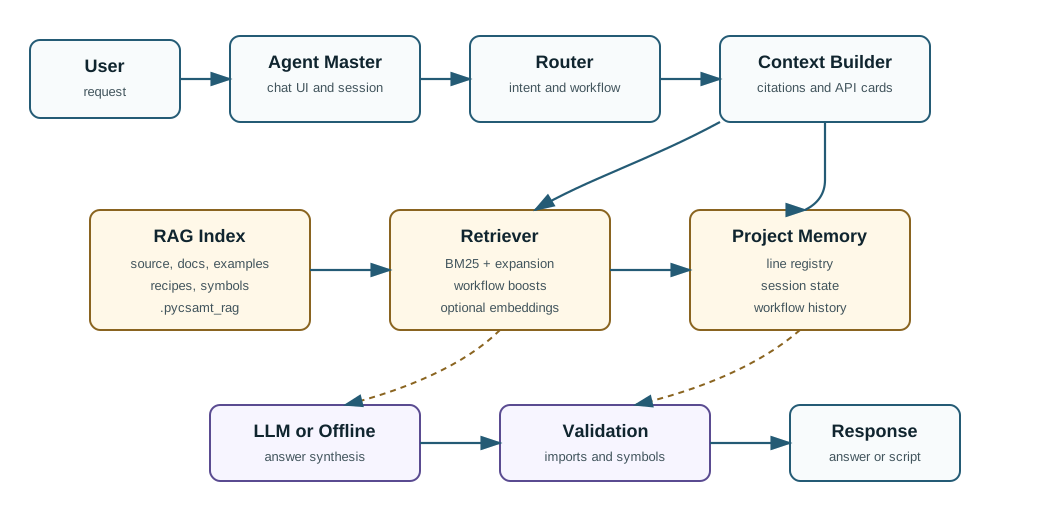
Agent Master uses the Assistant package as a grounding layer: requests are routed, matched against the RAG index and project memory, assembled into a cited context, synthesized by an LLM or offline answer path, and checked by deterministic validation before the response is shown.#
In text form, the same flow is:
user request
  -> intent / workflow routing
  -> RAG retrieval over source, docs, examples, and recipes
  -> project registry and memory lookup
  -> cited context assembly
  -> answer, generated code, or workflow plan
  -> optional deterministic validation
  -> user-facing Agent Master response
The core packages are:
Package |
Responsibility |
|---|---|
|
Index construction, persistence, retrieval, query expansion, optional dense embeddings, reranking, feedback, and context assembly. |
|
Executable helper functions used by the assistant, including workflow helpers, project lookup, plotting helpers, and generated-code validation. |
|
Project state, session state, and workflow-history records. |
|
JSONL evaluation suites and a scoring harness for retrieval, workflow recognition, line resolution, and hallucination guards. |
Agent Master is the user-facing chat application. See
Agent Master for the application guide and
Workflow Orchestrator for the workflow dispatcher used by
pycsamt.agents.WorkflowOrchestratorAgent.
2.3. Corpus Policy#
The RAG corpus is built from a selected subset of the repository. The policy
lives in pycsamt.assistant.rag.config so experts or professionals can inspect exactly
what is indexed and what is excluded.
Indexed roots include:
Source |
Why it is indexed |
|---|---|
|
Package implementation, public APIs, workflow agents, models, EM tools, inversion helpers, and domain logic. |
|
User guide, application guide, tutorials, CLI guide, API guide, and theory documentation. |
|
Runnable usage examples and workflow demonstrations. |
|
Assistant-facing recipes for common user requests. |
|
Root-level project orientation and assistant guidance when present. |
The indexer accepts Python, reStructuredText, and Markdown files. It excludes files that are likely to pollute retrieval or dominate scoring with irrelevant content, including bytecode caches, build outputs, generated distributions, large data/result folders, static web assets, most UI glue, unit tests, and the RAG implementation internals themselves. Tests are intentionally excluded because they often contain artificial calls, negative examples, fixtures, and mock objects that are useful for development but poor reference material for end-user answers.
This policy gives a concrete answer to the question “what evidence can the assistant use?” It is not the whole repository; it is a curated technical corpus focused on APIs, documentation, and workflow guidance.
2.4. Chunk Types And Metadata#
Each retrievable unit is a chunk, represented by
pycsamt.assistant.rag.schemas.RAGChunk. A chunk carries both text
and metadata so retrieval results can be ranked, filtered, cited, and used for
code generation.
Important fields include:
Field |
Meaning |
|---|---|
|
Stable chunk identifier, usually derived from source path and line range. |
|
Searchable text, such as a docstring plus symbol header, or a documentation section. |
|
Repository-relative source file path. |
|
Chunk category, such as |
|
Fully qualified Python symbol when the chunk represents code. |
|
Optional workflow tag, such as |
|
Static priority used as a ranking boost – see Retrieval Model for how it enters the score. |
|
Extra structured information such as signatures, parameters, returns, headings, or line spans. |
Python files are indexed with an AST-based indexer so functions, classes, methods, signatures, and docstrings can be retrieved as code-aware chunks. Documentation and recipes are split into section-level chunks so answers can cite a focused documentation passage rather than an entire page.
2.5. Index Building And Persistence#
Build the local index with:
1python -m pycsamt.assistant.rag build
By default, this creates:
.pycsamt_rag/
  manifest.json
  chunks.jsonl
chunks.jsonl stores one serialized chunk per line. The manifest
stores the index version, creation time, corpus counts, per-kind and
per-workflow statistics, output directory, and a corpus fingerprint.
The fingerprint is content-based, not timestamp-based – deliberately, since merely running the test suite can rewrite a file byte-for-byte and bump its modification time without changing a single indexed token. For the sorted set of indexable files \(p_1, \ldots, p_n\), it folds each file’s repository-relative path and content digest into one running SHA-256:
with paths sorted deterministically before hashing so the result does not depend on filesystem iteration order. If indexed source, documentation, examples, or recipes change – content, not mtime – the fingerprint changes and a stale-index check (compare \(\mathrm{fp}\) against a freshly computed one) flags the persisted index for rebuilding.
Useful inspection commands:
1python -m pycsamt.assistant.rag stats
2python -m pycsamt.assistant.rag query "static shift"
3python -m pycsamt.assistant.rag query "how far down can I trust my model"
The stats command reports corpus counts. The query command prints
the top retrieved chunks, including chunk kind, workflow tag, label, and
source path. These commands are useful for inspecting the retrieval layer
directly, before any LLM-generated answer is produced.
2.6. Current Corpus Statistics#
The following statistics were generated from a clean local rebuild with:
1python -m pycsamt.assistant.rag build
Build metadata:
Field |
Value |
|---|---|
Index version |
|
Created |
|
Persisted path |
|
Source fingerprint |
|
Embeddings |
|
Total chunks |
|
Chunk counts by kind:
Kind |
Count |
Interpretation |
|---|---|---|
|
|
User guide, application guide, tutorial, theory, CLI, and API prose sections. |
|
|
Class methods extracted from Python source. |
|
|
Top-level functions, classes, and other Python symbols. |
|
|
Module-level docstrings and module descriptions. |
|
|
Assistant recipes for recurring workflow requests. |
Chunk counts by workflow tag:
Workflow |
Count |
Typical evidence |
|---|---|---|
|
|
Phase tensor, strike, skew, anisotropy, dimensionality, and related diagnostics. |
|
|
Occam2D preparation, mesh/startup files, and inversion setup. |
|
|
AMA correction, galvanic shift detection, correction plots, and static-shift agents. |
|
|
Tipper and induction-arrow functionality. |
|
|
Forward modelling helpers and examples. |
|
|
Neural inversion, model-zoo, PINN, and AI-assisted inversion paths. |
|
|
ModEM input/output and backend support. |
|
|
Data quality control, flags, SNR, and frequency checks. |
|
|
MARE2DEM preparation and export workflows. |
|
|
Depth of investigation, Bostick-style sensitivity, and reliability checks. |
|
|
Noise removal and outlier handling. |
|
|
Tensor rotation and orientation workflows. |
|
|
3-D inversion agent and backend material. |
|
|
2-D AI/profile inversion material. |
|
|
Report generation and output synthesis. |
|
|
Code-generation agent and script-writing workflows. |
These numbers should be regenerated for each release artifact because the corpus changes whenever source files, recipes, or documentation change.
2.7. Retrieval Model#
The default retriever is a hybrid lexical retriever implemented in pure Python. It does not require FAISS, sentence-transformers, a hosted vector store, or network access.
The ranking components are:
Component |
Role |
|---|---|
Identifier-aware tokenization |
Splits names such as |
BM25 scoring |
Ranks chunks using Okapi BM25 over tokenized chunk text. |
Deterministic query expansion |
Maps domain phrasing to corpus vocabulary. For example, “vertical offset” can add static-shift and galvanic-distortion terms. |
Workflow inference |
Infers workflow tags from the query and applies a boost to matching chunks. |
Static priority |
Boosts high-value implementation areas such as |
Recipe boost |
Gives workflow recipes additional weight when they match the query. |
Exact symbol boost |
Promotes chunks whose symbol is explicitly named by the user. |
Optional feedback adjustment |
Can demote or promote symbols from user feedback without deleting possible correct answers. |
Query expansion is intentionally conservative. It only fires on specific phrases and its terms are scored at lower weight than the user’s own words. This lets natural geophysical language find code vocabulary while keeping off-topic questions from drifting into unrelated areas.
These components do not vote independently; they compose into one score per chunk, and the order of composition matters for reproducibility as much as the individual pieces do. The lexical stage first blends the query’s own BM25 score with a discounted BM25 pass over its expansion terms \(e(q)\) – the full BM25 derivation is in the glossary –
A chunk with \(L(c) = 0\) – sharing no token with the query or its expansion – is dropped immediately: no downstream boost can manufacture a relevance that lexical matching did not find. Every surviving chunk is then rescaled by structural evidence, multiplicatively rather than by weighted sum, so one strong signal (an exact symbol match, say) cannot be diluted back down by several weak ones:
where each \(b_*\) factor is \(1\) unless its condition fires:
\(b_{\mathrm{wf}} = 1.6\) when the chunk’s workflow tag matches the
query’s inferred workflow, \(b_{\mathrm{recipe}} = 1.25\) for a recipe
chunk, \(b_{\mathrm{sym}} = 1.5\) when the query text literally contains
the chunk’s leaf symbol name, and \(b_{\mathrm{fb}}\) applies a learned
per-symbol delta from prior user feedback, floored at \(0.15\) so a hard
negative can demote a chunk but never erase it from consideration entirely.
The ranked chunks are exposed through RetrievedContext.top_score, the
raw \(s(c)\) of the best match, which resurfaces later as the
confidence proxy behind the assistant’s decision to answer or ask a
clarifying question.
2.8. Optional Dense Retrieval#
Dense retrieval is optional. It is enabled only when the index is built with embeddings and a compatible embedding backend is available.
Example:
1python -m pycsamt.assistant.rag build --embed
When embeddings are active, the index stores embeddings.npz alongside the
manifest and chunk file. The default embedding backend is OpenAI embeddings
when an API key is supplied. The interface is backend-agnostic, so a local
embedding backend can be added without changing the retrieval callers.
The dense path is fused with the lexical ranking using Reciprocal Rank Fusion rather than raw score fusion. This matters because BM25 scores and cosine similarities live on different numeric scales – a score-level average would let whichever ranker happens to produce larger numbers quietly dominate. Ranks are scale-free, so fusion instead asks only “how early does each ranker place this chunk”:
with 0-based ranks and a chunk missing from one ranking simply contributing
nothing from that term. Before fusion, the dense ranking itself is built
from cosine similarity between the (L2-normalised) query embedding and every
stored chunk vector, keeping only chunks at or above a similarity floor of
0.20 so near-orthogonal, plainly unrelated chunks are never dragged into
contention regardless of how the lexical side ranked them; only the top
max(k * 5, 50) chunks of each ranking are fused, not the full corpus. If
vectors or an embedding backend are absent, or embedding the query fails for
any reason, the retriever degrades silently to the deterministic
BM25 path above – dense retrieval is additive, never a single point
of failure for retrieval itself.
2.9. Context Assembly#
Retrieval returns a pycsamt.assistant.rag.schemas.RetrievedContext.
The context builder then prepares an
pycsamt.assistant.rag.context_builder.AssembledContext for the
answering layer.
The assembled context contains:
the user query;
the ranked chunks used as evidence;
citation metadata for source paths and labels;
project context resolved from the project registry;
related symbols;
API cards extracted from code chunks;
a confidence proxy based on top retrieval score or project-line matches.
API cards are important for generated code. They expose the real signature, parameters, defaults, and return information of retrieved functions or classes. This makes code generation less dependent on prose and reduces the chance of invented argument names.
The confidence proxy is what turns a retrieval score into a decision.
Rather than trusting every top hit, AssembledContext.is_confident
reduces the whole retrieval pass to one boolean:
where \(s_{\max}\) is exactly the top chunk’s composed score \(s(c)\) from the retrieval model above. A resolved project context (the query already names a survey line the registry recognizes) is treated as confident on its own, independent of the text score, because knowing which data the user means is often worth more than any one chunk’s wording match. Below the floor, with no session context to anchor a guess, the assistant asks a clarifying question instead of answering from weak evidence – deliberately biased toward admitting uncertainty over fabricating a plausible-sounding but ungrounded response.
When no LLM key is configured, the context builder can compose a deterministic offline answer from the top retrieved chunks. With an LLM key, the model is expected to synthesize a fluent response from the same cited context.
2.10. Generated-Code Validation#
The Assistant includes deterministic checks for generated scripts, run by
pycsamt.assistant.tools.validation_tools.validate_generated_code().
The validator parses generated Python code with ast and inspects
imports from pycsamt. For each import it can verify, it checks whether
the referenced module, attribute, or submodule actually exists – and only
ever flags a symbol it can prove absent; an import it cannot check (an
optional heavy dependency, say) is reported as a warning, not an error, so
the validator never blocks generation on its own inability to verify.
This catches common hallucinations such as a plausible-looking but non-existent top-level import:
>>> from pycsamt.assistant.tools.validation_tools import validate_generated_code

>>> validate_generated_code("from pycsamt import static_shift\n")
{'ok': False, 'syntax_ok': True,
 'errors': ["'pycsamt' has no attribute or submodule 'static_shift'"],
 'warnings': [], 'checked': []}
against the real symbol the same request should have produced:
>>> validate_generated_code("from pycsamt.agents import StaticShiftAgent\n")
{'ok': True, 'syntax_ok': True, 'errors': [],
 'warnings': [], 'checked': ['pycsamt.agents.StaticShiftAgent']}
static_shift reads like a reasonable module name – it is the workflow
tag used throughout this page – which is exactly why a lexical or even a
fluent language model can produce it with confidence; only checking the
real package namespace catches the mismatch. This validator is a narrower,
complementary check to the hallucination guard used in
pycsamt.assistant.evals: the guard flags forbidden strings inside
retrieved evidence before an answer is composed, while this validator
checks a specific generated script’s imports after the fact. Neither
proves a script is scientifically correct; together they provide a
narrower but valuable guarantee – generated code should not reference
pyCSAMT APIs already known to be absent.
2.11. Memory And Project Context#
The Assistant has a small memory layer for project and session continuity. This layer is separate from retrieval over static source files.
Current responsibilities include:
project state, such as the active survey or output locations;
session state, such as recent user choices;
workflow history, such as previously run operations and their outputs;
project registry lookup, such as resolving survey-line names to paths and defaults.
This distinction is important. The RAG index answers “what does pyCSAMT know how to do?” Memory and project registry answer “what is the current project context?”
2.12. Evaluation Suites#
The Assistant includes JSONL evaluation suites under
pycsamt.assistant.evals.suites. Each record can define a query and
expected behavior, including:
expected intent;
expected workflow;
expected survey line;
expected retrieved symbols;
strings that must not appear in generated or retrieved outputs.
Run the default retrieval evaluation with:
1python -m pycsamt.assistant.rag eval
The evaluation harness reports metrics such as intent accuracy, workflow
accuracy, line accuracy, mean symbol recall, retrieval workflow coverage,
non-empty retrieval rate, hallucination guard violations, and
test-file pollution. A violation is counted per record whenever one of its
declared must_not_contain strings turns up in the text of the chunks
retrieved for that query – so the metric measures what evidence retrieval
surfaced, not what any answering model went on to say. Test-file pollution
is tracked separately because unit tests are excluded from the intended
retrieval corpus; retrieving them would indicate a corpus policy problem
rather than a hallucination.
Bundled suites:
Suite |
Records |
Purpose |
|---|---|---|
|
|
Paraphrases, synonyms, and negations that avoid direct API vocabulary; exercises query expansion, workflow tagging, and test-pollution guards. |
|
|
Broad package-QA and retrieval questions covering static shift, loading, phase analysis, inversion, and hallucination guards. |
|
|
General pyCSAMT package questions and expected retrieved symbols. |
|
|
Static-shift questions, workflow requests, code requests, and line resolution. |
|
|
AI inversion, Occam2D preparation, U-Net 2-D inversion, GCN 3-D inversion, and ModEM routing. |
|
|
EDI loading, |
|
|
Phase tensor, dimensionality, skew, geoelectric strike, and related code-generation routing. |
For reproducible evaluation results, record the command, pyCSAMT version, git commit, manifest statistics, and whether embeddings were enabled.
2.13. Representative Retrieval Examples#
The examples below were produced with the rebuilt offline index and default BM25 retrieval. They are intentionally shown before any LLM synthesis so the evidence exposed to the assistant can be inspected directly.
Static-shift query:
1python -m pycsamt.assistant.rag query "static shift correction"
Representative top results:
Rank |
Kind |
Workflow |
Label and source |
|---|---|---|---|
1 |
|
|
|
2 |
|
|
|
3 |
|
|
|
5 |
|
|
|
Phase-analysis query:
1python -m pycsamt.assistant.rag query "phase tensor strike direction"
Representative top results:
Rank |
Kind |
Workflow |
Label and source |
|---|---|---|---|
1 |
|
|
|
5 |
|
|
|
6 |
|
|
|
8 |
|
|
|
Occam2D preparation query:
1python -m pycsamt.assistant.rag query "prepare Occam2D input files"
Representative top results:
Rank |
Kind |
Workflow |
Label and source |
|---|---|---|---|
1 |
|
|
|
2 |
|
|
|
5 |
|
|
|
6 |
|
|
|
2.14. BM25 And Dense Retrieval Comparison#
The Assistant supports two retrieval modes:
Mode |
Strengths |
Tradeoffs |
|---|---|---|
Offline BM25 |
Deterministic, local, fast to inspect, reproducible without network access, and good for exact symbols, workflow vocabulary, CLI names, and documented terms. |
Can miss paraphrases when the user’s language and the code/docs share little vocabulary; conservative query expansion is used to reduce this gap. |
BM25 plus dense embeddings |
Better semantic matching for paraphrases and broader conceptual questions when a suitable embedding model is available. |
Requires an embedding backend and a vector cache; results may depend on the embedding model version, so the model name and version should be recorded alongside any reported retrieval results. |
Dense retrieval is opt-in:
1python -m pycsamt.assistant.rag build --embed
2python -m pycsamt.assistant.rag query --dense "static shift correction"
In dense mode, lexical and vector rankings are combined by Reciprocal Rank Fusion. Record both the embedding model and whether dense retrieval was enabled when documenting results, because the default release configuration is the offline BM25 path.
2.16. Direct Inspection Workflow#
The following sequence is a direct way to inspect the Assistant’s retrieval layer without running Agent Master:
1python -m pycsamt.assistant.rag build
2python -m pycsamt.assistant.rag stats
3python -m pycsamt.assistant.rag query "static shift correction"
4python -m pycsamt.assistant.rag query "phase tensor strike direction"
5python -m pycsamt.assistant.rag query "prepare Occam2D input files"
6python -m pycsamt.assistant.rag eval
For each query, inspect:
whether the top results come from relevant source files or documentation;
whether workflow tags match the task;
whether retrieved code symbols are real package symbols;
whether documentation chunks are specific enough to support a cited answer;
whether evaluation reports hallucination or test-pollution violations.
2.17. Reproducibility Checklist#
For reproducible reporting of Assistant behavior, record:
pyCSAMT version and git commit;
Python version and operating system;
exact RAG build command;
index manifest, including
version,created,n_chunks,source_fingerprint, andembedded;chunk counts by kind and workflow;
whether dense retrieval was enabled;
embedding provider and model when dense retrieval was enabled;
evaluation command and suite path;
evaluation metrics and any hallucination/test-pollution violations;
representative query outputs kept for later comparison;
any local project registry used to resolve survey-line names;
any API keys or external services used, described by provider and model name only, not by secret value.
2.18. Limitations#
The Assistant is a grounding and validation layer, not a scientific authority by itself.
Known limitations:
retrieval quality depends on the indexed documentation, docstrings, and recipes;
BM25 can miss paraphrases unless query expansion or embeddings bridge the vocabulary gap;
optional dense embeddings may improve semantic matching but introduce an external model dependency;
generated-code validation checks symbol existence, not scientific validity;
memory improves continuity but must not replace explicit user confirmation for destructive or expensive workflows;
stale indexes should be rebuilt after source, documentation, example, or recipe changes.