
4. Agent Catalogue#
The pyCSAMT agent catalogue is the navigation map for the AI-assisted
workflow layer. It lists the public classes exported by pycsamt.agents,
groups them by the role they play in a survey workflow, and points to the
detail page where each agent is documented.
Every entry below is an agent in the sense used throughout this
guide: a class that inherits BaseAgent, accepts
one input dictionary, and always returns a standardised AgentResult – whether it runs a deterministic pandas computation, a
finite-difference forward solve, or an LLM call. That single contract is
what lets loading, QC, inversion preparation, AI inversion, and report
writing be treated as interchangeable steps that a coordinator or an
orchestrator can chain, preview, and cost the same way, and it is why the
catalogue below can be read as a map rather than a set of unrelated tools.
Terms marked with this :term: styling are defined once in the
Glossary, so this page and the group pages it links to do not repeat
their definitions.
Use this page when you need to answer one of these questions:
Which agent should I start with?
Which agents can operate before inversion?
Which agents write files for Occam2D, ModEM, or MARE2DEM?
Which agents belong to the AI/model-zoo layer?
Which agents produce reports, maps, scripts, or EDI exports?
The catalogue intentionally separates agent classes from support
interfaces. Modules such as web.py, __main__.py, and _pricing.py
support agent usage, but they are not listed as workflow agents because they
do not define an executable BaseAgent subclass.
4.6. How to read the catalogue#
Most users should think in terms of a workflow lifecycle:
request or config
    -> load survey
    -> QC and correction
    -> tensor / tipper / strike diagnostics
    -> denoise / decimate / rotate if needed
    -> forward model or inversion preparation
    -> evaluate, interpret, export, report
The agent groups follow that lifecycle. Each group page contains deeper
examples and agent-specific input/output notes. The lifecycle itself is not
enforced by any single class: it emerges from how you wire agents together,
either explicitly with AgentCoordinator (see
Agent Coordinator) or implicitly by letting
WorkflowOrchestratorAgent choose the
chain from a natural-language request (see Workflow Orchestrator). Both
accept a dry run so the plan – which agents, in which order, with
which LLM provider – can be inspected before anything is written or
charged.
4.7. Catalogue groups#
The five groups below mirror the lifecycle diagram above, from survey intake through to deliverables. Skim the “Use it for” column first; it is usually enough to decide which detail page to open next.
Group |
Use it for |
Detail page |
|---|---|---|
Foundation and survey intake |
The execution contract, LLM-aware base class, result object, natural language request parsing, data loading, and explicit workflow chaining. |
|
Processing and diagnostics |
Data QC, static-shift correction, tensor diagnostics, strike analysis, tipper products, tensor rotation, frequency decimation, and denoising. |
|
Forward and inversion workflows |
Synthetic forward modelling, inversion preparation, Occam2D, ModEM, MARE2DEM, backend execution, result evaluation, and model comparison. |
|
AI and model-zoo agents |
Neural 1-D, 2-D, and 3-D inversion, ensemble uncertainty, joint inversion, anomaly detection, and checkpoint discovery. |
|
Orchestration, pipeline, and outputs |
Natural-language workflow routing, pyCSAMT pipeline execution, batch processing, interpretation, maps, sensitivity, EDI export, reports, and reproducible scripts. |
4.8. Choosing the right entry point#
The table above answers “which group”; the table below answers “which class inside that group should I instantiate first” for the needs that come up most often. Each row’s “Continue with” column is itself a small agent chain, not a single next call – read it as “hand this agent’s output to one of these.”
Need |
Start with |
Continue with |
|---|---|---|
A user writes a natural-language request. |
||
You already know the data path. |
||
You want a reproducible fixed chain. |
Any ordered set of processing, inversion, and output agents |
|
You want the request to choose the workflow. |
The orchestrator builds and runs the matching chain |
|
You want pyCSAMT pipeline presets. |
||
You need inversion-ready files. |
||
You need AI inversion. |
||
You need deliverables. |
4.9. Foundation and survey intake#
These components are the first layer of the agent system. They define how
agents are built, how results are returned, and how a survey enters the
workflow. Read them in the order they appear below: BaseAgent is the
contract every agent honors, AgentResult is the shape every agent
returns, ContextInputAgent turns free text into a request that matches
that shape, MTLoaderAgent turns a path into the Sites object the
rest of the catalogue operates on, and AgentCoordinator strings any of
the above into a named, resumable run.
One behavior is worth knowing before the first call. BaseAgent
resolves its LLM provider lazily and fails soft: with no API key configured,
or with the anthropic/openai/google-generativeai package not
installed, query_llm() logs the failure and returns None instead of
raising. Agents built on top of it – ContextInputAgent’s regex
fallback, DataQCAgent’s confidence scoring, and most of the catalogue –
keep working in a plain, deterministic mode; only llm_interpretation on
the returned AgentResult comes back None, while status and
the numeric outputs are unaffected. This is what makes the “Minimal
examples” below reproducible without any provider key.
Component |
Main responsibility |
Typical input |
Detail |
|---|---|---|---|
Shared execution base for LLM access, provider/model resolution, cost tracking, JSON extraction, plotting helpers, and validation helpers. |
Subclass code |
||
Standard return object with |
Agent output |
||
Convert natural-language requests into structured workflow configuration. Falls back to deterministic parsing when no LLM is configured. |
|
||
Load EDI, AVG, J, path lists, existing |
|
||
Chain explicit agent steps with input mapping, dry run previews, per-step checkpoints, and cost aggregation. |
Step graph |
4.10. Processing and diagnostics#
Processing agents operate after loading and before inversion, interpretation, or reporting. They are useful in notebooks, desktop/web tools, batch pipelines, and orchestrated workflows.
None of these agents reimplement the underlying physics: each one is a
thin, LLM-optional wrapper around the same pycsamt.emtools functions
documented in EM Tools Guide, so the exact scoring rules and
formulas behind a QC table, a static-shift correction, or a phase-tensor
diagnostic live on one page and are reused everywhere, including here.
Agent |
Main responsibility |
Typical output |
Detail |
|---|---|---|---|
Assess station coverage, dead bands, outliers, frequency gaps, and survey quality control indicators via the weighted confidence ratio. |
QC table, figures |
||
Detect and correct static shift using AMA, LOESS, or spatial-median strategies from Static-Shift Correction. |
Corrected sites |
||
Produce phase tensor, skew, strike, dimensionality, Mohr, and Argand diagnostics from Phase Tensor And Impedance Tensor Tools, Geoelectric Strike, and Dimensionality Assessment. |
Diagnostic figures |
||
Rotate impedance tensors to a target angle or strike reference while preserving survey metadata. |
Rotated sites |
||
Analyze tipper amplitude, phase, real/imaginary induction arrows, and spatial induction-vector products. |
Tipper summaries |
||
Select stable, inversion-ready periods from dense, irregular, or noisy
frequency sampling, honoring the SNR/QC flags from |
Selected periods |
||
Apply robust (Noise Removal And Spatial Filtering) and AI-assisted denoising before diagnostics, inversion, or AI training. |
Denoised sites |
TensorRotationAgent is the one processing agent with a formula worth
stating explicitly, because it is easy to get the rotation direction wrong
by hand: for a rotation angle \(\theta\), the two-sided rotation
is applied per frequency to the impedance tensor, with the tipper vector rotated the same way. With \(x\) north and \(y\) east, a positive \(\theta\) rotates the measurement axes clockwise in map view, from north toward east, following the geological azimuth convention rather than a mathematics-style counter-clockwise convention; \(\theta = 90^\circ\) turns the new \(x\) axis to east. This is the detail that most often causes a rotated section to come out mirrored when ported from another code base.
In Agent Master, a stated angle is applied as given (“rotate by 30 degrees clockwise” or “counter-clockwise”). An angle without a stated sense prompts a question rather than a guess, and “rotate to the strike” uses the estimated geoelectric strike.
4.11. Forward and inversion workflows#
These agents connect processed survey data to modelling and inversion
workflows. Use the general agent when you want backend-agnostic behavior, and
the specialized agents when you already know the inversion code – the
distinction mirrors the one drawn in Choosing A Model Backend and
Overview between the common pycsamt.inversion API and
direct model integration.
Agent |
Main responsibility |
Typical output |
Detail |
|---|---|---|---|
Run 1-D, 2-D, or 3-D forward modelling from resistivity models for
synthetic checks and sensitivity experiments, applying the same
forward operator as |
Forward response |
||
Prepare inversion-ready files through a backend-agnostic interface. |
Input directory |
||
Write Occam2D data, mesh, model, and startup files. |
Occam2D project |
||
Prepare ModEM 3-D impedance data files and related model inputs. |
ModEM project |
||
Prepare, run, or inspect MARE2DEM 2.5-D EM inversion projects, including data, resistivity, settings, and optional MPI execution. |
MARE2DEM project |
||
Drive the |
Backend result |
||
Load inversion outputs and compute RMS misfit, residual phase-tensor sections, and misfit pseudosections. |
Evaluation report |
||
Compare inversion sections, parameter sweeps, before/after corrections, or outputs from different backends. |
Comparison figures |
Two agents in this group are worth distinguishing carefully because their
names are easy to conflate: InversionPrepAgent/Occam2DAgent/
ModEmAgent/Mare2DEMAgent only write native input files for an
external solver – they do not iterate a model – while
InversionBackendAgent actually runs an inversion (built-in or external)
and returns a fitted inversion model. Reach for the writers when the
native project itself is the deliverable, and for InversionBackendAgent
when the agent workflow should own the solve end to end.
4.12. AI and model-zoo agents#
AI agents are useful when a trained model or model-zoo checkpoint is available,
when rapid approximate inversion is acceptable, or when anomaly/uncertainty
screening should complement deterministic processing. They are
task-oriented orchestration around the same AI inversion classes in
pycsamt.ai.inversion documented in AI inversion agents –
reach for that page when you need full control of datasets, network
construction, training loops, or loss functions, and reach for the agent
here when the built-in workflow already matches the task. Every agent in
this group inherits the same caveat: a fast prediction does not remove
non-uniqueness, so its output still needs the response-space and
uncertainty review described in AI inversion validation.
Agent |
Main responsibility |
Typical output |
Detail |
|---|---|---|---|
Run end-to-end 1-D neural AI inversion from observed survey data. |
1-D models |
||
Run 2-D profile inversion with U-Net style models and lateral continuity. |
2-D section |
||
Run 3-D spatial inversion using graph-based neural models and inter-station message passing. |
3-D volume |
||
Estimate uncertainty with a deep ensemble – several independently seeded members trained on the same architecture and dataset. |
Uncertainty bands |
||
Run multi-modal inversion across MT, TEM, CSAMT, gravity, or paired datasets when available. |
Joint model |
||
Flag anomalous station-frequency samples, unusual profiles, or survey regions needing manual review. |
Anomaly table |
||
List, download, inspect, and use pre-trained checkpoints from the pyCSAMT model zoo. |
Checkpoint path |
4.13. Orchestration, pipeline, and outputs#
These agents sit above individual processing steps. They route workflows,
execute batches, bridge the pyCSAMT pipeline system, and create deliverables.
Most of them consume the AgentResults produced by the groups above
rather than raw survey data, which is why they usually appear last in a
chain.
Agent |
Main responsibility |
Typical output |
Detail |
|---|---|---|---|
Classify a natural-language request, choose a workflow type, assemble a chain, and run or preview it (see Workflow Orchestrator). |
Workflow result |
||
Recommend or run pyCSAMT processing pipeline presets and step lists from an agent workflow (see Pipeline System). |
Pipeline result |
||
Apply the same workflow to multiple lines, folders, or profiles with a
consistent output structure; parallel via |
Batch manifest |
||
Convert resistivity, inversion, and diagnostic products into geological or hydrogeological interpretation (see Interpretation). |
Interpretation text |
||
Interpolate per-station inversion results onto a plan-view grid at one or more requested depths to build horizontal depth-slice maps. |
Map figures |
||
Estimate sensitivity, depth of investigation, and vertical resolution from the Bostick skin depth relation (see CSUMT Bostick Depth And Survey Design). |
Sensitivity section |
||
Export corrected, rotated, filtered, or recomputed survey objects back to standard EDI files. |
EDI files |
||
Assemble figures, tables, warnings, and interpretation into Markdown, HTML, or PDF reports. |
Report files |
||
Generate a standalone Python script from workflow configuration and outputs so interactive work can be reproduced. |
Python script |
4.14. Typical chains#
The four chains below are the ones referenced most often from the
“Choosing the right entry point” table. Each is a valid sequence of
add_step calls on an AgentCoordinator (see
Agent Coordinator for the full input_fn wiring), and each is exactly
the kind of chain WorkflowOrchestratorAgent assembles automatically once it classifies a
matching request.
4.14.1. Quality-control chain#
MTLoaderAgent
-> DataQCAgent
-> PhaseAnalysisAgent
-> ReportAgent
4.14.2. Correction and inversion-preparation chain#
MTLoaderAgent
-> DataQCAgent
-> StaticShiftAgent
-> TensorRotationAgent
-> FrequencyDecimationAgent
-> Occam2DAgent or ModEmAgent or Mare2DEMAgent
4.14.3. AI inversion chain#
MTLoaderAgent
-> DataQCAgent
-> DenoisingAgent
-> AIInversionAgent or Inv2DAgent or Inv3DAgent
-> EnsembleAgent
-> InterpretationAgent
-> ReportAgent
4.14.4. Batch workflow chain#
ContextInputAgent
-> WorkflowOrchestratorAgent
-> BatchSurveyAgent
-> ReportAgent
-> CodeGenerationAgent
4.15. Minimal examples#
The three snippets below are runnable as written from a pyCSAMT checkout
root, against the 28-station WILLY AMT profile bundled under
data/AMT/WILLY_DATA/L18PLT. No API key is required – as noted above,
every agent here still runs its deterministic path and only
llm_interpretation comes back empty.
Load and QC a survey, keeping the resulting Sites object for every
later step:
>>> from pycsamt.agents import MTLoaderAgent, DataQCAgent

>>> loaded = MTLoaderAgent().execute({"path": "data/AMT/WILLY_DATA/L18PLT"})
>>> qc = DataQCAgent().execute({"sites": loaded["sites"]})

>>> print(loaded.status, loaded["n_stations"])
success 28
>>> print(qc.summary)
QC complete: 0 station(s) flagged out of 28. 2 figure(s) produced.
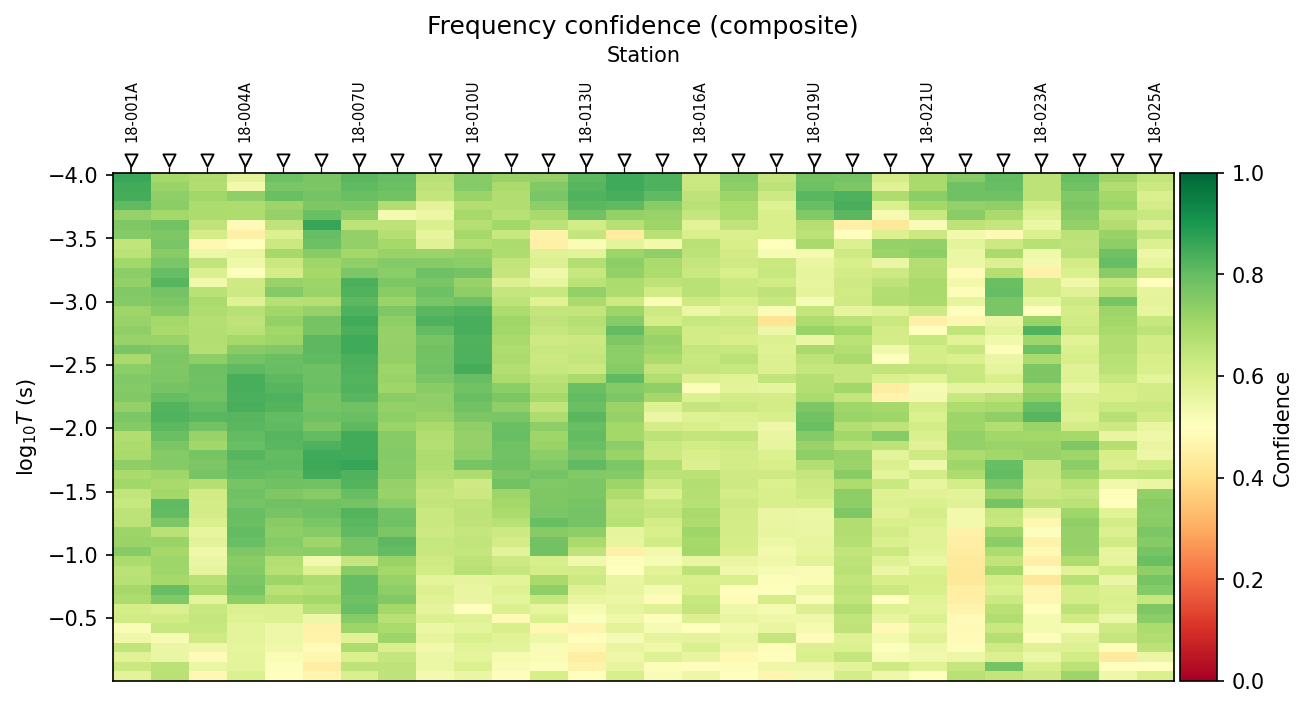
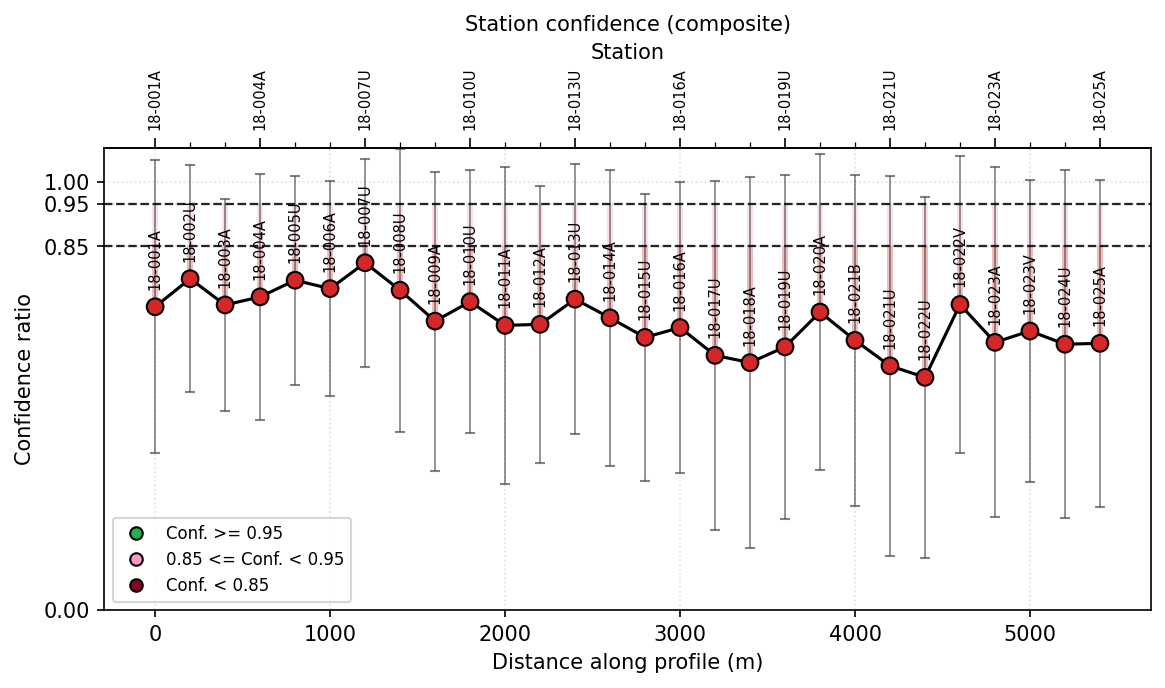
DataQCAgent writes these two figures whenever output_dir is
supplied (omitted above to keep the snippet minimal); with no
output_dir the same arrays come back in-memory under
qc.data["figures"]. Both panels plot the weighted confidence
ratio, per frequency on the left and composited per
station on the right. Notice that every station here sits in the “Conf.
< 0.85” band and yet n_flagged is 0: the confidence ratio is a
continuous quality signal for review, while the pass/fail flag returned in
qc.data["flagged_stations"] comes from the separate, coarser
qc_flags rule – a low confidence ratio is a prompt to look closer, not
by itself a rejection.
Continuing from loaded["sites"], prepare an Occam2D project:
>>> from pycsamt.agents import Occam2DAgent

>>> occam = Occam2DAgent().execute({
...     "sites": loaded["sites"],
...     "output_dir": "outputs/occam2d",
...     "run_external": False,
... })

>>> print(occam.summary)
Occam2D prep: 28 stations × 53 periods. 4/4 files written to outputs/occam2d.
>>> sorted(occam.data)
['data_path', 'mesh_path', 'model_path', 'n_data', 'n_periods', 'n_stations', 'output_dir', 'startup_path']
run_external=False stops after writing OccamDataFile.dat,
Occam2DMesh, Occam2DModel, and OccamStartup – the same four
files Occam2D describes – without requiring the Occam2D
binary to be installed. Set it to True only once that binary is
available and the run should actually execute.
Preview an orchestrated workflow before running it:
>>> from pycsamt.agents import WorkflowOrchestratorAgent

>>> plan = WorkflowOrchestratorAgent().execute({
...     "request": "Run QC, correct static shift, and report",
...     "data_path": "data/AMT/WILLY_DATA/L18PLT",
...     "dry_run": True,
... })
Workflow: orchestrated_static_shift
Steps   : 4
Config  : {
  "path": "data/AMT/WILLY_DATA/L18PLT",
  "output_dir": "pycsamt_workflow_output",
  "request": "Run QC, correct static shift, and report"
}

────────────────────────────────────────────────────────────
   1. [load]
       Agent  : MTLoaderAgent
       LLM    : claude/claude-sonnet-4-6
       Action : Load EDI files
   2. [qc]
       Agent  : DataQCAgent
       LLM    : claude/claude-sonnet-4-6
       Action : Data quality control
   3. [static_shift]
       Agent  : StaticShiftAgent
       LLM    : claude/claude-sonnet-4-6
       Action : Static-shift detection and AMA correction
   4. [report]
       Agent  : ReportAgent
       LLM    : claude/claude-sonnet-4-6
       Action : Generate static-shift report
────────────────────────────────────────────────────────────

>>> print(plan["workflow_type"])
static_shift
>>> print(plan["steps"])
[{'name': 'load', 'agent': 'MTLoaderAgent', 'description': 'Load EDI files'}, {'name': 'qc', 'agent': 'DataQCAgent', 'description': 'Data quality control'}, {'name': 'static_shift', 'agent': 'StaticShiftAgent', 'description': 'Static-shift detection and AMA correction'}, {'name': 'report', 'agent': 'ReportAgent', 'description': 'Generate static-shift report'}]
That banner is printed automatically by the coordinator’s dry run
preview, not by an explicit print() call above; the LLM row is each
step’s resolved default provider/model, not proof of a live connection –
compare it with the graceful degradation described earlier. The path was
passed through data_path rather than embedded in request because
ContextInputAgent’s regex fallback only recognizes absolute-looking
paths (a leading / or ~); pass data_path explicitly whenever a
relative path is already known. Remove dry_run (or set it to
False) once the plan looks right and the workflow should actually run.
4.16. Support interfaces#
The following modules support the agent system but are not workflow agents
– they have no execute() method and never appear in a coordinator chain
or an orchestrator plan, so they are deliberately absent from every table
above:
pycsamt.agents._pricingCost estimation helpers used by
pycsamt.agents.AGENT_CONFIGandBaseAgent.pycsamt.agents.webOptional Gradio interface for interactive agent usage.
pycsamt.agents.__main__Command-line entry point for lightweight agent demonstrations and utility commands.
pycsamt.api.agentsThe global provider, key, model, pricing, and budget configuration layer. See Agent And LLM Configuration.