
7. Format Converter#
Every classical solver writes its own file layout, EDI and EMTF-XML disagree
about how a transfer function should be serialized, and a borehole, a
geology legend, a fault trace, or a target list each need their own small
JSON container before they can sit next to a resistivity model in
Map View or the desktop’s 3-D panel.
pyCSAMT Format Studio — the standalone converter app, pycsamt.app.converter
— is the one small tool whose entire job is turning all of that into a file
another pyCSAMT surface can open directly.
It is deliberately not a scaled-down desktop GUI. The full desktop suite loads a survey, processes it, models it, and only then offers a Format Converter tool (from its Tools menu) that exports an already-loaded survey to EDI/CSV/JSON — EMTF-XML, PCBH, PCGL, PCGS, and PCPT are not reachable from the desktop app at all. This standalone app skips the survey entirely: point it at a file or folder, choose an output, click the one orange button, and it is done. That focus is also what makes it freezable — see Compiling A Standalone Build — into a double-click binary you can hand to a field engineer or office colleague who does not want a Python environment at all.
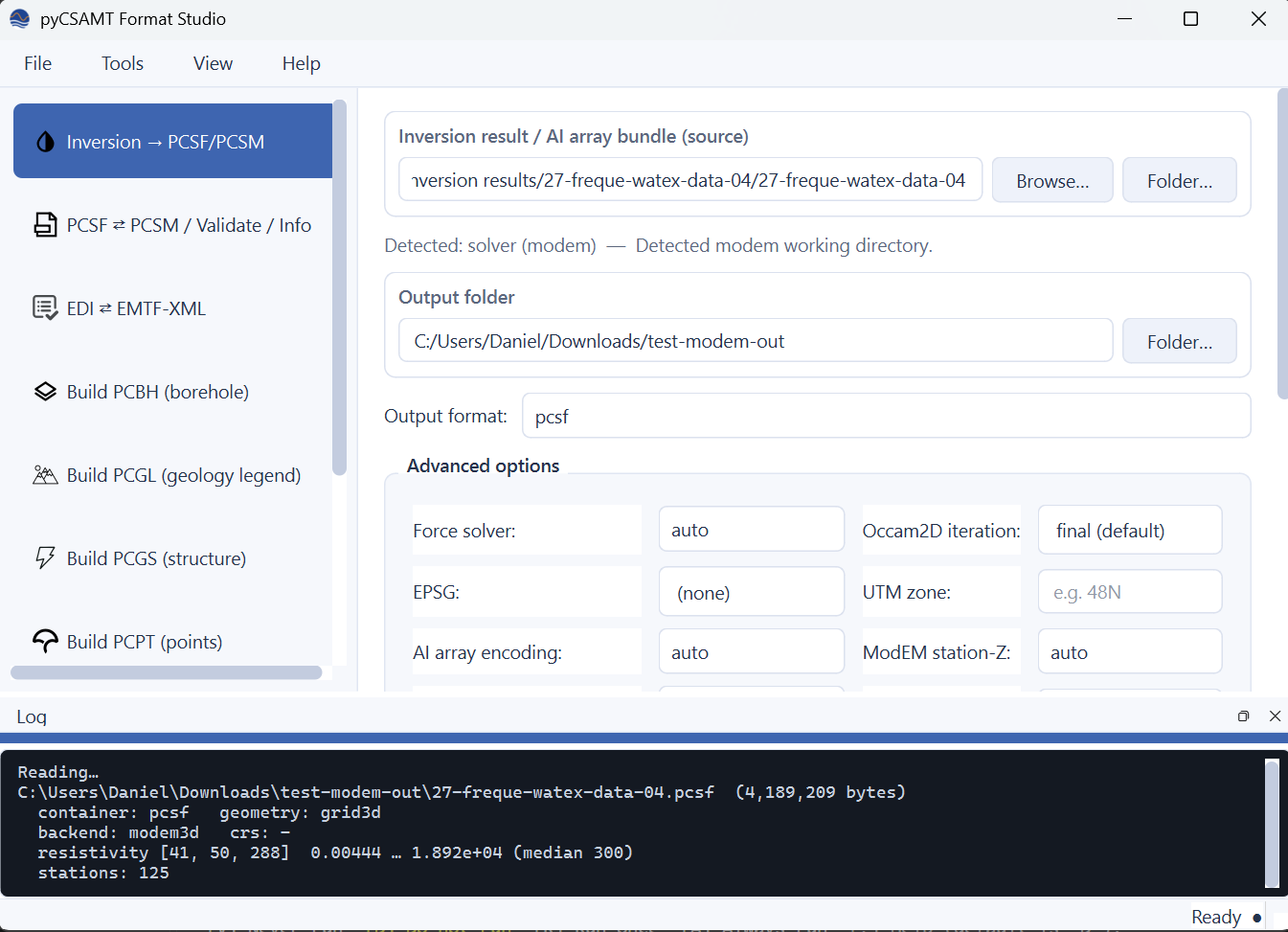
The Inversion → PCSF/PCSM page after converting a real ModEM 3-D run. The sidebar lists all nine tools in the same order as the Tools menu; the source field auto-detected a ModEM working directory (“Detected: solver (modem)”); the Advanced options panel exposes solver-specific overrides two-up so they never force horizontal scrolling; and the shared log dock at the bottom — one dock every page reports to, not nine separate ones — shows the result of the previous action taken on the currently-loaded file (here, a follow-up Info read-back: a \(41\times 50\times 288\) grid, 125 stations, resistivity spanning four orders of magnitude).#
What it converts, end to end:
Page |
Converts |
|---|---|
Inversion → PCSF/PCSM |
Occam2D / ModEM 3-D / MARE2DEM working directory, or an AI/DL
|
PCSF ⇄ PCSM / Validate / Info |
Lossless transcoding between the two, plus structural validation and a full summary of an existing file. |
EDI ⇄ EMTF-XML |
Historical SEG EDI transfer functions ⇄ IRIS/EMTF-XML, one file or a whole directory, in either direction. |
Build PCBH |
CSV / relational CSV directory / XLSX / LAS 2.0 log → a PCBH borehole document. |
Build PCGL |
CSV of named resistivity units → a PCGL geology legend. |
Build PCGS |
CSV(s) of planar/linear structural measurements and fault traces → a PCGS structural-evidence document. |
Build PCPT |
CSV/XLSX of named points → a PCPT points-of-interest document. |
Batch queue |
A mixed folder of EDI / EMTF-XML / inversion sources, converted sequentially with a per-row status. |
Settings |
Persisted defaults (EPSG, UTM zone, ModEM conventions, EDI/XML policy, theme) applied to every new job. |
Every page is a thin widget around one function in
pycsamt.app.converter.jobs — plain, Qt-free Python that reuses exactly
the engine the pycsamt format command line drives
(pycsamt.format.convert_engine, pycsamt.emtf,
pycsamt.format.borehole, pycsamt.format.geology,
pycsamt.format.structure, pycsamt.format.pointset). This page
documents both faces side by side: click through the GUI, or drive the same
conversion from a script or CI job with the CLI command shown in each
section. Format Commands already has the exhaustive option reference for
convert / detect / info / validate; this page links there
rather than repeating it, and gives full treatment to the six sub-commands
(edi-to-xml, xml-to-edi, build-pcbh, build-pcgl,
build-pcgs, build-pcpt) that are not documented anywhere else yet.
7.1. Install And Launch#
The converter app ships with the same optional application extra as the full desktop suite — one install covers every pyCSAMT GUI surface:
pip install "pycsamt[app]"
For development from a source checkout:
pip install -e ".[app,dev]"
Launch it with the dedicated entry point:
pycsamt-converter
which is equivalent to:
python -m pycsamt.app.converter
Either form opens a window titled pyCSAMT Format Studio at a modest 920×620 by default (minimum 760×520) — small enough to sit next to a file browser, not a window that swallows the whole screen. Every page scrolls internally if its content genuinely needs more room than the window offers, so resizing smaller never clips a field.
Unlike the full desktop app, the converter app never needs survey data
loaded first — there is no station list, no map, no EDI folder to open at
startup. You pick a source path on whichever page you need and go. Nothing
here writes into your data folders except the output path you explicitly
choose, and every builder/convert action refuses to overwrite an existing
file unless its Overwrite existing output checkbox is ticked (CLI:
--overwrite).
7.2. Compiling A Standalone Build#
The converter app never needs a binary — pycsamt-converter /
python -m pycsamt.app.converter work directly once
pip install "pycsamt[app]" is done. Packaging exists for one specific
case: handing a double-click-able build to someone who does not want a
Python environment at all. It is the only pyCSAMT application shipped this
way — the full desktop suite, the web app, Map View, and the agent app are
not packaged as frozen binaries, precisely because this app’s narrow scope
(convert files, nothing else) is what keeps the freeze small enough to be
worth building.
Build it with PyInstaller from a Python
environment that has pycsamt installed together with its app extra,
plus PyInstaller itself:
pip install -e ".[app]"
pip install pyinstaller
Then, from that environment and the repository root, on Windows:
powershell -ExecutionPolicy Bypass -File packaging\pyinstaller\build_converter.ps1
or the equivalent on Linux/macOS:
bash packaging/pyinstaller/build_converter.sh
Both scripts wrap pyinstaller --noconfirm --clean
packaging/pyinstaller/pycsamt_converter.spec — run that directly for more
control over PyInstaller’s own flags.
The build is a onedir build, not a onefile: the app lands in
dist/pycsamt-converter/ as pycsamt-converter.exe (or
pycsamt-converter on Linux/macOS) plus an _internal/ folder of
dependencies. Onedir starts faster and is easier to debug than onefile’s
self-extracting-to-temp approach — the whole folder is what you zip up and
hand to someone, not just the executable.
Expect roughly 600 MB — that is the scientific Python stack (NumPy, SciPy,
pandas, Matplotlib, h5py, pyproj, openpyxl) plus Qt/PySide6, not the
converter app’s own code. The spec explicitly excludes PyTorch, TensorFlow,
and the other pyCSAMT apps (pycsamt.ai,
pycsamt.app.desktop/web/mapview/agent_master): none of those
are reachable from pycsamt.app.converter.jobs, so leaving them out
costs no functionality while keeping the frozen build a few hundred MB
smaller. If a future page needs one of them, drop it from the excludes
list in the spec rather than fighting a ModuleNotFoundError at runtime.
Before handing out a build, smoke-test it: launch
dist/pycsamt-converter/pycsamt-converter.exe on a clean machine, then
convert one real file on each page — an inversion working directory or
.npz on the Inversion page, a PCSF↔PCSM transcode, a real .edi on the
EDI↔XML page, a CSV on each of the four builder pages, and a mixed batch
queue. A page that silently does nothing usually means an uncaught
traceback the windowed (console=False) build swallowed; rebuild with
console=True in the spec’s EXE(...) call temporarily to see it.
pytest pycsamt/app/converter/tests/test_jobs.py already covers every
conversion function’s correctness in-process — the frozen-build smoke test
above only checks that PyInstaller’s dependency bundling did not drop
something the tests do not exercise (import resolution, Qt plugin loading,
data files).
Note
The build is not code-signed, so Windows SmartScreen / macOS Gatekeeper will warn on first launch — mention this to whoever receives it. First launch is also slower than later ones while the OS caches the bundled DLLs; this is normal, not a hang. Rebuild after any dependency bump — there is no CI job producing this binary automatically yet, so an old build silently stops covering a new format/emtf submodule until someone rebuilds it.
7.3. Finding Your Way Around#
Every page shares the same frame, visible in the screenshot above:
Chrome |
What it does |
|---|---|
Menu bar |
File (Settings, Quit) · Tools — one checkable entry per page,
|
Sidebar |
The same nine tools, in the same order as the Tools menu; click or use the shortcut, either updates the other. |
Log dock |
One shared, dockable panel at the bottom (capped around 140 px) that every page reports progress and results to — not a separate log embedded in each page. Toggle it from View → Log. |
Status bar |
A quiet “Ready ●” indicator; most feedback lives in the log dock instead. |
Theme (View → Theme → Light/Dark) persists across launches through the
same ConverterSettings that backs
the Settings page. Primary actions — Convert, Build, Transcode, Run all,
Save settings — are always the single orange button on a page; anything
secondary (Validate, Info, Browse…) stays neutral, so the one action that
actually writes a file is never ambiguous.
7.4. Source Detection#
Two pages — Inversion and the batch queue — rely on the same detector,
pycsamt.format.detect_source(). It never
loads heavy array data; it looks at file names, extensions, and a handful of
solver signatures (an *.iter file for Occam2D, Modular_NLCG.log /
ModEM.inv for ModEM, a *.poly PSLG for MARE2DEM, resistivity/key
names for an AI .npz) and reports what it found. Format Commands
documents every signature and the full category table
(pcsf / pcsm / solver / ai_arrays / unknown); on the
Inversion page, the same result appears live under the source field as soon
as you drop a path in, for example:
Detected: solver (modem) — Detected modem working directory.
When a directory carries more than one solver’s signature, detection
reports medium confidence and picks one — use Force solver in Advanced
options (CLI: --solver) to override it rather than renaming files.
7.5. Inversion → PCSF/PCSM#
This page takes whatever an inversion produced and turns it into one self-describing PCSF (or its ASCII sibling, PCSM) file that Map View, the desktop’s 3-D panel, the web map view, or a plain analysis script can open without knowing which solver produced it. See PCSF — Common Subsurface Format for the format itself — canonical resistivity is always linear \(\Omega\,\mathrm{m}\), with the source backend’s native encoding preserved alongside it as provenance, never assumed.
Source accepts a solver working directory (or a single signature file
inside one, such as run/ITER17.iter or demo.poly — the detector
resolves it to that file’s folder), a .npz/.npy AI array bundle, or
an existing .pcsf/.pcsm file, and shows the live detection result
described above. Output folder and Output format (pcsf /
pcsm / pcsm.gz) control where the result lands.
Advanced options lays its short scalar fields out two per row — nine fields become five grid rows instead of nine — with two full-width DropZones and two checkboxes below:
Field |
Meaning |
|---|---|
Force solver |
Override auto-detection ( |
Occam2D iteration |
Which |
EPSG / UTM zone |
Projection used together with Topography source and, for AI
|
AI array encoding |
|
ModEM station-Z |
How to read the |
ModEM air threshold (Ω·m) |
Cells above this resistivity are masked as above-topography air fill
rather than real model resistivity (default \(10^{8}\)); pass
|
Created by / Description |
Free-text values written into the PCSF |
Below the grid, Topography source accepts a .bln/.csv/.stn
file or an EDI directory and is attached per station (Occam2D and ModEM
only) via pycsamt.format.topo_source’s name/positional matching;
MARE2DEM .poly lets you rebuild the mesh from a specific PSLG file
instead of the one auto-discovered next to the run (MARE2DEM conversion
needs the triangle package — see Troubleshooting
if it is missing). Write PCSM block in log10(rho) only affects the
human-readable text block for --to pcsm; the canonical stored
resistivity stays linear either way.
Under the hood this is one call to pycsamt.format.convert_engine’s
adapters, exactly what pycsamt format convert runs:
pycsamt format convert data/modem/run01/ run01.pcsm.gz \
    --topo data/AMT/WILLY_DATA --epsg 32648
See Format Commands for the complete convert option table (every
field above has a matching flag) and more worked examples across all three
solvers and AI arrays.
7.6. PCSF ⇄ PCSM / Validate / Info#
One source field, three actions. Transcode (the orange button)
round-trips a .pcsf/.pcsm/.pcsm.gz file to the other encoding —
Transcode to and Output file only matter for this action.
Validate and Info read the same source field and ignore the output
field entirely; they exist to answer “is this file sound?” and “what is
actually in this file?” without writing anything.
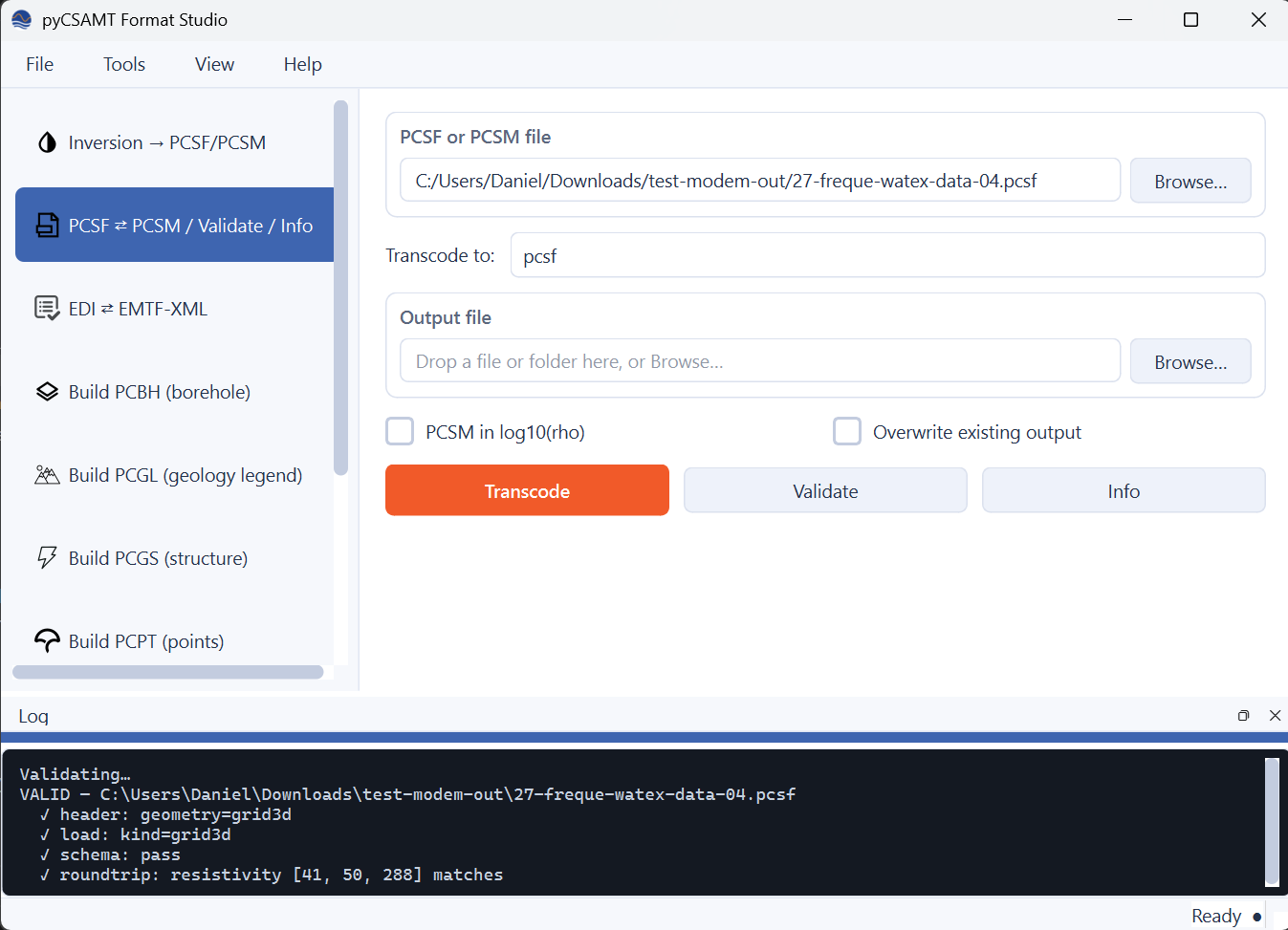
Validate run against the same 27-freque-watex-data-04.pcsf from
the Inversion example above. Four checks run in order — header, load,
schema, round-trip — and every one has to pass for the file to report
VALID; the round-trip step specifically re-writes the model to a
temporary file of the same encoding, reads it back, and compares the
resistivity array element-for-element, which catches a writer silently
dropping precision that a header-only check would miss.#
Validate’s four steps and Info’s full field-by-field summary
(geometry, every stored resistivity-like array with its NaN count, station
table, topography kind, provenance) are documented in full, with more
examples, under Format Commands:
pycsamt format info model.pcsf
pycsamt format validate model.pcsm --no-roundtrip
7.7. EDI ⇄ EMTF-XML#
Losslessly converts between historical SEG EDI transfer functions and IRIS/EMTF-XML, one file or an entire directory at a time. See EDI Interoperability for exactly what maps to what; the short version is that both formats store the same impedance/tipper tensors and uncertainties, but EDI is a fixed-width ASCII block format from the 1980s and EMTF-XML is a modern, richly-annotated schema, so some EMTF-only metadata (arbitrary transfer-function types, full covariance matrices, several provenance blocks) has no EDI destination — the app never silently drops it without telling you (see EDI/XML data-loss policy below).
Direction switches the whole form between EDI → EMTF-XML and EMTF-XML → EDI; the options below it change to match:
Option |
Direction |
Meaning |
|---|---|---|
Prefer EDI SPECTRA blocks |
EDI → XML |
When an EDI carries raw |
EDI/XML data-loss policy |
XML → EDI |
|
Strict XML parsing |
XML → EDI |
Reject a malformed |
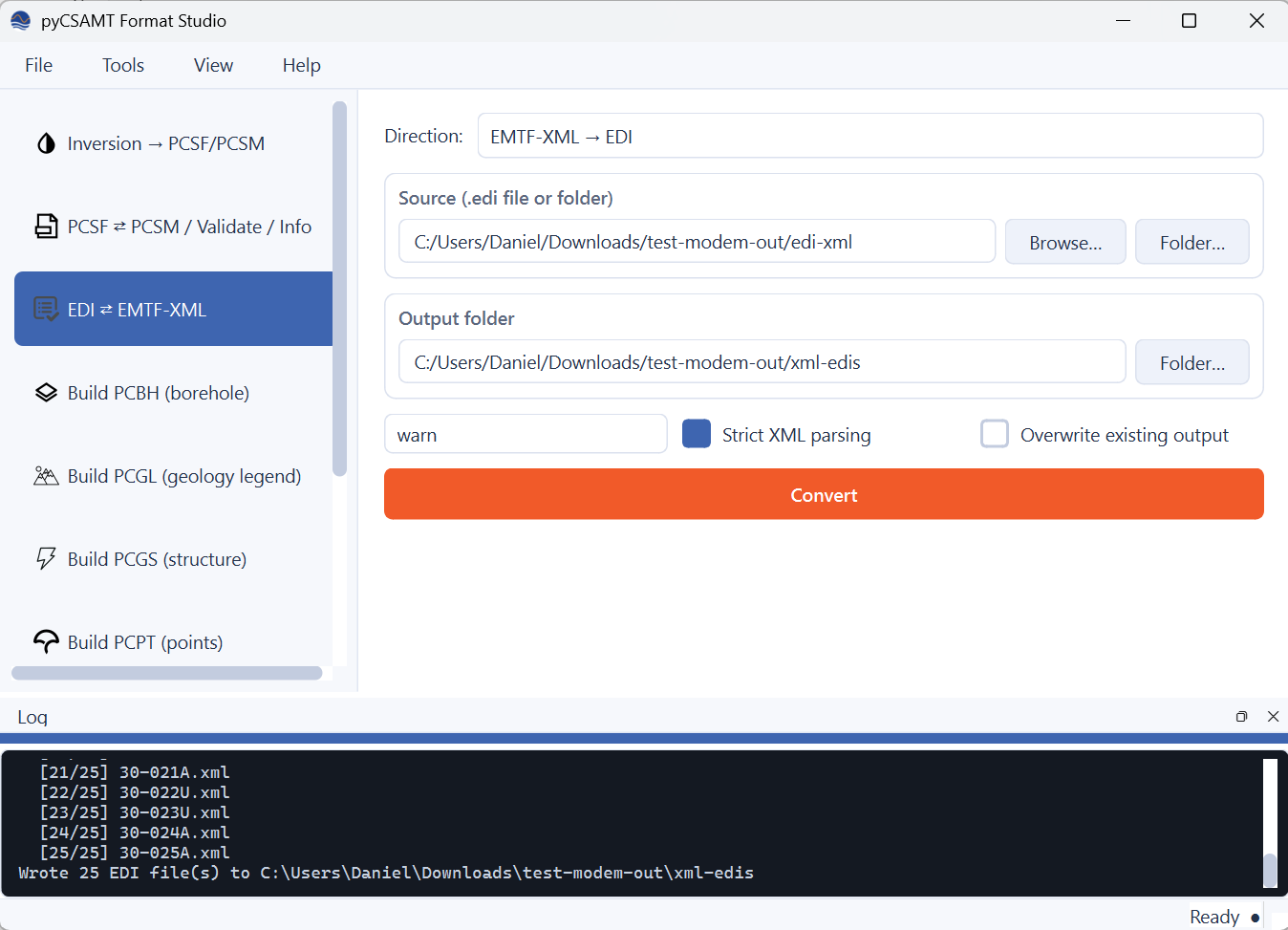
A real folder conversion in progress: 25 EDI files converted one at a time, each logged as it completes, ending in a one-line summary. The same per-item progress reporting backs the batch queue below.#
Both directions accept a single file or a whole folder for Source, and neither is documented anywhere else in the CLI reference yet, so here is the full picture. EDI → XML:
pycsamt format edi-to-xml SOURCE [--prefer-spectra/--no-prefer-spectra] \
    [-o OUTPUT_DIR] [--overwrite] [-v]
Run against the bundled Broken Hill sample survey, it converts every
.edi in the folder and reports each one as it finishes:
pycsamt format edi-to-xml data/MT/broken-hill/edis -o xml_out
which prints:
                          format edi-to-xml
┌─────────────────────────────────┬─────────────────────────────────┐
│ data/MT/broken-hill/edis/BH_10_… │ xml_out/BH_10_imp_rev.xml       │
│ data/MT/broken-hill/edis/BH_11_… │ xml_out/BH_11_imp.xml           │
│                              …   │                              …  │
└─────────────────────────────────┴─────────────────────────────────┘

✓ 21 file(s) written to xml_out
XML → EDI takes the same shape, with the loss-policy and strictness flags instead:
pycsamt format xml-to-edi SOURCE [--on-loss {warn,raise,ignore}] \
    [--strict/--permissive] [-o OUTPUT_DIR] [--overwrite] [-v]
Feeding the XML directory produced above straight back through this direction round-trips it to EDI, aborting instead of warning on any irrecoverable EMTF content this time:
pycsamt format xml-to-edi xml_out -o edi_out --on-loss raise
Data and model citation
The Broken Hill EDI files used in the examples above are the real,
bundled sample survey under data/MT/broken-hill/edis — cite both the
article and the data release if you reuse them:
AlQahtani, Y., Ozaydin, S., Chatzaras, V., Rey, P. F., & Passos, T. (2026). Why does the Broken Hill deposit sit in resistive crust? Magnetotelluric evidence for metamorphic decoupling of a world-class mineral system. Journal of Geophysical Research: Solid Earth, 131, e2026JB035666. https://doi.org/10.1029/2026JB035666
AlQahtani, Y., Ozaydin, S., Chatzaras, V., Rey, P. F., & Passos, T. (2026). Open data for the article “Why does the Broken Hill deposit sit in resistive crust?”. Zenodo. https://doi.org/10.5281/zenodo.21272106
7.8. Build PCBH (Borehole)#
Builds a PCBH document — one or more
boreholes with collar, interval, and lithology data — from a combined CSV, a
directory of relational tables (with an import.yaml manifest), an XLSX
workbook, or a single LAS 2.0 log. Source kind defaults to auto
(inferred from the path: a directory is csv-dir, .xlsx/.xlsm is
xlsx, .las is las, anything else is csv); force it
explicitly when a source needs a specific reader.
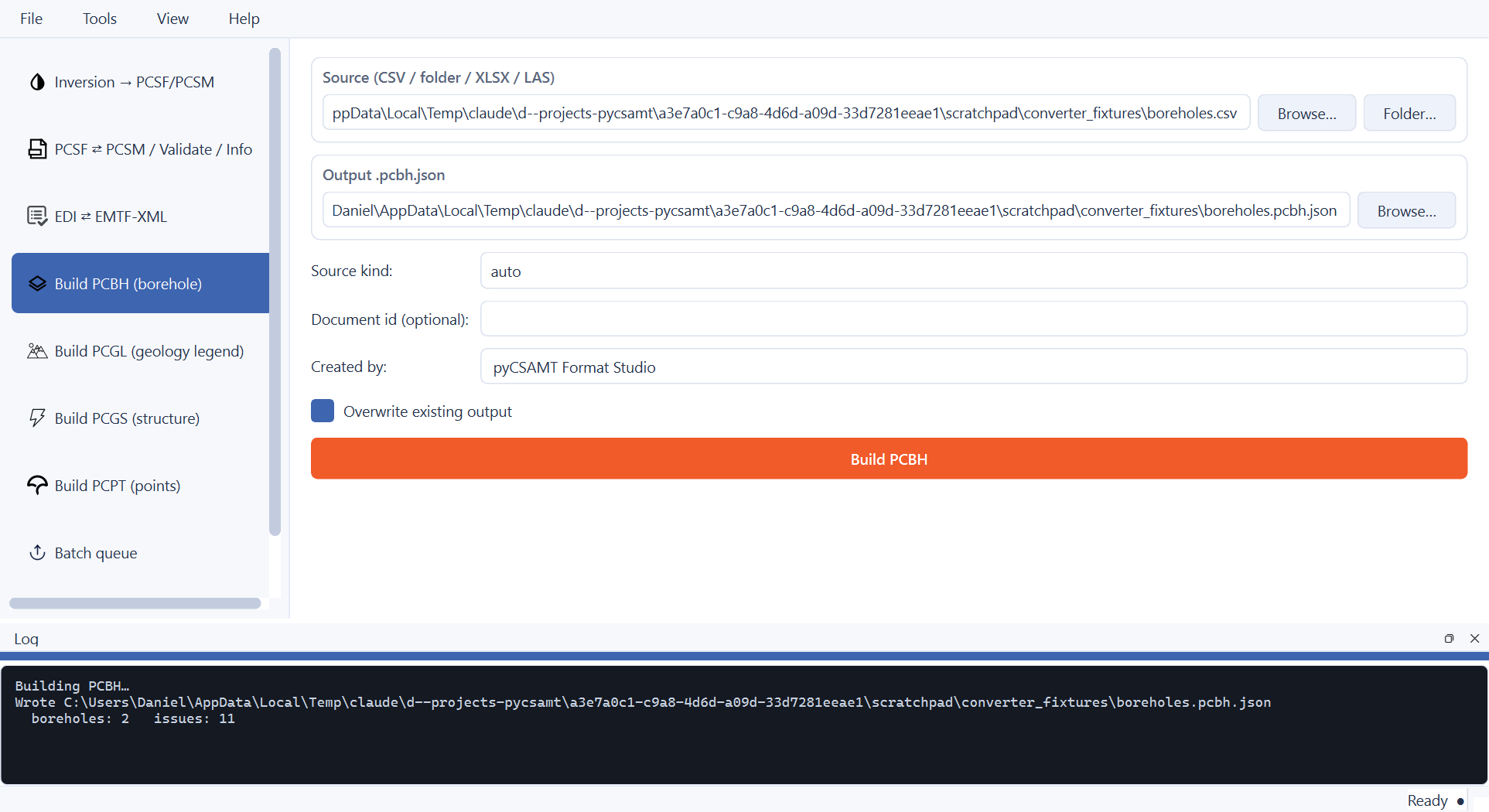
A combined collar+interval CSV — two boreholes, two lithology intervals each — built successfully: 4 rows read, 4 accepted, 0 rejected, but 11 issues logged anyway. Issues are non-fatal warnings (missing optional fields, unusual but not invalid values); the document still writes. Check the log for what they were before treating the output as final — a large issue count on a small file is worth reading.#
The LAS collar panel only appears when Source kind is (or resolves
to) las — a single wireline log has no collar coordinates of its own, so
Collar id, X, Y, Z, and Horizontal CRS are required and
the build refuses to run without all five.
Important
Borehole kind is a controlled vocabulary, not free text: water,
mining_exploration, mining_production, geotechnical,
environmental, petroleum, geothermal, scientific,
monitoring, or unknown. A CSV value outside that list — a plain
"exploration" instead of "mining_exploration", for example — is
rejected per-row with unsupported borehole kind '...' rather than
silently accepted. status is similarly controlled: planned,
drilling, completed, suspended, abandoned,
decommissioned, unknown.
The equivalent CLI command:
pycsamt format build-pcbh SOURCE [-o OUT.pcbh.json] [--from {auto,csv,csv-dir,xlsx,las}] \
    [--collar-id ID --x X --y Y --z Z --crs CRS] [--document-id ID] \
    [--created-by TEXT] [--overwrite]
Against the same combined CSV as the screenshot above (--from inferred
as csv automatically):
pycsamt format build-pcbh boreholes.csv
which prints the same read/accepted/rejected and issue counts the GUI’s log dock shows:
                  format build-pcbh
┌──────────────────────────────┬──────────────────────┐
│ wrote                        │ boreholes.pcbh.json  │
│ document_id                  │ csv:boreholes         │
│ boreholes                    │ 2                      │
│ rows read/accepted/rejected  │ 4/4/0                  │
│ issues                       │ 11                     │
└──────────────────────────────┴──────────────────────┘

✓ boreholes.pcbh.json
A LAS log needs the collar flags on the command line, since a LAS file has no location of its own:
pycsamt format build-pcbh ZK01.las --collar-id ZK01 \
    --x 512340 --y 2894210 --z 118.4 --crs EPSG:32650
7.9. Build PCGL (Geology Legend)#
A PCGL document is a small, named lookup table: geological unit names mapped
to a resistivity range, so a rendered depth slice or fence panel can be
coloured and labelled by rock type instead of by raw ohm-metres alone. It is
the same schema from_csv()
accepts, wrapped in PCGL’s document envelope.
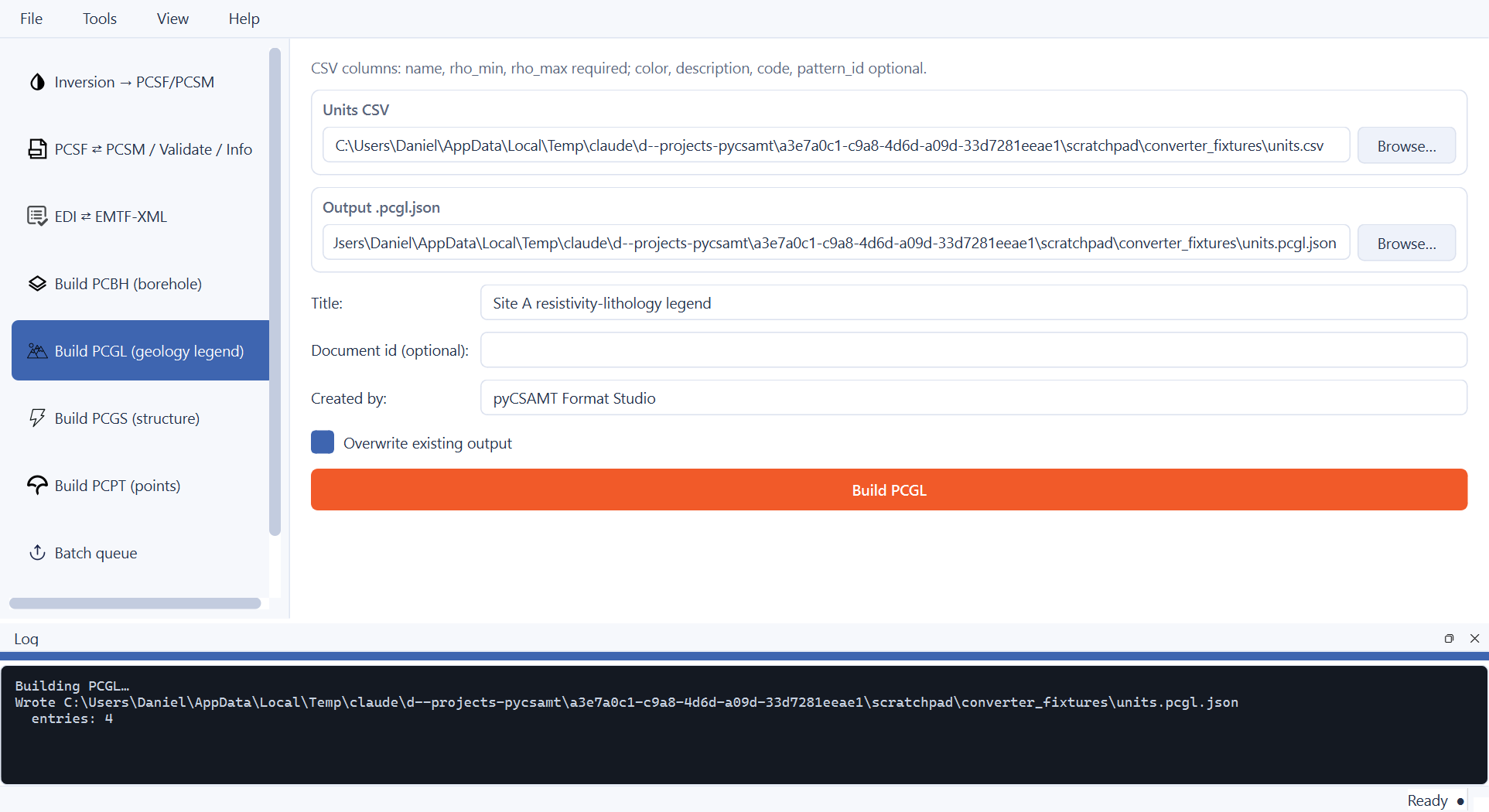
Four resistivity units built into one legend from a plain CSV — the page itself states the accepted columns right above the source field, so there is no need to look them up elsewhere before starting.#
Source columns: name, rho_min, rho_max required;
color, description, code, source, pattern_id,
pattern_source optional. Title and Document id are free text
(document id defaults to a stable value derived from the source filename).
The CLI equivalent:
pycsamt format build-pcgl SOURCE.csv [-o OUT.pcgl.json] [--title TEXT] \
    [--document-id ID] [--created-by TEXT] [--overwrite]
Against the same units.csv as the screenshot above:
pycsamt format build-pcgl units.csv --title "Site A geology legend"
which prints:
           format build-pcgl
┌─────────────┬────────────────────────┐
│ wrote       │ units.pcgl.json         │
│ document_id │ pcgl:units              │
│ title       │ Site A geology legend   │
│ entries     │ 4                       │
└─────────────┴────────────────────────┘

✓ units.pcgl.json
7.10. Build PCGS (Structure)#
A PCGS document holds structural field evidence — planar measurements (bedding, foliation), linear measurements (fold axes, lineations), and fault traces — each in its own optional CSV, combined into one document. At least one of the three is required; any combination of the other two is fine.
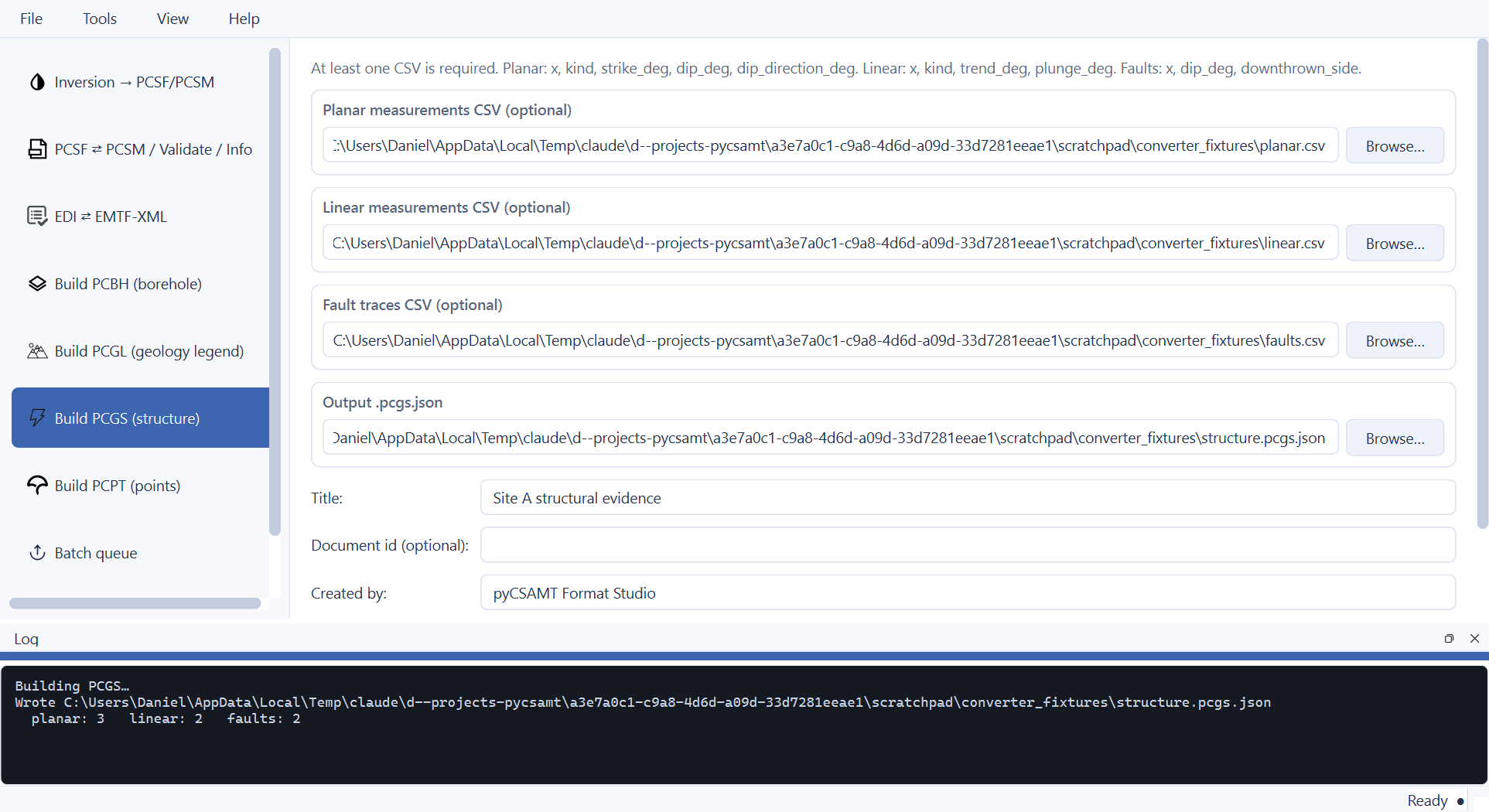
All three optional CSVs supplied at once — 3 planar, 2 linear, and 2 fault measurements combined into one PCGS document. Leaving any of the three DropZones empty is fine; the hint text above them spells out each CSV’s required columns so you never have to leave the page to check.#
CSV |
Required columns |
|---|---|
Planar |
|
Linear |
|
Faults |
|
Warning
downthrown_side accepts exactly left or right — compass
directions such as east/west are rejected outright
(downthrown_side must be one of ('left', 'right'), got '...').
“Left”/”right” here means relative to the profile direction implied by
increasing x, not a geographic compass bearing; translate a mapped
compass direction to left/right before building the CSV.
The CLI equivalent takes the same three optional paths:
pycsamt format build-pcgs [--planar PATH] [--linear PATH] [--faults PATH] \
    -o OUT.pcgs.json [--title TEXT] [--document-id ID] [--created-by TEXT] [--overwrite]
Against the same three CSVs as the screenshot above:
pycsamt format build-pcgs --planar planar.csv --linear linear.csv --faults faults.csv \
    -o structure.pcgs.json --title "Site A structural evidence"
which prints:
                  format build-pcgs
┌─────────────┬─────────────────────────────────┐
│ wrote       │ structure.pcgs.json               │
│ document_id │ pcgs:2026-09-15T20:13:16.233925Z │
│ planar      │ 3                                  │
│ linear      │ 2                                  │
│ faults      │ 2                                  │
└─────────────┴─────────────────────────────────┘

✓ structure.pcgs.json
The document_id shown above is the generated default — a UTC
timestamp — used whenever --document-id is omitted; pass an explicit id
for anything you intend to reference elsewhere later.
7.11. Build PCPT (Points)#
A PCPT document is a flat list of named points — drill targets, geophysical anomalies, sample locations — each with coordinates and an optional note, for overlay on a map or 3-D scene alongside a resistivity model.
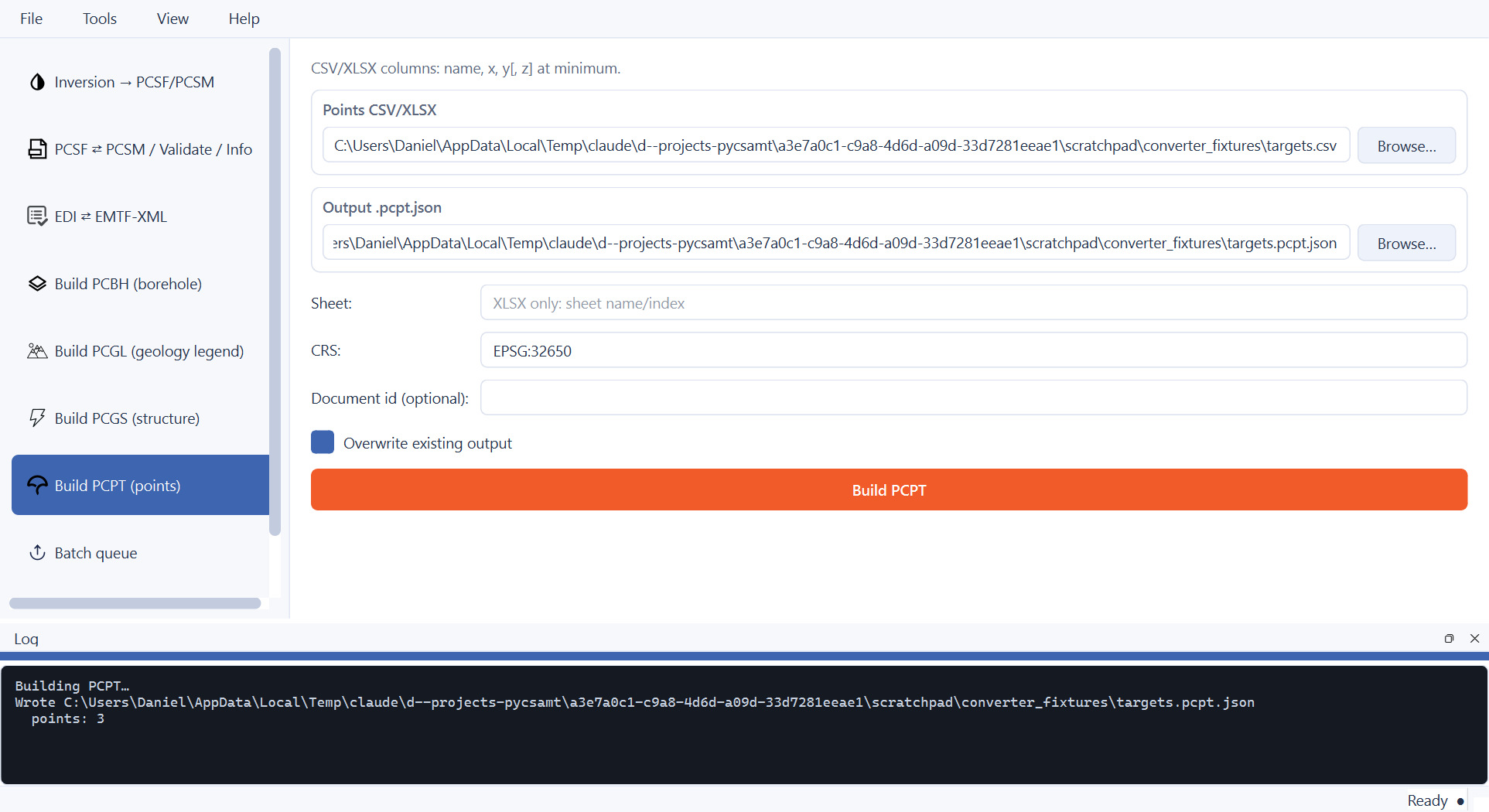
Three targets built from a CSV with an explicit CRS. When the source
has no CRS column and none is given, the builder infers EPSG:4326 if
any point carries longitude/latitude, or a local unprojected grid
otherwise — passing CRS explicitly, as here, avoids relying on that
inference for anything that matters.#
Source columns: name, x, y[, z] at minimum (CSV or
XLSX); Sheet and a header-row override apply to XLSX only. CRS is
free text (EPSG:4326, EPSG:32650, …).
The CLI equivalent:
pycsamt format build-pcpt SOURCE [-o OUT.pcpt.json] [--sheet NAME_OR_INDEX] \
    [--header-row N] [--crs CRS] [--document-id ID] [--overwrite]
Against the same targets.csv as the screenshot above:
pycsamt format build-pcpt targets.csv --crs EPSG:32650
which prints:
         format build-pcpt
┌─────────────┬────────────────────┐
│ wrote       │ targets.pcpt.json  │
│ document_id │ pcpt:targets       │
│ points      │ 3                  │
│ crs         │ EPSG:32650         │
└─────────────┴────────────────────┘

✓ targets.pcpt.json
7.12. Batch Queue#
Converts a mixed pile of files — inversion results/AI arrays, .pcsf,
.pcsm, .edi, EMTF-XML — one after another with a per-row status,
instead of repeating the Inversion or EDI ⇄ XML page once per file.
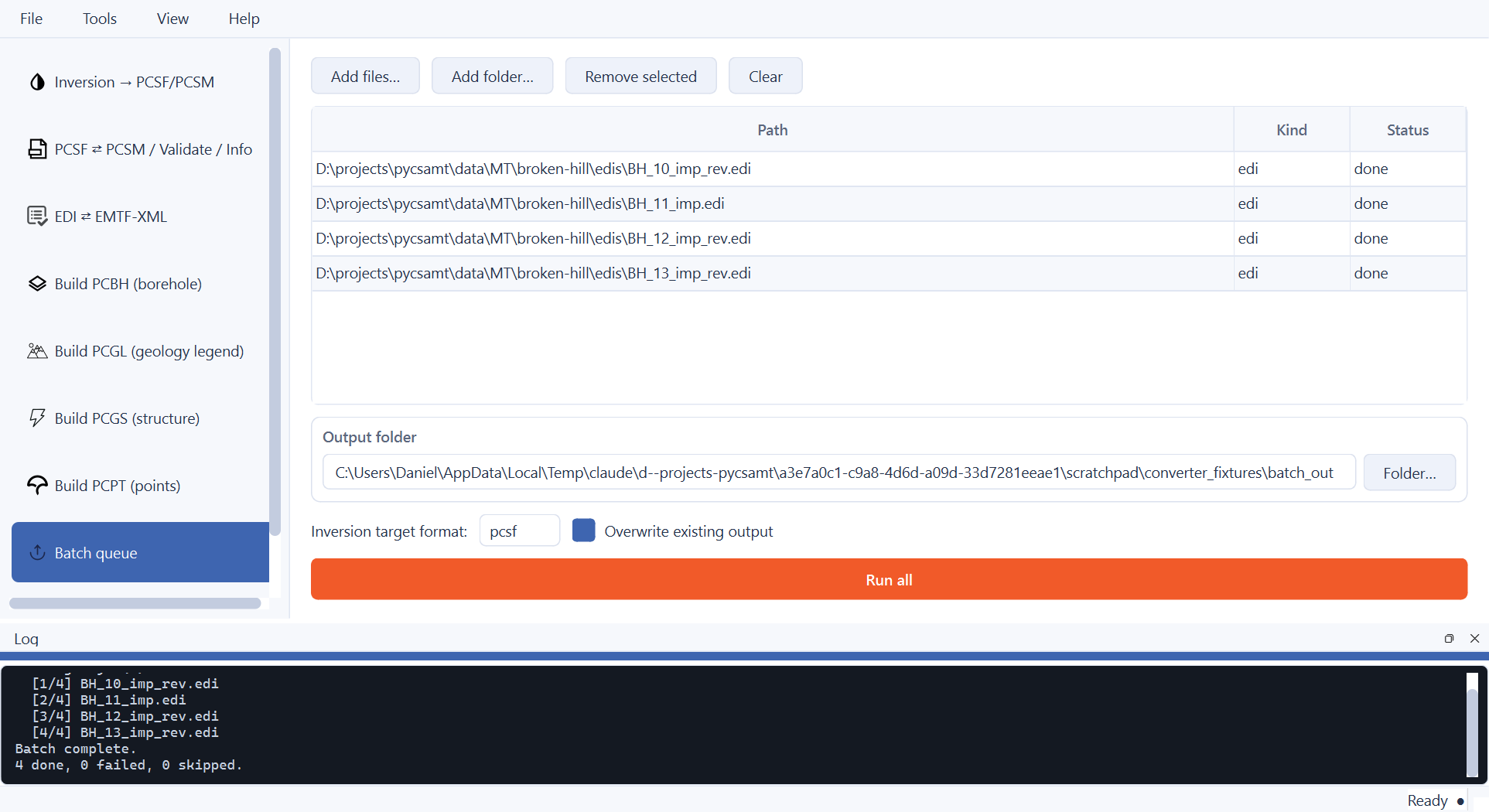
Four real EDI files added via Add folder…, auto-classified as
edi in the Kind column, run, and marked done one at a time —
the log dock mirrors the same per-item progress shown in the table, and
the closing summary line (“4 done, 0 failed, 0 skipped”) is the fastest
way to confirm a large batch actually finished cleanly.#
Add files…/Add folder… classify each path automatically via
classify_batch_item() — .edi →
edi, .xml → xml, anything detect_source()
calls solver/ai_arrays/pcsf/pcsm → inversion, everything
else → unknown (queued but always skipped). Each row converts
independently: one failure is recorded in Status and does not stop the
rest of the queue, which matters for a folder where most files are good but
a handful are corrupt or from an unrelated survey.
Inversion target format (pcsf/pcsm) applies only to
inversion-kind rows; an edi row always converts to EMTF-XML and an
xml row always converts to EDI — there is no direction choice per row,
unlike the dedicated EDI ⇄ XML page. PCBH/PCGL/PCGS/PCPT builders are not
queued here — each needs its own structured per-file options (collar
coordinates, planar/linear/fault CSV groupings) that do not fit one generic
row; use their own dedicated pages, one file at a time, instead.
There is no single CLI command equivalent to the batch queue — script the same behaviour with a shell loop over the per-format commands documented above, for example:
for f in survey_edi/*.edi; do
    pycsamt format edi-to-xml "$f" -o survey_xml/
done
7.13. Settings#
Persisted defaults applied to every new job on every page — not a global override you have to fight per-run. Any value set explicitly on a page (EPSG, UTM zone, a checkbox) still wins over the default for that one job; Settings only fills in what you leave blank.
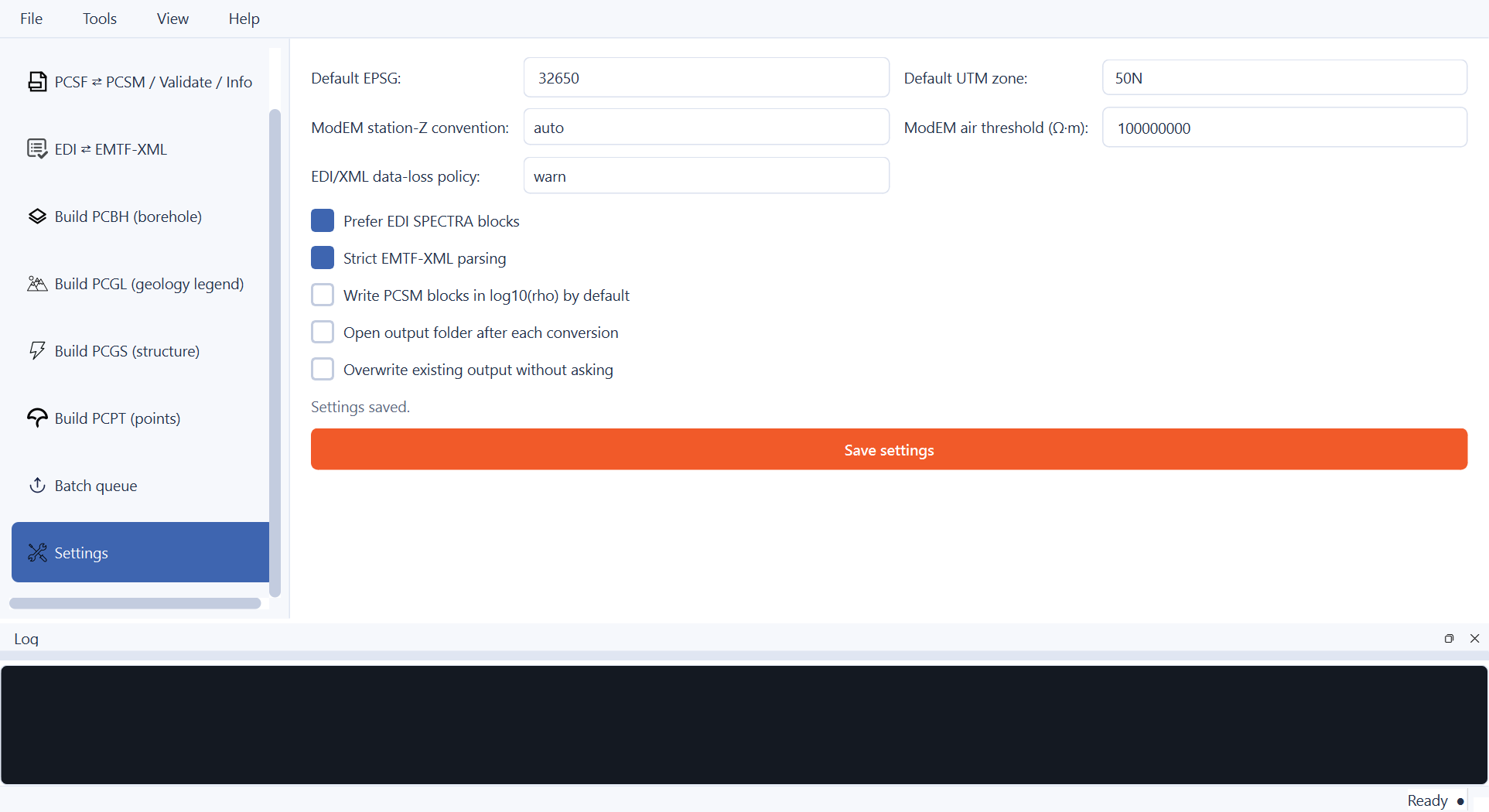
Defaults set once — an EPSG/UTM zone pair, the ModEM conventions, and the EDI/XML policy — apply to the Inversion and EDI ⇄ XML pages from the next job onward without retyping them.#
Setting |
Applies to |
|---|---|
Default EPSG / Default UTM zone |
Inversion page’s |
ModEM station-Z convention / air threshold |
Inversion page’s ModEM-specific fields, as their own defaults. |
EDI/XML data-loss policy |
EDI ⇄ EMTF-XML page’s XML → EDI direction. |
Prefer EDI SPECTRA blocks / Strict EMTF-XML parsing |
EDI ⇄ EMTF-XML page’s two direction-specific checkboxes. |
Write PCSM blocks in log10(rho) by default |
Inversion and PCSF ⇄ PCSM pages’ log10-view checkboxes. |
Open output folder after each conversion |
Every builder/convert action, once a job finishes. |
Overwrite existing output without asking |
Every page’s overwrite protection — the app-wide equivalent of ticking Overwrite existing output on every single page. |
Settings persist through Qt’s QSettings under the
earthai-tech / pycsamt-converter org/app pair — an INI file under
the OS user-config directory on Linux, or the native registry on Windows,
resolved automatically by pycsamt.app.converter.settings. There is no
CLI equivalent: a script instead passes the same options as flags on every
invocation, or wraps them in a shell alias/wrapper for repeated use.
7.14. Troubleshooting#
… exists — pass --overwrite to replace it/ a page refuses to runThe target file already exists and Overwrite existing output is unticked (CLI: pass
--overwrite). This is deliberate — nothing in the app replaces a file you did not explicitly allow it to.Nothing to convert — … looks like: …detect_source()returnedunknownfor the Inversion page’s source. Check the live “Detected: …” hint under the source field, and force Force solver if it is a non-standard solver directory — see Source Detection.MARE2DEM → PCSF needs the 'triangle' packageMARE2DEM conversion rebuilds the run’s triangulation from its
.polyPSLG and needs the optionaltrianglepackage:pip install triangle.unsupported borehole kind '...'/downthrown_side must be one of (...)A CSV value falls outside PCBH’s or PCGS’s controlled vocabulary — see the tables under Build PCBH and Build PCGS above for the exact accepted values.
--from las needs --collar-id, --x, --y, --z and --crsA LAS 2.0 log has no collar location of its own; all five must be supplied (GUI: the LAS collar panel; CLI: the matching flags).
- “Pick a source file or folder first.” / “Pick an output … first.” in the log
A required field is still empty — every page validates its own required fields locally before starting a background job, rather than letting a background worker fail on missing input.
- A page seems to hang
Every conversion runs on a background
QThread(ConversionWorker); the log dock’s progress bar switches to indeterminate mode for jobs with no per-item progress (most builders) and shows real[n/total]steps for ones that do (EDI ⇄ XML, batch queue). A large EDI/XML folder or a big ModEM grid genuinely takes time — watch the log dock rather than the window title for confirmation it is still working.
Frozen-build-specific issues (blank window, missing DLL, slow first launch) are covered separately under Compiling A Standalone Build.
See also
- Format Commands
The complete
pycsamt formatcommand reference — full option tables forconvert/detect/info/validate, more worked examples across every solver, and the Python-API equivalents this whole app (and CLI) sits on top of.- PCSF — Common Subsurface Format
What PCSF/PCSM actually are, the canonical-resistivity invariant, and how every solver’s native encoding maps into it.
- PCBH — Common Borehole Format
The full PCBH schema — collars, trajectories, intervals, structures, samples — behind the Build PCBH page.
- EDI Interoperability
Exactly what does and does not survive an EDI ⇄ EMTF-XML round trip.
- Desktop GUI
The full survey-processing suite this app deliberately leaves out — QC, corrections, forward modelling, inversion, interpretation.