
13.8. Export And Reporting#
The export and reporting tools are the last mile of a site workflow. Export functions write cleaned EDI-like objects to disk or package them into an archive. Report classes summarize one station or a whole survey for terminal inspection, notebooks, QA logs, and downstream tables. In practice, this page connects three things that should always agree: the station object in memory, the file written to disk, and the row recorded in the manifest.
Use this page when you need to:
write one corrected station to a known file path;
batch-write a selected survey with deterministic file names;
create a manifest CSV for a delivery directory or zip archive;
package cleaned sites into a zip file;
generate single-station and survey-level report tables;
understand how terminal reports, dictionaries, and DataFrames differ.
If the goal is not only to write existing sites, but also to rotate, frequency-filter, recompute resistivity/phase, and regenerate EDI files from another software source, use EDI Recompute Workflow. The export helpers documented here are simpler writer utilities for objects that have already been prepared.
13.8.1. Tool Map#
Tool |
Module |
Main purpose |
|---|---|---|
|
|
Write one EDI-like object to a target path. |
|
|
Batch-write many sites to an output directory with templated file names and an optional manifest CSV. |
|
|
Stage sites in a temporary directory, compress them, and optionally write a manifest. |
|
Compute and display statistics for one
|
|
|
Compute and display survey-level and per-station statistics for a collection. |
|
|
|
Write one EMTF-XML file per station – the XML-side equivalent of
|
The writers on this page (write_site(), write_sites(),
pack_zip()) all write EDI, regardless of whether a station is
EDI- or XML-native: they iterate through Site.edi, which
materializes an EDI view transparently for an XML-native station (see
Site Containers). To write EMTF-XML instead, use
write_xml() or
to_xml() directly – there is currently no
XML-side equivalent of the manifest/zip helpers on this page.
13.8.2. Reproducible Demo Sites#
The examples below use a small synthetic site class so the outputs can be
reproduced without local survey files. A real EDI object can replace
DemoSite as long as it exposes a header, frequency array, impedance arrays,
and one supported writer method.
>>> from pathlib import Path
>>> from tempfile import TemporaryDirectory

>>> import numpy as np
>>> import pandas as pd
>>>
>>> class Head:
...     def __init__(self, station, lat, lon, elev):
...         self.dataid = station
...         self.station = station
...         self.lat = lat
...         self.lon = lon
...         self.long = lon
...         self.elev = elev
...
>>> class ZBlock:
...     def __init__(self, freq):
...         self.freq = np.asarray(freq, dtype=float)
...

>>> class DemoSite:
...     def __init__(self, station, lat, lon, elev, chainage, scale=1.0):
...         self.name = station
...         self.station = station
...         self.Head = Head(station, lat, lon, elev)
...         self.Z = ZBlock([1.0, 10.0, 100.0, 1000.0])
...         self.freq = self.Z.freq
...         self.chainage = chainage
...
...         self.z = np.ones((4, 2, 2), dtype=complex) * scale
...         self.z[:, 0, 1] = [1 + 1j, 2 + 2j, 3 + 3j, 4 + 4j]
...         self.z[:, 1, 0] = [1 - 1j, 2 - 2j, 3 - 3j, 4 - 4j]
...
...         self.rho = np.array(
...             [
...                 [[20, 100 * scale], [95 * scale, 18]],
...                 [[22, 120 * scale], [110 * scale, 19]],
...                 [[24, 140 * scale], [130 * scale, 20]],
...                 [[26, 160 * scale], [150 * scale, 21]],
...             ],
...             dtype=float,
...         )
...
...         self.phase = np.array(
...             [
...                 [[5, 42], [-41, 6]],
...                 [[5, 44], [-43, 6]],
...                 [[5, 46], [-45, 6]],
...                 [[5, 48], [-47, 6]],
...             ],
...             dtype=float,
...         )
...         self.tipper = np.zeros((4, 2))
...
...     @property
...     def coords(self):
...         return (self.Head.lat, self.Head.lon, self.Head.elev)
...
...     def get_section(self, name):
...         if str(name).lower() == "head":
...             return self.Head
...         raise KeyError(name)
...
...     def has_component(self, name):
...         return name.lower() in {"zxx", "zxy", "zyx", "zyy"}
...
...     def to_file(self, path):
...         path = Path(path)
...         path.write_text(
...             f"station={self.name}\n"
...             f"lat={self.Head.lat:.3f}\n"
...             f"lon={self.Head.lon:.3f}\n"
...             f"nfreq={len(self.freq)}\n"
...         )
...
...     def to_dataframe(self, kind="resphase", *, api=None):
...         return pd.DataFrame(
...             {
...                 "freq_hz": self.freq,
...                 "rho_xy": self.rho[:, 0, 1],
...                 "phase_xy": self.phase[:, 0, 1],
...             }
...         )
...
>>> def demo_sites():
...     return [
...         DemoSite("S01", 35.100, -117.200, 620.0, 0.0, 1.0),
...         DemoSite("S02", 35.115, -117.185, 635.0, 250.0, 1.1),
...         DemoSite("S03", 35.140, -117.170, 660.0, 520.0, 0.9),
...     ]
...
The station summaries use the same impedance convention used elsewhere in the site guide. For a frequency index \(k\), the impedance tensor is
The component positions in (1) keep the tensor and
reported suffixes consistent. Report statistics then reduce finite values
component-wise. For example, the
mean apparent resistivity reported for the xy component is
Equation (2) is a reporting reduction only. It does not edit the source arrays or change the exported EDI files.
13.8.3. Export Workflow#
Export normally happens after loading, selecting, editing, and quality checks. The example uses a temporary directory but prints only stable artifact names.
>>> from pycsamt.site.export import write_sites

>>> sites = demo_sites()

>>> with TemporaryDirectory() as tmp:
...     root = Path(tmp)
...     paths = write_sites(
...         sites,
...         outdir=root / "clean_edi",
...         template="{index:03d}_{station}",
...         manifest_csv=root / "clean_edi_manifest.csv",
...     )
...
...     print([path.name for path in paths])
...     manifest = pd.read_csv(root / "clean_edi_manifest.csv")
...     print(manifest[["index", "station", "filename"]])
['000_S01.edi', '001_S02.edi', '002_S03.edi']
   index station     filename
0      0     S01  000_S01.edi
1      1     S02  001_S02.edi
2      2     S03  002_S03.edi
The export functions accept a pycsamt.site.base.Sites object, an
EDICollection, a list of EDI-like objects, or a single EDI-like object. For
writing, an object is EDI-like when it supports at least one common writer
method: write(new_edifn=...), write(path), to_file(path), or
save(path).
13.8.4. Writing One Site#
Use pycsamt.site.export.write_site() when the output path is already
known and you are only writing one object.
>>> from pycsamt.site.export import write_site

>>> with TemporaryDirectory() as tmp:
...     out = write_site(
...         demo_sites()[0],
...         Path(tmp) / "single" / "S01_corrected.edi",
...     )
...
...     print(out.name)
...     print(out.exists())
...     print(out.read_text().splitlines()[0])
S01_corrected.edi
True
station=S01
The parent directory is created automatically. If the target file already
exists, overwrite behavior depends on the underlying EDI writer. For explicit
collision control in batch exports, use pycsamt.site.export.write_sites()
with exist_ok.
13.8.5. Batch Writing Sites#
Use pycsamt.site.export.write_sites() for a selected survey or station
group.
>>> from pycsamt.site.export import write_sites

>>> with TemporaryDirectory() as tmp:
...     written = write_sites(
...         demo_sites(),
...         outdir=Path(tmp) / "line_01",
...         template="{index:03d}_{station}",
...         exist_ok=False,
...         manifest_csv=Path(tmp) / "line_01_manifest.csv",
...     )
...
...     for path in written:
...         print(path.name)
...
000_S01.edi
001_S02.edi
002_S03.edi
If the rendered file name does not end with .edi, the extension is added
automatically. In the example above, a station named S01 at index 0 is
written as 000_S01.edi.
13.8.6. Filename Templates#
Filename templates are rendered from a context collected from each EDI header and its input order. Let \(s_i\) be the resolved station identity for the \(i\)-th site and let \(c_i\) be its chainage. A template is a function
In (3), \(\phi_i\) is latitude,
\(\lambda_i\) is longitude, and
\(h_i\) is elevation. Missing template values are rendered as empty fields,
then .edi is appended when the suffix is absent.
Template key |
Source |
Notes |
|---|---|---|
|
Station name helper. |
Uses the same station-name resolution as the site utilities. |
|
Input iteration order. |
Zero-based integer. Supports Python format specifiers such as
|
|
EDI |
Missing values become |
|
EDI |
Also accepts |
|
EDI |
Missing values become |
|
EDI object attribute. |
Reads |
Examples:
>>> templates = {
...     "by_station": "{station}.edi",
...     "by_order": "{index:03d}_{station}",
...     "by_line_position": "{index:03d}_{station}_{chainage:.0f}m",
... }

>>> with TemporaryDirectory() as tmp:
...     for folder, template in templates.items():
...         paths = write_sites(
...             demo_sites()[:2],
...             Path(tmp) / folder,
...             template=template,
...         )
...         print(folder, [path.name for path in paths])
...
by_station ['S01.edi', 'S02.edi']
by_order ['000_S01.edi', '001_S02.edi']
by_line_position ['000_S01_0m.edi', '001_S02_250m.edi']
Keep templates simple and avoid path separators inside station names when building files for external delivery.
13.8.7. Collision Policy#
By default, pycsamt.site.export.write_sites() refuses to overwrite an
existing file. Internally, each rendered filename is also checked against the
names already produced in the same batch, so duplicate station names are
disambiguated before writing.
>>> from pycsamt.site.export import write_sites

>>> with TemporaryDirectory() as tmp:
...     root = Path(tmp)
...     _ = write_sites(
...         [demo_sites()[0]],
...         root / "line_01",
...         template="000_S01.edi",
...     )
...
...     try:
...         write_sites(
...             [demo_sites()[0]],
...             root / "line_01",
...             template="000_S01.edi",
...             exist_ok=False,
...         )
...     except FileExistsError as exc:
...         print(type(exc).__name__)
...         print(str(exc).replace(str(root), "<tmp>"))
...
FileExistsError
<tmp>\line_01\000_S01.edi
Pass exist_ok=True when an export directory is intentionally being
refreshed.
>>> with TemporaryDirectory() as tmp:
...     root = Path(tmp)
...     _ = write_sites([demo_sites()[0]], root / "line_01", template="000_S01.edi")
...
...     refreshed = write_sites(
...         [demo_sites()[0]],
...         root / "line_01",
...         template="000_S01.edi",
...         exist_ok=True,
...     )

...     print([path.name for path in refreshed])
['000_S01.edi']
13.8.8. Manifest CSV#
Both pycsamt.site.export.write_sites() and
pycsamt.site.export.pack_zip() can write a manifest CSV. The manifest is
a compact audit table for exported stations. If the exported station set is
\(\mathcal{S}=\{S_0,\ldots,S_{n-1}\}\), then the manifest contains one row
In (4), \(p_i\) is the directory path or archive path recorded for the file. This row-level mapping is what makes a delivered set reproducible: a reviewer can trace each file back to the input order, station name, coordinate tuple, and rendered filename.
Column |
Meaning |
|---|---|
|
Zero-based input order used during export. |
|
Resolved station name. |
|
Latitude from the EDI header, or |
|
Longitude from the EDI header, or |
|
Elevation from the EDI header, or |
|
|
|
File name written in the output directory or archive. |
|
Full exported file path for directory exports, or the zip archive path for archive exports. |
>>> import pandas as pd

>>> with TemporaryDirectory() as tmp:
...     root = Path(tmp)
...     _ = write_sites(
...         demo_sites(),
...         root / "clean_edi",
...         template="{index:03d}_{station}",
...         manifest_csv=root / "clean_edi_manifest.csv",
...     )
...
...     manifest = pd.read_csv(root / "clean_edi_manifest.csv")
...     print(manifest[["index", "station", "filename"]].to_string(index=False))
 index station    filename
     0     S01 000_S01.edi
     1     S02 001_S02.edi
     2     S03 002_S03.edi
The manifest is only written when at least one row exists.
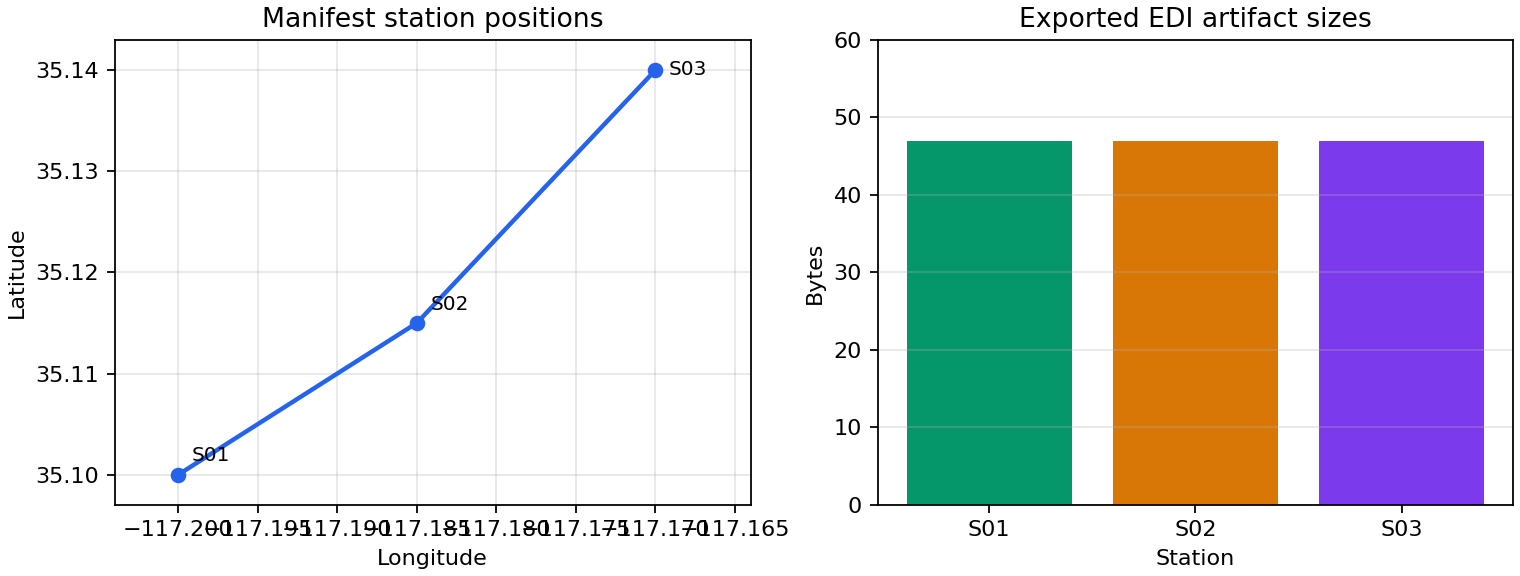
A compact visual check of the same synthetic delivery: station coordinates come from the manifest fields, and artifact sizes come from the exported EDI files.#
The left panel confirms that the manifest preserves the intended southwest-to- northeast station order, with the larger S02–S03 separation visible directly from the coordinate spacing. The equal 47-byte bars on the right are expected for this controlled example because every station writer emits the same four fields. In a real delivery, modest size differences are normal, but a zero-byte file or a single extreme bar would be a useful signal to inspect the associated station before packaging.
13.8.9. Zip Packaging#
Use pycsamt.site.export.pack_zip() when you need a single archive for a
delivery, web upload, or reproducible artifact.
>>> from zipfile import ZipFile

>>> from pycsamt.site.export import pack_zip

>>> with TemporaryDirectory() as tmp:
...     root = Path(tmp)
...     archive = pack_zip(
...         demo_sites()[:2],
...         out_zip=root / "line_01_clean.zip",
...         template="{station}.edi",
...         manifest_csv=root / "line_01_clean_manifest.csv",
...     )
...
...     print(archive.name)
...     with ZipFile(archive, "r") as zf:
...         print(sorted(zf.namelist()))
...
...     manifest = pd.read_csv(root / "line_01_clean_manifest.csv")
...     print(manifest[["index", "station", "filename"]].to_string(index=False))
line_01_clean.zip
['S01.edi', 'S02.edi']
 index station filename
     0     S01  S01.edi
     1     S02  S02.edi
The function writes each site to a temporary directory, then stores those
files inside the archive with zipfile.ZIP_DEFLATED compression. The
original EDI sources are not deleted or modified by packaging.
13.8.10. Reporting Workflow#
Reports are read-only summaries. They do not modify site data. A site report summarizes one station, while a survey report repeats the same calculation for each station and then adds survey-level coverage.
>>> from pycsamt.site.report import SiteReport

>>> site = demo_sites()[0]
>>> report = SiteReport(site)

>>> print(report.summary())
SiteReport('S01'  4 freq  ρ_xy=130 Ω·m  φ_xy=45.0°)
>>> info = report.to_dict()
>>> print(
...     {
...         key: info[key]
...         for key in [
...             "name",
...             "nfreq",
...             "freq_min",
...             "freq_max",
...             "rho_xy_mean",
...             "phi_xy_mean",
...         ]
...     }
... )
{'name': 'S01', 'nfreq': 4, 'freq_min': 1.0, 'freq_max': 1000.0, 'rho_xy_mean': 130.0, 'phi_xy_mean': 45.0}

>>> z_frame = report.to_dataframe("resphase", api=False)
>>> print(z_frame.head(2).to_string(index=False))
 freq_hz  rho_xy  phase_xy
     1.0   100.0      42.0
    10.0   120.0      44.0
If the optional rich package is installed, terminal reports use rich
panels and tables. Without rich, pyCSAMT falls back to plain-text output.
13.8.11. Single-Site Reports#
pycsamt.site.report.SiteReport computes statistics for one
pycsamt.site.base.Site-like object. The dictionary returned by
pycsamt.site.report.SiteReport.to_dict() contains:
name,lat,lon, andelev;nfreq,freq_min,freq_max,per_min, andper_max;component availability for
Zxx,Zxy,Zyx, andZyy;has_tipper;mean and standard deviation for apparent resistivity and phase summaries of the
xyandyxcomponents;per-component finite-data quality fractions.
The reciprocal relation in (5) derives the period bounds directly from the frequency bounds:
The finite-data quality fraction for a component \(c\) is
Equation (6) equals one only when every sampled
value of the component is usable. For complex impedance, both real and
imaginary parts must be finite. The
DataFrame returned by pycsamt.site.report.SiteReport.to_dataframe()
delegates to the underlying site to_dataframe method. Use the kind
argument to choose the station table representation supported by the site
object.
13.8.12. Survey Reports#
pycsamt.site.report.SitesReport computes one station record per site
and a survey-level summary.
>>> from pycsamt.site.report import SitesReport

>>> report = SitesReport(demo_sites())

>>> print(report.summary())
SitesReport(3 stations  freq 1 Hz → 1 kHz)
>>> frame = report.to_dataframe(api=False)
>>> print(
...     frame[
...         ["station", "nfreq", "freq_min", "freq_max", "rho_xy", "phi_xy"]
...     ].to_string(index=False)
... )
station  nfreq  freq_min  freq_max  rho_xy  phi_xy
    S01      4       1.0    1000.0   130.0    45.0
    S02      4       1.0    1000.0   143.0    45.0
    S03      4       1.0    1000.0   117.0    45.0

>>> records = report.to_dict()
>>> print(len(records))
3
>>> print(list(frame.columns[:6]))
['station', 'lat', 'lon', 'elev', 'nfreq', 'freq_min']
The survey DataFrame contains one row per station with columns:
 1station
 2lat
 3lon
 4elev
 5nfreq
 6freq_min
 7freq_max
 8has_Zxx
 9has_Zxy
10has_Zyx
11has_Zyy
12has_tipper
13rho_xy
14rho_xy_std
15rho_yx
16rho_yx_std
17phi_xy
18phi_xy_std
19phi_yx
20phi_yx_std
Use top to limit only the terminal display. It does not limit
to_dict or to_dataframe.
13.8.13. API View Wrapping#
Report DataFrame methods accept api:
api=FalseReturn a plain pandas DataFrame.
api=TrueReturn a pyCSAMT API view wrapper around the DataFrame.
api=NoneDefer to the global API-view configuration.
>>> from pycsamt.site.report import SiteReport, SitesReport

>>> one_station = SiteReport(demo_sites()[0]).to_dataframe(
...     "resphase",
...     api=False,
... )
>>> survey_frame = SitesReport(demo_sites()).to_dataframe(api=False)

>>> print(type(one_station).__name__)
DataFrame
>>> print(type(survey_frame).__name__)
DataFrame
Use plain DataFrames for local analysis and API views when returning data from public-facing pyCSAMT APIs.
13.8.14. End-To-End Delivery Example#
The following pattern creates a cleaned station export, a manifest, an archive,
and a survey report table. In a real project, replace demo_sites() with the
output of your loading, selection, and editing pipeline.
>>> from pycsamt.site.export import pack_zip, write_sites
>>> from pycsamt.site.report import SitesReport

>>> with TemporaryDirectory() as tmp:
...     root = Path(tmp) / "line_01"
...     sites = demo_sites()
...
...     exported = write_sites(
...         sites,
...         root / "edi",
...         template="{index:03d}_{station}",
...         manifest_csv=root / "manifest.csv",
...     )

...     archive = pack_zip(
...         sites,
...         root / "edi.zip",
...         template="{index:03d}_{station}.edi",
...         manifest_csv=root / "zip_manifest.csv",
...     )

...     summary = SitesReport(sites).to_dataframe(api=False)
...     summary.to_csv(root / "site_report.csv", index=False)

...     print([path.name for path in exported])
...     print(archive.name)
...     print((root / "site_report.csv").name)
...     print(summary[["station", "nfreq"]].to_string(index=False))
['000_S01.edi', '001_S02.edi', '002_S03.edi']
edi.zip
site_report.csv
station  nfreq
    S01      4
    S02      4
    S03      4
13.8.15. Common Mistakes#
- Assuming
pycsamt.site.export.write_site()enforces overwrite policy The single-site writer delegates to the backend writer. Use
pycsamt.site.export.write_sites()withexist_ok=Falsewhen you need explicit collision protection.- Forgetting that
{index}is zero-based The index in filenames and manifests is the input iteration position, starting from
0.- Using
pycsamt.site.export.pack_zip()when you also need individual files The zip function stages files in a temporary directory. Use
pycsamt.site.export.write_sites()first when the directory tree itself is part of the delivery.- Expecting reports to clean data
Reports summarize the current objects. Run selection and editing before generating reports.
- Confusing
topwith filtering SitesReport.report(top=10)limits terminal display only. It does not remove stations from the report object.
13.8.16. Next Pages#
Site Selection for choosing which stations to export or report;
Site Editing for changing station data before writing;
EDI Recompute Workflow for regenerating EDI files from raw or foreign EDI inputs;
Computed Diagnostics for analysis tables that complement site reports;
Site Containers for the
SiteandSiteswrappers used by reporting.