
13.6. EDI Recompute Workflow#
The pycsamt.site.recompute module provides a higher-level workflow for
normalizing EDI files and rewriting them with pyCSAMT. It is intended
for surveys where EDI files may come from another package or commercial
software, and you want to rebuild the transfer-function blocks, derived
apparent resistivity/phase values, station names, and output
folder layout in a controlled way.
Use this workflow when you need to:
read one EDI file, one line folder, a survey folder, an
EDICollection, or an in-memory list of EDI objects;rotate impedance and/or tipper components before writing;
keep only a frequency band before recomputation;
fill missing values before computing derived quantities;
recompute apparent resistivity and phase from impedance;
write new EDI files using the pyCSAMT writer;
preserve line folders or flatten all recomputed stations into one folder;
write a manifest that records source paths, output paths, line names, station names, and processing status.
The default output folder name is recomputed_edis. This is intentionally
plain: users opening the project directory can immediately see that the folder
contains EDI files regenerated by pyCSAMT.
13.6.1. Tool Map#
Tool |
Scope |
Main purpose |
|---|---|---|
Workflow class |
Configure and run a reproducible recomputation/export workflow. |
|
|
Convenience function |
Run |
|
One EDI object |
Apply the same recomputation operations to one in-memory EDI object. |
Result object |
Hold recomputed EDI objects, wrapped sites, output paths, and records. |
|
Manifest row |
Describe one station outcome. |
13.6.2. Quick Start#
The examples on this page recompute the bundled WILLY AMT survey,
data/AMT/WILLY_DATA, which contains five line folders: L18PLT,
L22PLT, L26PLT, L30PLT, and L34PLT. Recompute a single line
folder and keep the line name in the output tree:
>>> from pycsamt.site.recompute import recompute_edis

>>> result = recompute_edis(
...     "data/AMT/WILLY_DATA/L18PLT",
...     rotate_angle=30.0,
...     template="{source_stem}.edi",
...     overwrite=True,
...     progress=True,
...     verbose=1,
... )

>>> print(result.output_root.name)
recomputed_edis
>>> print(sorted(p.name for p in result.paths)[:5])
['18-001A.edi', '18-002U.edi', '18-003A.edi', '18-004A.edi', '18-005U.edi']
>>> print(len(result.paths))
28
output_root is resolved next to the source line folder – here, a
recomputed_edis directory created beside WILLY_DATA – normally as
an absolute path, so only its name is printed above; the exact prefix
depends on where your checkout of the repository lives. For the input:
WILLY_DATA/
  L18PLT/
    18-001A.edi
    18-002U.edi
    ...
the default output is:
WILLY_DATA/
  recomputed_edis/
    L18PLT/
      18-001A.edi
      18-002U.edi
      ...
    manifest.csv
The explicit template="{source_stem}.edi" above is deliberate rather than
decorative. See Filename Templates for why the class
default, {station}, would not reproduce these filenames on this
dataset.
13.6.3. Whole Survey Folders#
When the source directory contains subdirectories with EDI files, each subdirectory is treated as a survey line.
WILLY_DATA/
  L18PLT/
    *.edi
  L22PLT/
    *.edi
  L26PLT/
    *.edi
  L30PLT/
    *.edi
  L34PLT/
    *.edi
Run:
>>> from pycsamt.site.recompute import EDIRecomputer

>>> runner = EDIRecomputer(
...     rotate_angle=30.0,
...     rotate_components=("Z", "Tip"),
...     recompute_resphase=True,
...     template="{source_stem}.edi",
...     overwrite=True,
... )

>>> result = runner.run("data/AMT/WILLY_DATA")

>>> import collections
>>> print(collections.Counter(record.line for record in result.records))
Counter({'L18PLT': 28, 'L22PLT': 25, 'L26PLT': 25, 'L30PLT': 25, 'L34PLT': 25})
>>> print(len(result.paths))
128
>>> print(len(result.failed))
0
The output preserves the line structure:
WILLY_DATA/
  recomputed_edis/
    L18PLT/
      *.edi
    L22PLT/
      *.edi
    L26PLT/
      *.edi
    L30PLT/
      *.edi
    L34PLT/
      *.edi
    manifest.csv
13.6.4. Flattened Output#
Set preserve_line_dirs=False when all recomputed files should be written
directly inside the output root. In that case, include {line} in the
filename template to avoid collisions between stations from different lines.
>>> result = recompute_edis(
...     "data/AMT/WILLY_DATA",
...     preserve_line_dirs=False,
...     template="{line}_{source_stem}.edi",
...     overwrite=True,
... )

>>> print(sorted(p.name for p in result.paths)[:3])
['L18PLT_18-001A.edi', 'L18PLT_18-002U.edi', 'L18PLT_18-003A.edi']
>>> print(len(result.paths))
128
This writes:
WILLY_DATA/
  recomputed_edis/
    L18PLT_18-001A.edi
    L22PLT_22-013VF.edi
    L26PLT_26-001A.edi
    ...
    manifest.csv
13.6.5. Operation Order#
For each station, EDIRecomputer applies operations in this order:
load the EDI object, or use the provided in-memory EDI object;
copy it by default, so the original object is not mutated;
rotate selected components when
rotate_angleis provided;subset the frequency range when
fmin/fmaxorkeep_freqis provided;fill missing values when
fill_missing_valuesis provided;recompute apparent resistivity and phase when
recompute_resphase=True;apply the optional station
rename_policy;write the EDI with pyCSAMT when
write=True;append a record to the result manifest.
This order is important. For example, when a frequency band is selected,
resistivity and phase are recomputed only for the retained frequency rows.
Internally, frequency subsetting slices several aligned arrays (frequency,
impedance tensor, its errors, resistivity, phase, and tipper)
one at a time; you may see one benign Failed to compute rho/phi after
setting Z log line per station while that happens. It reflects a
transient, self-correcting intermediate state – the next array in the
sequence brings resistivity and phase back into agreement with the new
frequency count – not a failure of the recomputation itself.
The effect is easier to audit on one real station. Here the source response is compared with a copied response after 30-degree rotation, restriction to 10–1000 Hz, and derived-value recomputation:
>>> import matplotlib.pyplot as plt
>>> import numpy as np
>>> from pycsamt.seg.edi import EDIFile
>>> from pycsamt.site.recompute import recompute_edi

>>> raw = EDIFile("data/AMT/WILLY_DATA/L18PLT/18-001A.edi")
>>> processed = recompute_edi(
...     raw,
...     rotate_angle=30.0,
...     fmin=10.0,
...     fmax=1000.0,
...     recompute_resphase=True,
...     copy=True,
... )

>>> fig, ax = plt.subplots(1, 2, figsize=(9, 3.6), constrained_layout=True)
>>> _ = ax[0].loglog(
...     raw.Z.freq, np.abs(raw.Z.z[:, 0, 1]), "o-", ms=3, label="source Zxy"
... )
>>> _ = ax[0].loglog(
...     processed.Z.freq, np.abs(processed.Z.z[:, 0, 1]),
...     "s-", ms=3, label="rotated, retained Zxy",
... )
>>> _ = ax[0].set(
...     xlabel="frequency (Hz)", ylabel="|Zxy|", title="Tensor and band"
... )
>>> _ = ax[0].legend(frameon=False)

>>> source_phase = np.degrees(np.angle(raw.Z.z[:, 0, 1]))
>>> final_phase = np.degrees(np.angle(processed.Z.z[:, 0, 1]))
>>> _ = ax[1].semilogx(
...     raw.Z.freq, source_phase, "o-", ms=3, label="source phase"
... )
>>> _ = ax[1].semilogx(
...     processed.Z.freq, final_phase,
...     "s-", ms=3, label="recomputed phase",
... )
>>> _ = ax[1].set(
...     xlabel="frequency (Hz)", ylabel="phase (degrees)",
...     title="Derived phase",
... )
>>> _ = ax[1].legend(frameon=False)
>>> for axis in ax:
...     axis.grid(True, which="both", alpha=0.22)
...
>>> fig.savefig("recompute_operation_order.png", dpi=180)
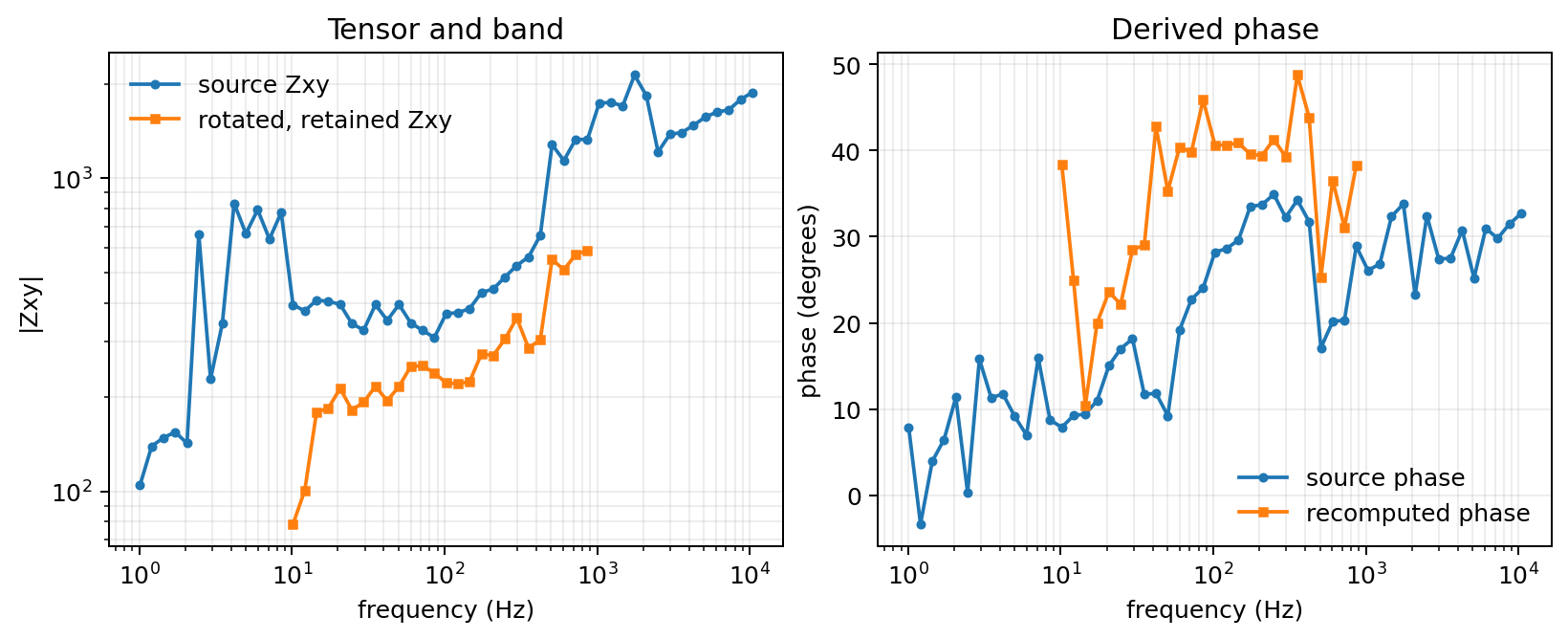
Source and recomputed Zxy for 18-001A. The recomputed curve contains
only native frequencies inside the requested band.#
The orange series begins at the first native frequency above 10 Hz and ends at
863.9 Hz, the last native value below 1000 Hz; the workflow does not invent
samples at the requested endpoints. Rotation changes both Zxy magnitude
and phase because it mixes all four tensor components. The resulting phase is
then derived from that rotated, sliced complex tensor rather than trimmed from
the blue source-phase series.
13.6.6. Rotation Control#
By default, both impedance and tipper are rotated when present, using the
same congruence rotation as the tensor-editing tools in
pycsamt.emtools:
Equation (1) is a coordinate transformation: it redistributes values among tensor components but preserves tensor invariants such as trace and determinant. It must therefore precede recomputation of component-wise apparent resistivity and phase.
>>> result = recompute_edis(
...     "data/AMT/WILLY_DATA/L18PLT",
...     rotate_angle=30.0,
...     rotate_components=("Z", "Tip"),
... )
Rotate only impedance:
>>> result = recompute_edis(
...     "data/AMT/WILLY_DATA/L18PLT",
...     rotate_angle=30.0,
...     rotate_components=("Z",),
... )
Rotate only tipper:
>>> result = recompute_edis(
...     "data/AMT/WILLY_DATA/L18PLT",
...     rotate_angle=30.0,
...     rotate_components=("Tip",),
... )
rotate_components=("Z",) and ("Z", "Tip") rotate impedance
identically; the difference only shows up in stations that carry tipper
data. For 18-001A, which has no tipper, the first frequency row of
\(Z\) rotates the same way under both settings:
Z[0] before:            [[  708.5 +138.7j  1583.0+1016.0j]
                         [-1887.0- 985.0j  -542.0-258.2j]]
Z[0] after Z-only:      [[  264.2  +52.9j  1117.5+ 836.4j]
                         [-2352.5-1164.6j   -97.7-172.4j]]
Z[0] after Z-and-Tip:   [[  264.2  +52.9j  1117.5+ 836.4j]
                         [-2352.5-1164.6j   -97.7-172.4j]]
and rotate_components=("Tip",) leaves this station’s \(Z\) completely
untouched, since there is no tipper for it to rotate instead.
13.6.7. Frequency And Missing Values#
Keep a frequency band before recomputing derived quantities:
>>> result = recompute_edis(
...     "data/AMT/WILLY_DATA",
...     fmin=1.0,
...     fmax=1000.0,
...     recompute_resphase=True,
...     write=False,
... )

>>> station0 = result.sites[0]
>>> print(station0.freq.size)
39
>>> print(station0.freq.min(), station0.freq.max())
1.008 863.9
The retained rows are the 39 stations-by-frequency samples that actually
fall in [1.0, 1000.0] Hz, whether the EDI stores frequency ascending or
– as in this survey – descending; freq, \(Z\), its errors, and the
recomputed resistivity/phase all stay aligned to the same 39 rows.
For a native frequency vector \(\mathbf f\), range selection constructs one inclusive mask and applies it to every aligned first axis:
Using the same \(m\) from equation (2) for errors, tipper, and derived arrays is what keeps row \(k\) associated with one physical frequency throughout the workflow.
Fill missing values before recomputation. how="zero" replaces
non-finite entries with 0; how="nan" leaves them as NaN so they
stay visibly missing instead of looking like a real zero-amplitude reading:
>>> import numpy as np

>>> from pycsamt.seg.edi import EDIFile
>>> from pycsamt.site.edit import fill_missing

>>> edi = EDIFile("data/AMT/WILLY_DATA/L18PLT/18-001A.edi")
>>> edi.Z.z[5, 0, 1] = np.nan  # simulate one bad reading

>>> filled_zero = fill_missing(edi, how="zero", inplace=False)
>>> filled_nan = fill_missing(edi, how="nan", inplace=False)

>>> print(filled_zero.Z.z[5, 0, 1])
0j
>>> print(filled_nan.Z.z[5, 0, 1])
(nan+0j)
Use "zero" only when zeros are meaningful for your downstream workflow.
For quality-control workflows, "nan" is often safer because missing values
remain visible in later checks. In recompute_edis, pass
fill_missing_values="zero" or "nan" to apply this survey-wide before
the resistivity/phase recomputation step.
After rotation, selection, and filling, each retained impedance component is converted using
Thus equation (3) operates on the final tensor and frequency rows rather than copying potentially stale derived values from the source EDI.
13.6.8. Filename Templates#
The recompute workflow supports these filename template keys:
Key |
Meaning |
|---|---|
|
Station identity after optional renaming – the EDI’s own
|
|
Zero-based order across all recomputed inputs. |
|
Inferred line folder name, such as |
|
Stem of the source EDI filename. |
{station} and {source_stem} are easy to conflate, but they read from
different places. {source_stem} is the file’s own name on disk;
{station} is resolved from the EDI header the same way
pycsamt.site.base.Site.name() is, before the constructor-level
stabilization described in Site Containers has a chance to run –
recompute_edis reads raw EDI objects directly, not Site
wrappers, so that stabilization step never happens here.
On this bundled survey the two disagree. Each station’s on-disk filename is
its short line/station code (18-001A.edi), but its EDI header dataid
still carries the original acquisition-year prefix used when the line was
collected (23-18-001A):
>>> result = recompute_edis(
...     "data/AMT/WILLY_DATA/L18PLT",
...     template="{index:04d}_{station}.edi",
...     write=False,
... )

>>> print(result.records[0].station)
23-18-001A
>>> print([p.name for p in result.paths][:1] if result.paths else "no write")
no write
Using the class default template, {station}.edi, would therefore write
23-18-001A.edi, not 18-001A.edi – which is exactly why every
worked example on this page passes template="{source_stem}.edi"
explicitly rather than relying on the default. Prefer {station} only
when the EDI dataid values are the identifiers you actually want on
disk; otherwise {source_stem} keeps written filenames matching their
inputs regardless of what a header happens to say.
>>> _ = recompute_edis(
...     "data/AMT/WILLY_DATA",
...     template="{source_stem}.edi",
... )

>>> _ = recompute_edis(
...     "data/AMT/WILLY_DATA",
...     preserve_line_dirs=False,
...     template="{line}_{source_stem}.edi",
... )

>>> _ = recompute_edis(
...     "data/AMT/WILLY_DATA",
...     template="{index:04d}_{source_stem}.edi",
... )
If a template does not end with .edi, the extension is appended
automatically.
13.6.9. Result Object#
The returned EDIRecomputeResult gives access to both in-memory objects
and written paths.
>>> result = recompute_edis(
...     "data/AMT/WILLY_DATA/L18PLT",
...     template="{source_stem}.edi",
...     overwrite=True,
... )

>>> edis = result.edis
>>> sites = result.sites
>>> paths = result.paths
>>> failed = result.failed

>>> print(len(edis), type(sites).__name__, len(paths), len(failed))
28 Sites 28 0
>>> for record in result.records[:3]:
...     print(record.station, record.status, record.output.name)
...
23-18-001A ok 18-001A.edi
23-18-002U ok 18-002U.edi
23-18-003A ok 18-003A.edi
The manifest station column tracks the EDI dataid (23-18-001A),
while record.output follows the {source_stem} template
(18-001A.edi) – the same divergence introduced above. The sites
attribute is a pycsamt.site.base.Sites wrapper for convenient
station-centric inspection; wrapping normalizes the name, so
sites[0].name reads 18-001A even though result.records[0].station
reads 23-18-001A. The edis property preserves every recomputed EDI
object, including cases where imported files originally had duplicate
station identifiers.
13.6.10. Manifest CSV#
By default, written workflows create:
recomputed_edis/manifest.csv
The manifest contains:
Column |
Meaning |
|---|---|
|
Original EDI path when known. |
|
Recomputed EDI output path. |
|
Inferred line name. |
|
Station name after recomputation and optional renaming. |
|
|
|
Error text for failed rows. |
A real row from this survey looks like:
source,output,line,station,status,message
.../WILLY_DATA/L18PLT/18-001A.edi,.../recomputed_edis/L18PLT/18-001A.edi,L18PLT,23-18-001A,ok,
source and output are always full, absolute paths on your machine;
only the .../ prefixes above are shortened for the page. Failed rows
keep output empty and carry the exception type and message in
message instead of raising, so one bad station does not stop the whole
survey.
You can also write a manifest manually:
>>> result = recompute_edis(
...     "data/AMT/WILLY_DATA/L18PLT",
...     template="{source_stem}.edi",
...     manifest_csv=False,
...     overwrite=True,
... )
>>> manifest_path = result.to_manifest("reports/recompute_manifest.csv")
>>> print(manifest_path)
reports/recompute_manifest.csv
>>> print((result.output_root / "manifest.csv").exists())
False
manifest_csv=False skips the automatic manifest.csv next to the
written EDI files entirely – the second line above confirms it was never
created – so to_manifest becomes the only place the manifest is
written, and it creates any missing parent directories for you.
13.6.11. In-Memory Recompute#
Use write=False when you want recomputed objects but do not want files on
disk.
>>> from pycsamt.seg.edi import EDIFile

>>> edis = [
...     EDIFile("data/AMT/WILLY_DATA/L18PLT/18-001A.edi"),
...     EDIFile("data/AMT/WILLY_DATA/L18PLT/18-002U.edi"),
... ]

>>> result = recompute_edis(
...     edis,
...     rotate_angle=15.0,
...     write=False,
... )

>>> recomputed_edis = result.edis
>>> print(len(recomputed_edis))
2
>>> print(result.output_root)
None
>>> print(len(result.paths))
0
With write=False, output_root is None and paths is empty –
nothing was ever written to check – but recomputed_edis still holds two
fully rotated, in-memory EDIFile objects. This is
useful in notebooks, tests, or workflows that pass EDI objects directly to
another pyCSAMT layer.
13.6.12. Command-Line Use#
The same workflow is exposed through:
$ pycsamt site recompute data/AMT/WILLY_DATA/L18PLT --rotate 30 --progress
Recomputed 28/28 EDI file(s) -> /path/to/data/AMT/WILLY_DATA/recomputed_edis
Manifest: /path/to/data/AMT/WILLY_DATA/recomputed_edis/manifest.csv
As with the Python API, the destination printed after -> is resolved
beside WILLY_DATA, normally as an absolute path; only the /path/to/
prefix above stands in for wherever that folder lives on your machine.
Recompute a whole survey folder and preserve line folders:
$ pycsamt site recompute data/AMT/WILLY_DATA --rotate 30 --overwrite
Recomputed 128/128 EDI file(s) -> /path/to/data/AMT/WILLY_DATA/recomputed_edis
Manifest: /path/to/data/AMT/WILLY_DATA/recomputed_edis/manifest.csv
Flatten all output files into one directory:
$ pycsamt site recompute data/AMT/WILLY_DATA \
    --flatten \
    --template "{line}_{source_stem}.edi" \
    --overwrite
Recomputed 128/128 EDI file(s) -> /path/to/data/AMT/WILLY_DATA/recomputed_edis
Use an explicit output directory:
$ pycsamt site recompute data/AMT/WILLY_DATA \
    --output-dir cleaned_edis \
    --template "{source_stem}.edi"
Recomputed 128/128 EDI file(s) -> cleaned_edis
Manifest: cleaned_edis/manifest.csv
The key difference from the default is where the output tree is anchored,
not just its name. Without --output-dir, output is anchored beside the
source survey folder (WILLY_DATA/recomputed_edis) regardless of your
current directory. With --output-dir cleaned_edis, output is anchored
relative to wherever you ran the command from, independent of where
WILLY_DATA lives – pass an absolute --output-dir if the destination
must not depend on the working directory.
Dry-run without writing files:
$ pycsamt site recompute data/AMT/WILLY_DATA/L18PLT --rotate 30 --dry-run
Dry run - recomputed 28/28 EDI file(s) in memory; no files written.
Available CLI options include --rotate, --components, --freq,
--fill-missing, --skip-rho-phase, --datatype,
--synthesize-spectra, --flatten, --output-dir, --output-name,
--template, --no-manifest, --dry-run, --progress, and
--overwrite.
13.6.13. Relationship To Editing And Export#
The recompute workflow builds on the lower-level editing and export tools:
pycsamt.site.editprovides the single-operation building blocks;pycsamt.site.exportwrites generic EDI-like objects;pycsamt.site.recomputecombines loading, editing, pyCSAMT EDI rewriting, line-folder output, progress display, and manifest reporting.
Use pycsamt.site.edit when your code already owns a small number of EDI
objects and needs one operation. Use pycsamt.site.recompute when the
task is a complete survey delivery or a cleanup pass over EDI files imported
from another software package.