
4.7. Exporting Map Figures#
Use pycsamt.map.export_figure() when you want the
figure export format to be inferred from the path or supplied
through pycsamt.map.ExportOptions.
The export helpers work with the figure objects returned by station,
profile, 3-D, overlay, and pycsamt.map.MapView workflows.
They intentionally stay small: they create parent directories, route to
the right backend method, and return the output path.
That returned pathlib.Path is part of the reproducibility
contract. A script can write a map, record the exact artifact path, and
later compare the file suffix, size, or serialized
figure specification without repeating the plotting step.
The examples use one figure throughout so differences come from export format rather than changing map content:
>>> from pycsamt.map import (
...     StationMapOptions,
...     load_lines,
...     plot_station_map,
... )
>>> data = load_lines(
...     "data/AMT/WILLY_DATA",
...     detect="folder",
...     recursive=True,
... )
>>> fig = plot_station_map(
...     data,
...     options=StationMapOptions(overlay="elevation"),
... )
>>> print(len(data.stations), len(fig.data))
128 10
4.7.1. Choosing An Export Helper#
Use the helper that matches your goal:
write_htmlSave an interactive Plotly figure as HTML.
save_pngSave a Matplotlib figure or a Plotly figure as PNG.
write_imageSave a Plotly static image export in any format supported by Plotly image export, such as PNG, SVG, PDF, or WebP.
write_jsonSave a Plotly figure JSON specification.
write_dictSave a serialized figure dictionary as JSON text.
figure_to_dictReturn a Python dictionary without writing a file.
export_figureDispatch to the correct helper from an
pycsamt.map.ExportOptionsobject.
4.7.2. Output Directories#
All write helpers create parent directories automatically.
>>> from pycsamt.map import write_html
>>> path = write_html(fig, "outputs/maps/station.html")
>>> print(path.as_posix())
outputs/maps/station.html
>>> print(path.exists())
True
If the directory does not exist, it is created before the figure is written.
4.7.3. HTML#
HTML is the safest default for Plotly station, profile, and 3-D maps. It preserves hover text, legends, zooming, panning, map tiles, and 3-D rotation.
>>> from pycsamt.map import ExportOptions, export_figure
>>> path = export_figure(
...     fig,
...     ExportOptions(path="station.html"),
... )
>>> print(path.suffix, path.exists())
.html True
You can also call the direct helper:
>>> from pycsamt.map import write_html
>>> path = write_html(
...     fig,
...     "station_cdn.html",
...     include_plotlyjs="cdn",
... )
>>> print(path.name)
station_cdn.html
>>> print("cdn.plot.ly" in path.read_text(encoding="utf-8"))
True
include_plotlyjs is passed to Plotly’s write_html method.
Common values are:
"cdn"Keep files smaller by loading Plotly JavaScript from a CDN.
TrueEmbed Plotly JavaScript inside the HTML file for offline sharing.
FalseDo not include Plotly JavaScript. Use only when the surrounding page already loads Plotly.
The file-size tradeoff is deterministic: include_plotlyjs=True
embeds the JavaScript runtime in every file, while "cdn" stores a
small HTML document that loads Plotly externally. For archiving field
deliverables, prefer True when offline review matters; for
lightweight docs or dashboards, "cdn" is usually enough.
4.7.4. Explicit Format#
If the path has no suffix, set format. format may be provided
with or without a leading dot.
>>> path = export_figure(
...     fig,
...     ExportOptions(path="station", format="html"),
... )
>>> print(path.name, path.exists())
station True
>>> try:
...     export_figure(fig, ExportOptions(path="station_no_suffix"))
... except ValueError as exc:
...     print(exc)
Export path must include an extension or ExportOptions.format must be set.
Without a suffix or explicit format, export_figure raises
ValueError rather than guessing.
The explicit format selects a writer; it does not modify path. Thus
path="station" and format="html" write an HTML document named
station. Use path="station.html" when downstream software or a
web server relies on the conventional extension.
The dispatch rule is simple. Let \(e\) be the lower-case suffix of
path unless format is supplied; then format replaces
\(e\). .html and .htm route to HTML, .png routes to
save_png, .json and .dict route to serialized figure
exports, and other non-empty suffixes are passed to Plotly
write_image.
4.7.5. PNG#
Matplotlib figures are written with savefig. Plotly figures use
write_image and require Kaleido for
static image export.
>>> path = export_figure(
...     fig,
...     ExportOptions(path="station.png", scale=2.0),
... )
>>> print(path.name)
station.png
Direct helper:
>>> from pycsamt.map import save_png
>>> path = save_png(
...     fig,
...     "station.png",
...     width=1400,
...     height=900,
...     scale=2.0,
... )
>>> print(path.name)
station.png
For Plotly figures, width, height, and scale are forwarded
to Plotly image export. For Matplotlib figures, Plotly-specific keys
are filtered out before calling savefig.
>>> from pycsamt.map import StationMapOptions, plot_station_map
>>> static = plot_station_map(
...     data,
...     options=StationMapOptions(
...         backend="matplotlib",
...         overlay="elevation",
...     ),
... )
>>> path = save_png(
...     static,
...     "station_static.png",
...     dpi=200,
...     bbox_inches="tight",
... )
>>> print(path.name, path.exists())
station_static.png True
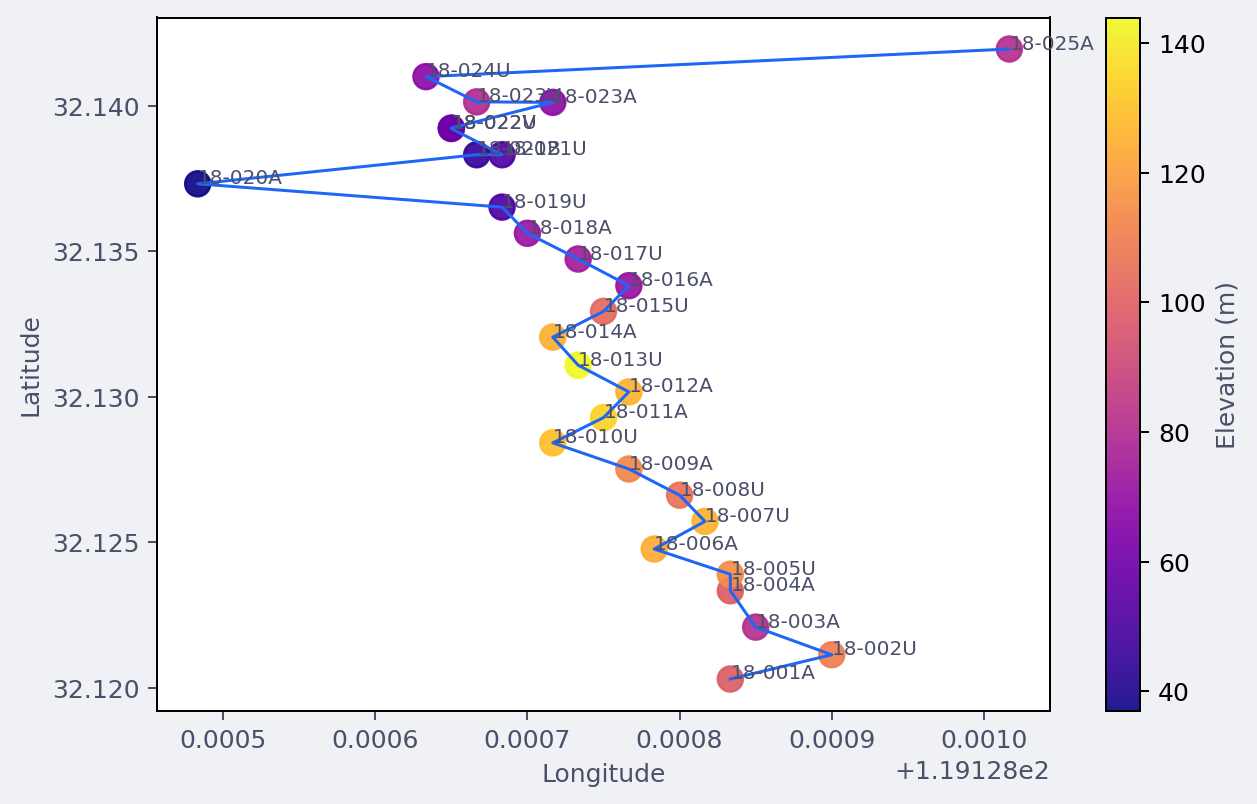
A Matplotlib station-map PNG written through save_png. Plotly
PNG/SVG/PDF export follows the same helper name, but uses Kaleido
under the hood.#
Static Plotly images require Kaleido. If Kaleido is missing,
pyCSAMT raises an ImportError with a clearer message.
4.7.6. Other Static Image Formats#
Use pycsamt.map.write_image() for non-PNG Plotly image formats:
>>> from pycsamt.map import write_image
>>> svg = write_image(fig, "station.svg", width=1200, height=800)
>>> pdf = write_image(fig, "profile.pdf", width=1400, height=900)
>>> print(svg.name, pdf.name)
station.svg profile.pdf
export_figure also routes unknown suffixes to write_image.
This lets Plotly decide whether a format is supported.
4.7.7. JSON And Dict Export#
write_json uses Plotly’s JSON methods when available and falls
back to dictionary export. write_dict writes the figure dictionary
as JSON text.
>>> from pycsamt.map import write_dict, write_json
>>> json_path = write_json(fig, "station.json")
>>> print(json_path.suffix, json_path.exists())
.json True
>>> try:
...     dict_path = write_dict(fig, "station.dict")
... except TypeError as exc:
...     print(type(exc).__name__, "not JSON serializable" in str(exc))
TypeError True
Use JSON or dict exports when you want to archive the figure specification, compare figure output in tests, or post-process traces in another tool.
For Plotly figures that contain NumPy-backed arrays, prefer
write_json because Plotly’s JSON encoder knows how to serialize
those arrays. write_dict is intentionally plain json.dumps and
is best for already JSON-serializable dictionaries.
>>> from pycsamt.map import figure_to_dict
>>> spec = figure_to_dict(fig)
>>> trace_types = [trace.get("type") for trace in spec.get("data", [])]
>>> print(len(trace_types), sorted(set(trace_types)))
10 ['scattermap']
figure_to_dict requires a Plotly-like object with to_dict or
to_plotly_json. Matplotlib figures do not expose this contract.
The dictionary returned by figure_to_dict is useful for in-memory
inspection, but it is not guaranteed to contain only JSON-native
values. Use write_json when the goal is a portable file.
4.7.8. ExportOptions Reference#
pycsamt.map.ExportOptions stores the common export controls:
pathOutput path.
formatOptional format override. Use this when
pathhas no suffix or when you want to force a specific export route.widthandheightStatic image dimensions for Plotly image export.
scaleStatic Plotly image scale factor. Defaults to
2.0.include_plotlyjsPassed to Plotly HTML export. Defaults to
"cdn".
4.7.9. Batch Export#
Because the helpers return pathlib.Path, batch workflows can
record or log output paths easily.
>>> from pycsamt.map import (
...     ExportOptions,
...     StationMapOptions,
...     export_figure,
...     plot_station_map,
... )
>>> overlays = ["index", "elevation", "rho", "phase"]
>>> outputs = []
>>> for overlay in overlays:
...     figure = plot_station_map(
...         data,
...         options=StationMapOptions(
...             overlay=overlay,
...             frequency=100.0,
...         ),
...     )
...     outputs.append(export_figure(
...         figure,
...         ExportOptions(path=f"outputs/station_{overlay}.html"),
...     ))
>>> print([path.name for path in outputs])
['station_index.html', 'station_elevation.html', 'station_rho.html', 'station_phase.html']
>>> print(len(outputs))
4
4.7.10. MapView Export#
pycsamt.map.MapView uses the same export machinery. It builds
the requested view, creates ExportOptions, and calls
export_figure internally.
>>> from pycsamt.map import MapView
>>> mv = MapView(data)
>>> path = mv.export(
...     "outputs/fence.html",
...     view="map3d",
...     mode="fence",
...     depth_range=(0.0, 2500.0),
... )
>>> print(path.name, path.exists())
fence.html True
This keeps application-style workflows and direct function workflows on the same export path.
For a compact survey handoff, pycsamt.map.MapView.export_all()
renders several standard views into one directory:
>>> written = mv.export_all(
...     "outputs/willy_map_bundle",
...     fmt="html",
...     views=("station", "pseudosection", "map3d"),
... )
>>> print({name: path.name for name, path in written.items()})
{'station': 'station.html', 'pseudosection': 'pseudosection.html', 'map3d': 'map3d.html'}
Each view is rebuilt from the same normalized pycsamt.map.MapData.
The convenience method guarantees a common destination and format, but it
does not freeze plotting options or input data. Archive the generating
script and source-data version beside the bundle when exact regeneration
matters.
4.7.11. Round-Trip And Testing Workflows#
JSON and dictionary exports are useful when you want to inspect or test figure content without rendering images.
>>> from pycsamt.map import figure_to_dict
>>> spec = figure_to_dict(fig)
>>> trace_types = [trace.get("type") for trace in spec["data"]]
>>> print(len(trace_types), sorted(set(trace_types)))
10 ['scattermap']
>>> assert "scatter" in trace_types or "scattermap" in trace_types
For persistent artifacts, prefer write_json:
>>> from pycsamt.map import write_json
>>> path = write_json(fig, "outputs/station_spec.json")
>>> print(path.as_posix())
outputs/station_spec.json
4.7.12. Recommended Formats#
- Station maps
Use HTML for inspection and PNG/SVG for reports.
- Profile pseudosections
Use HTML while tuning options, then PNG/SVG/PDF for publication drafts.
- 3-D maps
Prefer HTML. Static images capture only one camera angle.
- Automated tests
Use
figure_to_dictorwrite_jsonrather than pixel images.
4.7.13. Troubleshooting#
TypeError: HTML export requires a Plotly-like figurewrite_htmlonly works with figures exposingwrite_html. Matplotlib figures should be saved withsave_pngorfig.savefig.ImportErrormentioning KaleidoPlotly static image export needs Kaleido. Install the full/docs environment or export HTML instead.
ValueErrorabout extension or formatexport_figureneeds a file suffix such as.htmlor.png, or an explicitExportOptions.format.- Unexpected Matplotlib keyword behavior
save_pngremoves Plotly-only keys such asscale,width, andheightbefore calling Matplotlibsavefig. Use Matplotlib options likedpiandbbox_inchesfor static Matplotlib figures.- Dictionary export fails
The object must expose
to_dictorto_plotly_json. Use JSON or dict export for Plotly-like figures, not plain Matplotlib figures.