
Note
Go to the end to download the full example code.
Route requests offline#
Before any workflow runs, the agent stack must decide what a message even
is: a question about the package, a request for code, a plot, or an
instruction to run a processing pipeline on real data.
IntentRouter answers that question with a fast,
deterministic, rule-based classifier — no LLM, no API key, no network.
This example builds up from a single classification to a whole batch, then
turns the batch into a confidence chart coloured by intent. Everything runs
inside AGENT_CONFIG.offline()
so the router never reaches for an API key, even if one is present in the
environment.
One request at a time#
IntentRouter.route returns a
RouterDecision. Its intent says where the
message should go, confidence is the router’s self-reported certainty, and
needs_data tells the application whether an EDI dataset must be loaded
before the request can be honoured.
from pycsamt.agents import IntentRouter
from pycsamt.api.agents import AGENT_CONFIG

with AGENT_CONFIG.offline():
    router = IntentRouter()
    decision = router.route("What does static shift mean?")

print("intent    :", decision.intent)
print("confidence:", decision.confidence)
print("needs_data:", decision.needs_data)
print("source    :", decision.source)
intent    : question
confidence: 0.8
needs_data: False
source    : offline
A batch of mixed requests#
Real chat traffic is a mix of questions, code requests, plot requests and genuine “run this on my data” instructions. Routing a representative batch shows how each kind is separated. The router is stateless, so one instance classifies the whole list.
requests = [
    "What does static shift mean?",
    "Write Python code for survey QC",
    "Plot the phase tensor pseudosection",
    "Run QC on /data/AMT/WILLY_DATA/L22PLT",
    "Invert /surveys/line22 with Occam2D",
    "What is the strike of L22PLT?",
    "List the workflows you can run",
    "hello",
]

with AGENT_CONFIG.offline():
    router = IntentRouter()
    decisions = [router.route(text) for text in requests]

for text, dec in zip(requests, decisions):
    flag = "data" if dec.needs_data else "    "
    print(f"{dec.intent:<9} {dec.confidence:>4.2f} [{flag}]  {text}")
question  0.80 [    ]  What does static shift mean?
code      0.85 [    ]  Write Python code for survey QC
plot      0.70 [data]  Plot the phase tensor pseudosection
workflow  0.65 [data]  Run QC on /data/AMT/WILLY_DATA/L22PLT
workflow  0.65 [data]  Invert /surveys/line22 with Occam2D
metrics   0.82 [data]  What is the strike of L22PLT?
meta      0.88 [    ]  List the workflows you can run
meta      0.90 [    ]  hello
Visualise the routing decisions#
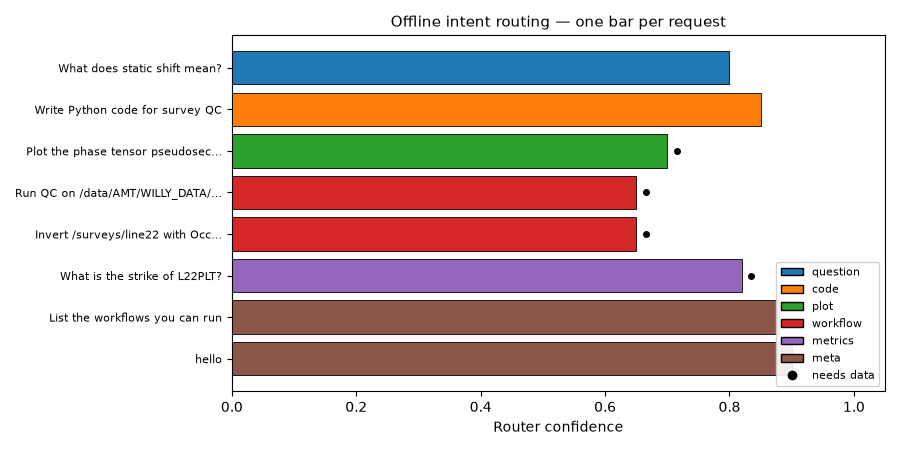
A horizontal bar per request — length is the confidence, colour is the intent
— makes the classifier’s behaviour legible at a glance. Requests that require
a loaded dataset (needs_data) are marked with a dot, so the “run a
workflow” instructions stand out from the questions and code requests.
import matplotlib.pyplot as plt
from matplotlib.patches import Patch

# Stable colour per intent so the legend and bars always agree.
intent_order = ["question", "code", "plot", "workflow", "metrics", "meta"]
palette = dict(zip(intent_order, plt.get_cmap("tab10").colors))

y = range(len(requests))
colors = [palette.get(d.intent, "0.6") for d in decisions]

fig, ax = plt.subplots(figsize=(9, 4.5))
ax.barh(
    list(y),
    [d.confidence for d in decisions],
    color=colors,
    edgecolor="black",
    linewidth=0.6,
)

for yi, dec in zip(y, decisions):
    if dec.needs_data:
        ax.plot(dec.confidence + 0.015, yi, "o", color="black", ms=4)

ax.set_yticks(list(y))
ax.set_yticklabels(
    [t if len(t) <= 34 else t[:31] + "…" for t in requests], fontsize=8
)
ax.invert_yaxis()  # first request on top
ax.set_xlim(0, 1.05)
ax.set_xlabel("Router confidence")
ax.set_title("Offline intent routing — one bar per request", fontsize=11)

present = [i for i in intent_order if any(d.intent == i for d in decisions)]
handles = [
    Patch(facecolor=palette[i], edgecolor="black", label=i) for i in present
]
handles.append(
    plt.Line2D(
        [], [], marker="o", color="black", linestyle="", label="needs data"
    )
)
ax.legend(handles=handles, fontsize=8, loc="lower right", framealpha=0.9)
fig.tight_layout()
Total running time of the script: (0 minutes 0.146 seconds)