
Note
Go to the end to download the full example code.
Preview a coordinated agent chain#
AgentCoordinator chains agents into a named workflow,
passing each step’s output to the next. Its dry-run mode previews the
dependency chain — step names, agents, and whether each uses an LLM — without
loading any data or writing any output, which is exactly what you want when
assembling a custom workflow.
This example wires a two-step chain (parse a request, then load the survey it
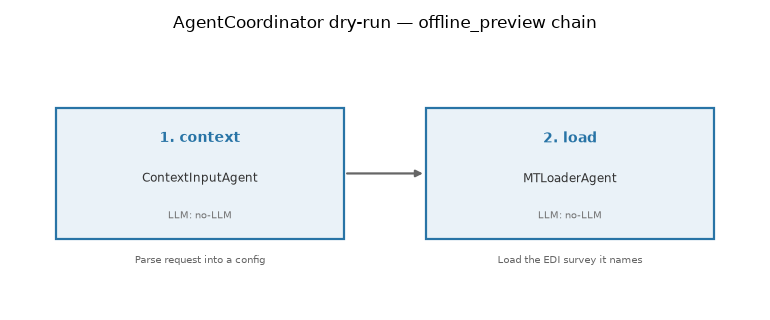
names), previews it, and draws the plan as a flow diagram. The coordinator is
built with verbose=False so the preview returns its structured step list
without printing, and everything runs offline.
Wire and preview the chain#
add_step registers each agent under a name; an input_fn maps the
accumulated results into the next step’s input. Here the loader’s path comes
from the config parsed by the first step. execute(..., dry_run=True)
returns an AgentResult whose data["steps"] lists
the plan — no agent actually runs.
from pycsamt.agents import (
    AgentCoordinator,
    ContextInputAgent,
    MTLoaderAgent,
)
from pycsamt.api.agents import AGENT_CONFIG

with AGENT_CONFIG.offline():
    coordinator = AgentCoordinator("offline_preview", verbose=False)
    coordinator.add_step(
        "context",
        ContextInputAgent(),
        description="Parse request into a config",
    )
    coordinator.add_step(
        "load",
        MTLoaderAgent(),
        input_fn=lambda results: {
            "path": (results["context"].get("config") or {}).get(
                "data_path", ""
            )
        },
        description="Load the EDI survey it names",
    )

    preview = coordinator.execute(
        {"request": "Load /data/AMT/WILLY_DATA/L22PLT and inspect it"},
        dry_run=True,
    )

steps = preview.get("steps") or []
print("status :", preview.status)
print("summary:", preview.summary)
for step in steps:
    print(
        f"  {step['step']}. {step['name']:<9} "
        f"{step['agent']:<20} LLM={step['llm']}"
    )
status : success
summary: Workflow preview: 2 steps.
  1. context   ContextInputAgent    LLM=no-LLM
  2. load      MTLoaderAgent        LLM=no-LLM
Draw the plan as a flow diagram#
The structured step list turns straight into a diagram: one box per step,
arrows for the data flow, and each box labelled with the agent and its LLM
status (no-LLM here, since the preview is fully offline).
import matplotlib.pyplot as plt


def draw_chain(steps, title, ax=None):
    """Render an agent chain as left-to-right connected boxes."""
    if ax is None:
        _, ax = plt.subplots(figsize=(3.6 * len(steps) + 0.5, 3.2))
    ax.axis("off")
    ax.set_xlim(0, len(steps))
    ax.set_ylim(0, 1)
    box_w, box_h, y0 = 0.78, 0.5, 0.25
    for i, step in enumerate(steps):
        x0 = i + (1 - box_w) / 2
        offline = step["llm"] == "no-LLM"
        face = "#eaf2f8" if offline else "#fdf2e9"
        edge = "#2874a6" if offline else "#ca6f1e"
        ax.add_patch(
            plt.Rectangle(
                (x0, y0),
                box_w,
                box_h,
                facecolor=face,
                edgecolor=edge,
                linewidth=1.6,
                zorder=2,
            )
        )
        cx = x0 + box_w / 2
        ax.text(
            cx,
            y0 + box_h - 0.09,
            f"{step['step']}. {step['name']}",
            ha="center",
            va="top",
            fontsize=10,
            fontweight="bold",
            color=edge,
        )
        ax.text(
            cx,
            y0 + box_h / 2 - 0.02,
            step["agent"],
            ha="center",
            va="center",
            fontsize=8.5,
            color="0.2",
        )
        ax.text(
            cx,
            y0 + 0.07,
            f"LLM: {step['llm']}",
            ha="center",
            va="bottom",
            fontsize=7.5,
            color="0.45",
        )
        ax.text(
            cx,
            y0 - 0.06,
            step["description"],
            ha="center",
            va="top",
            fontsize=7.5,
            color="0.4",
            wrap=True,
        )
        if i < len(steps) - 1:
            ax.annotate(
                "",
                xy=(i + 1 + (1 - box_w) / 2, y0 + box_h / 2),
                xytext=(x0 + box_w, y0 + box_h / 2),
                arrowprops=dict(arrowstyle="-|>", color="0.4", lw=1.6),
            )
    ax.set_title(title, fontsize=12, pad=10)
    return ax


draw_chain(steps, "AgentCoordinator dry-run — offline_preview chain")
plt.tight_layout()
Total running time of the script: (0 minutes 0.052 seconds)