
Note
Go to the end to download the full example code.
Reproducible presets#
Typing out the same step chain every time is error-prone, so
pycsamt.pipeline ships presets — named, curated workflows you can
run in one line. This example browses the catalogue and runs one end to end.
The preset catalogue#
preset_catalogue() prints every preset with its
purpose and step list — the menu of ready-made workflows.
from pycsamt.pipeline import (
    Pipeline,
    configure_pipe,
    get_preset,
    list_presets,
    preset_catalogue,
)

print(preset_catalogue())
Available pipeline presets
────────────────────────────────────────────────────────────
  basic_qc                Minimal denoising + frequency cleanup.  Good for quick-look inspection.
                          NR001 → FREQ002 → FREQ001 → FREQ004 → QC001

  noise_reduction         Stacked noise-removal chain for high-EMI environments.
                          NR001 → NR004 → NR005 → NR003 → NR010 → QC001

  full_processing         Standard end-to-end workflow: noise → frequency → skew gate → static-shift → strike rotation.
                          NR001 → FREQ002 → FREQ001 → FREQ004 → SK001 → TZ001 → SS001 → QC001

  tensor_analysis         Tensor-only cleanup: strike rotation, antisymmetry, sigma-clip, and off-diagonal balance.
                          TZ001 → TZ002 → TZ003 → TZ004 → QC001

  dimensionality_filter   Classify 1-D / 2-D / 3-D regions, mask unwanted class, and project to 2-D.
                          DIM001 → DIM002 → DIM003 → QC001

  publication_ready       Full chain for publication-quality output (C&G paper standard): noise removal, frequency editing, static-shift correction, strike rotation, and skew gating.
                          NR001 → FREQ002 → FREQ001 → FREQ004 → SS001 → TZ001 → TZ002 → SK001 → QC001

  stratagem_mt            emtools-level preset for Stratagem AMT data already loaded as a Sites object.  Applies AMA static-shift correction, selects the standard AMT band (10 Hz – 100 kHz), removes powerline harmonics and outliers, and masks incoherent frequency bins.  For the full raw EDI + GPS workflow (coordinate injection, hardware SNR masking, renaming) use pycsamt.pipeline.stratagem.StratagemPipeline instead.
                          SS001 → FREQ001 → FREQ002 → NR001 → NR004 → NR010 → QC001

  mt_qc                   Broadband MT quick-look: denoise, frequency cleanup, strike rotation, and data-driven tensor/tipper/strike QC. Opens and closes with a raw-vs-processed station preview.
                          PRE001 → NR001 → FREQ002 → FREQ001 → FREQ004 → TZ001 → QC001 → QC007 → QC005 → QC006 → PRE002

  amt_qc                  Same chain as mt_qc, trimmed to the standard AMT acquisition band (10 Hz - 100 kHz).
                          PRE001 → NR001 → FREQ002 → FREQ001 → FREQ004 → TZ001 → QC001 → QC007 → QC005 → QC006 → PRE002

  csamt_qc                CSAMT quick-look: mt_qc's chain plus near-field/transition-zone correction and its diagnostic pseudosection. source_offset defaults to None (auto-resolved per station from site metadata; stations without a resolvable offset are warned about and left uncorrected, never fail the run).
                          PRE001 → NR001 → FREQ002 → FREQ001 → FREQ004 → SRC001 → QC002 → SRC002 → TZ001 → QC001 → QC007 → QC005 → QC006 → PRE002

  csumt_qc                CSUMT quick-look: csamt_qc's chain trimmed to the CSUMT acquisition band, plus a Bostick depth-section snapshot.
                          PRE001 → NR001 → FREQ002 → FREQ001 → FREQ004 → SRC001 → QC002 → SRC002 → TZ001 → QC001 → QC004 → QC007 → QC005 → QC006 → PRE002
Presets as objects#
list_presets() returns
Preset objects; each carries a name,
description and its ordered steps.
11 presets:

  basic_qc           5 steps  — Minimal denoising + frequency cleanup.  Good for quick-look inspection.
  noise_reduction    6 steps  — Stacked noise-removal chain for high-EMI environments.
  full_processing    8 steps  — Standard end-to-end workflow: noise → frequency → skew gate → static-shift → strike rotation.
  tensor_analysis    5 steps  — Tensor-only cleanup: strike rotation, antisymmetry, sigma-clip, and off-diagonal balance.
  dimensionality_filter 4 steps  — Classify 1-D / 2-D / 3-D regions, mask unwanted class, and project to 2-D.
  publication_ready  9 steps  — Full chain for publication-quality output (C&G paper standard): noise removal, frequency editing, static-shift correction, strike rotation, and skew gating.
  stratagem_mt       7 steps  — emtools-level preset for Stratagem AMT data already loaded as a Sites object.  Applies AMA static-shift correction, selects the standard AMT band (10 Hz – 100 kHz), removes powerline harmonics and outliers, and masks incoherent frequency bins.  For the full raw EDI + GPS workflow (coordinate injection, hardware SNR masking, renaming) use pycsamt.pipeline.stratagem.StratagemPipeline instead.
  mt_qc              11 steps  — Broadband MT quick-look: denoise, frequency cleanup, strike rotation, and data-driven tensor/tipper/strike QC. Opens and closes with a raw-vs-processed station preview.
  amt_qc             11 steps  — Same chain as mt_qc, trimmed to the standard AMT acquisition band (10 Hz - 100 kHz).
  csamt_qc           14 steps  — CSAMT quick-look: mt_qc's chain plus near-field/transition-zone correction and its diagnostic pseudosection. source_offset defaults to None (auto-resolved per station from site metadata; stations without a resolvable offset are warned about and left uncorrected, never fail the run).
  csumt_qc           15 steps  — CSUMT quick-look: csamt_qc's chain trimmed to the CSUMT acquisition band, plus a Bostick depth-section snapshot.
Inspect one preset#
get_preset() fetches one by name. Its steps are
exactly the (label, Step) pairs you would otherwise write by hand.
preset = get_preset("basic_qc")
print(f"preset {preset.name!r}: {preset.description}\n")
for label, step in preset.steps:
    print(f"  {label:<14} {step}")
preset 'basic_qc': Minimal denoising + frequency cleanup.  Good for quick-look inspection.

  notch          Step [NR001] Power-line Harmonic Notch  (mains_hz=50, n_harm=30, tol_hz=0.08)
  drop_duplicates Step [FREQ002] Drop Duplicate Frequencies
  select_band    Step [FREQ001] Frequency Band Select  (band_hz=(0.001, 10000.0))
  align_grid     Step [FREQ004] Frequency Grid Alignment
  qc_snapshot    Step [QC001] QC Quick-Look Snapshot
Run a preset#
A preset drops straight into Pipeline — its
steps are a pipeline definition — so running it is one call on the data.
from _pipe_data import demo_sites, quiet_logs, scratch_dir

sites = demo_sites(n=8)
configure_pipe(show_progress=False, plot_dpi=72)
pipe = Pipeline(preset.steps, name=preset.name)

with quiet_logs():
    result = pipe.run(
        sites,
        outdir=scratch_dir(),
        save_plots=False,
        save_edis=True,
        save_report=True,
    )
print(result.summary())
PipelineResult  'basic_qc'
  Sites   : 8 in → 8 out
  Steps   : 5 (5 ok, 0 err)
  Time    : 0.06 s
  Plots   : 0
  Output  : /tmp/pycsamt_pipe_vx4qy1pt
Comparing the presets#
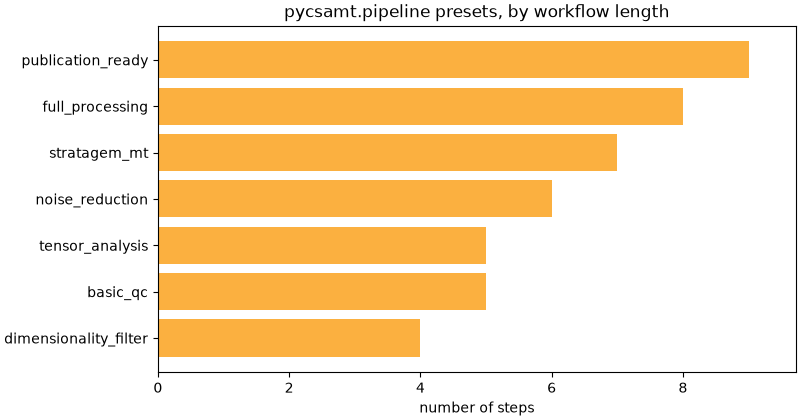
A quick chart of how much processing each preset applies — from the light
basic_qc to the full end-to-end workflows.
import matplotlib.pyplot as plt

names = [p.name for p in presets]
sizes = [len(p.steps) for p in presets]
order = sorted(range(len(presets)), key=lambda i: sizes[i])
fig, ax = plt.subplots(figsize=(8, 4.2), constrained_layout=True)
ax.barh([names[i] for i in order], [sizes[i] for i in order], color="#fbb040")
ax.set_xlabel("number of steps")
ax.set_title("pycsamt.pipeline presets, by workflow length")
ax.margins(x=0.08)
Takeaway. Presets make a standard workflow a one-liner and a shared vocabulary across a project. To pin an exact run — preset plus your own tweaks — serialise it to a config file: see Config-driven pipelines and reproducibility.
Total running time of the script: (0 minutes 0.212 seconds)