
Note
Go to the end to download the full example code.
Extract workflow context#
Once a message is known to be a workflow request (see
the routing example),
the next agent turns the free-text sentence into a structured configuration the
rest of the stack can execute.
ContextInputAgent does this offline with a robust set
of regular expressions — it recognises paths, workflow keywords, period ranges,
tensor components and stations without any LLM call.
The example starts with a bare request, then a fully-specified one, and finally renders the extracted configuration as a table so the mapping from words to config keys is explicit.
A minimal request#
With nothing but a verb, the parser still anchors the workflow type from
keywords. No path was given, so data_path stays empty and the agent
reports needs_review — a truthful signal that a human (or an earlier
step) must supply the survey location before anything can run.
from pycsamt.agents import ContextInputAgent
from pycsamt.api.agents import AGENT_CONFIG

with AGENT_CONFIG.offline():
    agent = ContextInputAgent()
    minimal = agent.execute({"request": "Run quality control on the survey"})

print("status :", minimal.status)
print("summary:", minimal.summary)
status : needs_review
summary: Config extracted: workflow='qc', path='?'.
A fully-specified request#
A richer sentence carries a path, a period range, a tensor component and an
output directory. The offline parser pulls each of them into the config
dictionary. Paths are recognised when written in POSIX form (leading /),
which is how they appear throughout the documentation.
request = (
    "Run phase tensor analysis on /data/AMT/WILLY_DATA/L22PLT "
    "for periods 0.01 to 100 s, component xy, "
    "and save to /output/l22_phase/"
)

with AGENT_CONFIG.offline():
    agent = ContextInputAgent()
    result = agent.execute({"request": request})

config = result.get("config") or {}
print("status :", result.status)
print("summary:", result.summary)
for key, value in sorted(config.items()):
    print(f"  {key:<14}: {value}")
if result.warnings:
    for w in result.warnings:
        print("  note:", w)
status : success
summary: Config extracted: workflow='phase_analysis', path='/data/AMT/WILLY_DATA/L22PLT'.
  component     : xy
  data_path     : /data/AMT/WILLY_DATA/L22PLT
  inversion_code: None
  output_dir    : /output/l22_phase/
  period_range  : [0.01, 100.0]
  station       : None
  verbose       : True
  workflow      : phase_analysis
  note: Data path does not exist on disk: '/data/AMT/WILLY_DATA/L22PLT'. Check the path and try again.
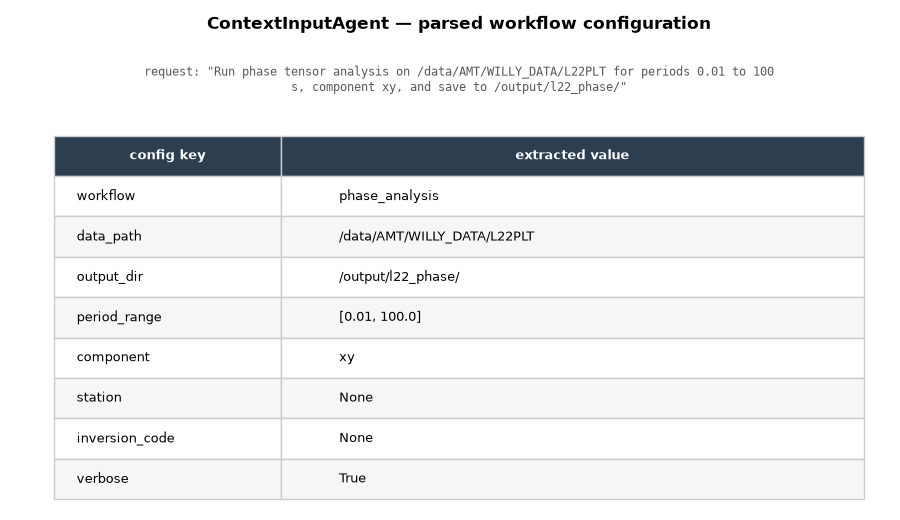
Render the extracted configuration#
The parsed config is what the AgentCoordinator and
WorkflowOrchestratorAgent consume directly. Showing
it as a table makes the “language → structure” step concrete: each row is a
field the downstream agents rely on.
import textwrap

import matplotlib.pyplot as plt

# The fields worth surfacing, in a sensible reading order.
field_order = [
    "workflow",
    "data_path",
    "output_dir",
    "period_range",
    "component",
    "station",
    "inversion_code",
    "verbose",
]
rows = [(k, str(config.get(k, "—"))) for k in field_order if k in config]

fig, ax = plt.subplots(figsize=(9, 5.2))
ax.axis("off")

# Title, then the originating request wrapped beneath it, then the table.
ax.text(
    0.5,
    1.18,
    "ContextInputAgent — parsed workflow configuration",
    transform=ax.transAxes,
    ha="center",
    va="bottom",
    fontsize=12,
    fontweight="bold",
)
wrapped = textwrap.fill(f'request: "{request}"', width=92)
ax.text(
    0.5,
    1.10,
    wrapped,
    transform=ax.transAxes,
    ha="center",
    va="top",
    fontsize=8.5,
    family="monospace",
    color="0.35",
)

table = ax.table(
    cellText=rows,
    colLabels=["config key", "extracted value"],
    colWidths=[0.28, 0.72],
    cellLoc="left",
    loc="upper center",
    bbox=[0.0, 0.0, 1.0, 0.92],
)
table.auto_set_font_size(False)
table.set_fontsize(9.5)

# Header styling + zebra striping for readability.
for (r, _c), cell in table.get_celld().items():
    cell.set_edgecolor("0.8")
    if r == 0:
        cell.set_facecolor("#2c3e50")
        cell.set_text_props(color="white", fontweight="bold")
    elif r % 2 == 0:
        cell.set_facecolor("#f4f6f8")

fig.subplots_adjust(left=0.06, right=0.96, top=0.80, bottom=0.04)
Total running time of the script: (0 minutes 14.772 seconds)