
Note
Go to the end to download the full example code.
Stratagem instrument presets#
The Zonge Stratagem workflow has its own end-to-end presets in
pycsamt.pipeline.stratagem — full pipelines that go from raw
instrument files (with survey coordinates and reprojection) all the way to
processed, renamed EDIs. This example browses those presets; running one
needs raw Stratagem data plus a coordinate file, so here we focus on the
recipes themselves.
The Stratagem catalogue#
stratagem_preset_catalogue() prints the available
instrument workflows and what each does.
from pycsamt.pipeline import (
    list_stratagem_presets,
    stratagem_preset_catalogue,
)

print(stratagem_preset_catalogue())
Stratagem pipeline presets
────────────────────────────────────────────────────────────────
  basic                   Direct equivalent of the legacy stratagem_edi_process_script.py: inject GPS coords → AMA static-shift → frequency trim → noise removal → export → rename.
                          remove_static_shift → drop_frequencies → remove_noises → export → rename

  full_processing         QC report → AMA static-shift → hardware-aware frequency filter → noise removal with smoothing → export → rename.
                          run_qc → remove_static_shift → drop_frequencies → remove_noises → export → rename

  publication_ready       C&G standard: full QC, hardware SNR masking, tight AMT band (15 Hz – 100 kHz), aggressive smoothing → export → rename.
                          run_qc → remove_static_shift → drop_frequencies → remove_noises → export → rename
Presets as objects#
list_stratagem_presets() returns
StratagemPreset objects. Each bundles
survey-wide defaults (projection, coordinate handling) with an ordered
step list — a complete acquisition-to-EDI recipe.
3 Stratagem presets:

  basic              5 steps — Direct equivalent of the legacy stratagem_edi_process_script.py: inject GPS coords → AMA static-shift → frequency trim → noise removal → export → rename.
  full_processing    6 steps — QC report → AMA static-shift → hardware-aware frequency filter → noise removal with smoothing → export → rename.
  publication_ready  6 steps — C&G standard: full QC, hardware SNR masking, tight AMT band (15 Hz – 100 kHz), aggressive smoothing → export → rename.
Inside a preset#
The publication_ready preset is the fullest — its steps and
survey defaults show exactly what a finished Stratagem run applies.
preset 'publication_ready': C&G standard: full QC, hardware SNR masking, tight AMT band (15 Hz – 100 kHz), aggressive smoothing → export → rename.

survey defaults:
  epsg             32649
  utm_zone         49N

steps:
  run_qc               {'include_skew': True, 'min_frac_ok': 0.5, 'min_snr_med': 3.0, 'max_skew_med': 5.0}
  remove_static_shift  {'half_window': 5, 'weights': 'tri', 'max_skew': 5.0}
  drop_frequencies     {'fmin': 15.0, 'fmax': 100000.0, 'snr_thresh': 3.0, 'min_frac': 0.5, 'use_hardware_mask': True}
  remove_noises        {'mains_hz': 50.0, 'n_harm': 30, 'tol_hz': 0.05, 'hampel_win': 3, 'hampel_nsig': 3.0, 'smooth': True, 'smooth_win': 3}
  export
  rename
How you would run it#
With raw data in hand it is a single call —
run_stratagem_preset() — pointing at the raw
directory and coordinate file:
from pycsamt.pipeline import run_stratagem_preset
result = run_stratagem_preset(
    "publication_ready",
    raw_dir="field/stratagem_raw/",
    outdir="processed/",
    epsg=32649, utm_zone="49N",
)
For step-by-step control, build a
StratagemPipeline directly and call run.
Preset lengths at a glance#
import matplotlib.pyplot as plt

names = [p.name for p in presets]
sizes = [len(p.steps) for p in presets]
order = sorted(range(len(presets)), key=lambda i: sizes[i])
fig, ax = plt.subplots(figsize=(7.5, 3.4), constrained_layout=True)
ax.barh([names[i] for i in order], [sizes[i] for i in order], color="#f15a29")
ax.set_xlabel("number of steps")
ax.set_title("Stratagem presets, by workflow length")
ax.margins(x=0.1)
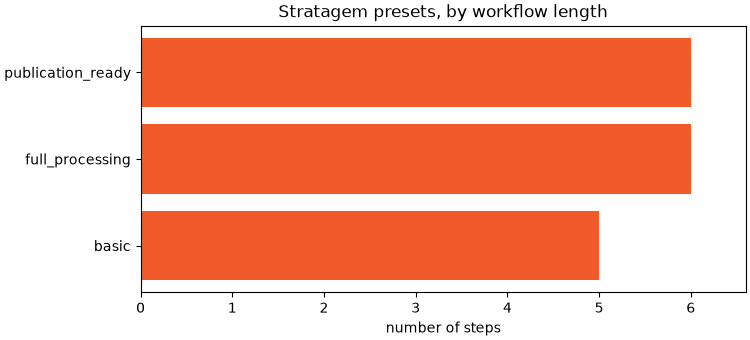
Takeaway. The Stratagem presets package the whole instrument workflow — import, reprojection, processing, export — as reproducible recipes, the same philosophy as the generic presets applied to a specific acquisition system.
Total running time of the script: (0 minutes 0.059 seconds)