
Note
Go to the end to download the full example code.
Exporting selected site collections#
The first two site-gallery examples covered loading, reporting, and selecting stations. This page finishes the basic workflow:
“I have a clean subset. How do I hand it off?”
Export is useful when a selected set of EDI files needs to be used by another program, attached to a processing report, archived with a manifest, or passed to a colleague without the rest of the survey directory.
This example demonstrates a careful export pattern:
build a small deterministic subset from the bundled WILLY survey;
preview the stations before writing anything;
choose stable, collision-resistant filenames;
write EDI files to a clean output directory;
write and inspect a CSV manifest;
package the same subset into a zip archive;
verify the exported directory can be loaded back with
pycsamt.emtools.ensure_sites().
The original EDI files are never modified. The generated files are written to
site_gallery_exports/ relative to the current working directory.
1. Imports and example-data location#
Gallery examples are easiest to read when imports are visible up front. The
small sys.path bootstrap lets this downloaded script run from a source
checkout; during documentation builds, docs/source/conf.py already does
this setup.
import csv
import os
import shutil
import sys
import zipfile
from pathlib import Path

import matplotlib.pyplot as plt


def repo_root():
    root = os.environ.get("PYCSAMT_DOCS_REPO_ROOT")
    return Path(root) if root else Path(__file__).resolve().parents[3]


ROOT = repo_root()
if str(ROOT) not in sys.path:
    sys.path.insert(0, str(ROOT))

from pycsamt.emtools import ensure_sites
from pycsamt.site import (
    SitesReport,
    by_freq,
    by_index,
    by_names,
    drop_empty,
    keep_finite_z,
    pack_zip,
    write_sites,
)

edi_root = ROOT / "data" / "AMT" / "WILLY_DATA"
export_root = Path("site_gallery_exports")
export_dir = export_root / "line18_first5"
manifest_csv = export_dir / "manifest.csv"
archive_path = export_root / "line18_first5.zip"
archive_manifest_csv = export_root / "line18_first5_zip_manifest.csv"
2. Prepare a deterministic subset#
This example intentionally uses a small subset so documentation builds stay fast and generated files remain easy to inspect. The selection chain mirrors a realistic workflow:
load all WILLY lines recursively;
keep stations with finite impedance;
keep line 18 by station-name pattern;
require overlap with a useful frequency band;
keep the first five stations for a compact export;
drop structurally empty stations as a final guard.
all_sites = ensure_sites(edi_root, recursive=True, verbose=0)

selected_sites = keep_finite_z(all_sites)
selected_sites = by_names(selected_sites, "18-*")
selected_sites = by_freq(selected_sites, 10.0, 1_000.0)
selected_sites = by_index(selected_sites, [0, 1, 2, 3, 4])
selected_sites = drop_empty(selected_sites)

if len(selected_sites) == 0:
    raise RuntimeError(
        "The export selection is empty; nothing can be written."
    )

if export_dir.exists():
    shutil.rmtree(export_dir)
if archive_path.exists():
    archive_path.unlink()
if archive_manifest_csv.exists():
    archive_manifest_csv.unlink()

selected_table = SitesReport(selected_sites).to_dataframe()

print(f"Loaded survey stations:   {len(all_sites)}")
print(f"Selected export stations: {len(selected_sites)}")
print(
    selected_table[
        ["station", "nfreq", "freq_min", "freq_max", "has_Zxy", "has_Zyx"]
    ].to_string(index=False)
)
Loaded survey stations:   53
Selected export stations: 5
station  nfreq  freq_min  freq_max  has_Zxy  has_Zyx
18-001A     53     1.008   10400.0     True     True
18-002U     53     1.008   10400.0     True     True
18-003A     53     1.008   10400.0     True     True
18-004A     53     1.008   10400.0     True     True
18-005U     53     1.008   10400.0     True     True
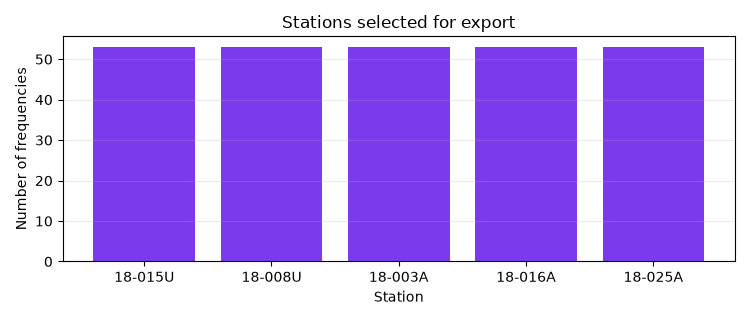
A small preview plot is helpful in the rendered gallery: it shows the subset size and confirms the selected stations all carry the same number of frequency samples.
fig, ax = plt.subplots(figsize=(7.5, 3.2))
ax.bar(selected_table["station"], selected_table["nfreq"], color="#7c3aed")
ax.set_title("Stations selected for export")
ax.set_xlabel("Station")
ax.set_ylabel("Number of frequencies")
ax.grid(axis="y", alpha=0.25)
fig.tight_layout()
3. Choose a filename template#
pycsamt.site.write_sites() renders filenames with a small template
language. Common fields include:
{station}Station name.
{index}Zero-based position in the selected collection.
{lat},{lon},{elev}Coordinates from the EDI header when available.
{chainage}Optional profile distance when available.
A good export template is stable and collision-resistant. Prefixing the
station with {index:03d} preserves selection order and keeps filenames
sorted in file browsers.
filename_template = "{index:03d}_{station}.edi"

expected_names = [
    filename_template.format(index=i, station=station)
    for i, station in enumerate(selected_table["station"])
]
print("Expected export filenames:")
print("\n".join(expected_names))
Expected export filenames:
000_18-001A.edi
001_18-002U.edi
002_18-003A.edi
003_18-004A.edi
004_18-005U.edi
4. Write selected EDI files and a manifest#
write_sites creates the output directory if needed. exist_ok=True is
appropriate for gallery builds and repeatable notebooks: rerunning the page
refreshes the files instead of failing on existing outputs.
In production, consider leaving exist_ok=False until you are certain the
destination is disposable. That protects previous handoff packages from
accidental overwrite.
written_paths = write_sites(
    selected_sites,
    export_dir,
    template=filename_template,
    exist_ok=True,
    manifest_csv=manifest_csv,
)

print(f"Wrote {len(written_paths)} EDI file(s) to {export_dir}")
for path in written_paths:
    print(f"  {path}")
print(f"Manifest written to {manifest_csv}")
Wrote 5 EDI file(s) to site_gallery_exports/line18_first5
  site_gallery_exports/line18_first5/000_18-001A.edi
  site_gallery_exports/line18_first5/001_18-002U.edi
  site_gallery_exports/line18_first5/002_18-003A.edi
  site_gallery_exports/line18_first5/003_18-004A.edi
  site_gallery_exports/line18_first5/004_18-005U.edi
Manifest written to site_gallery_exports/line18_first5/manifest.csv
5. Inspect the manifest#
The manifest is deliberately simple CSV. It records one row per exported station with enough metadata to audit the handoff:
indexPosition in the selected collection.
stationStation name.
lat,lon,elev,chainageHeader metadata where available.
filenameExported EDI filename.
pathFull path written by the export helper.
with manifest_csv.open("r", encoding="utf-8", newline="") as f:
    manifest_rows = list(csv.DictReader(f))

print(f"Manifest rows: {len(manifest_rows)}")
print("First manifest row:")
print(manifest_rows[0])
Manifest rows: 5
First manifest row:
{'index': '0', 'station': '18-001A', 'lat': '32.1203', 'lon': '119.12883333333333', 'elev': '99.0', 'chainage': 'nan', 'filename': '000_18-001A.edi', 'path': 'site_gallery_exports/line18_first5/000_18-001A.edi'}
The manifest can also be used as a cheap consistency check.
manifest_filenames = [row["filename"] for row in manifest_rows]
written_filenames = [path.name for path in written_paths]

if manifest_filenames != written_filenames:
    raise RuntimeError("Manifest filenames do not match written files.")

print("Manifest filenames match written files.")
Manifest filenames match written files.
6. Package the same subset into a zip archive#
pack_zip writes the selected sites to a temporary directory first, then
compresses the rendered EDI files into a zip archive. The source survey and
the directory export above are not modified.
zip_path = pack_zip(
    selected_sites,
    archive_path,
    template=filename_template,
    manifest_csv=archive_manifest_csv,
)

print(f"Archive written to {zip_path}")
print(f"Archive manifest written to {archive_manifest_csv}")
Archive written to site_gallery_exports/line18_first5.zip
Archive manifest written to site_gallery_exports/line18_first5_zip_manifest.csv
Inspect the archive contents using Python’s standard zipfile module.
This is a good habit in automated examples because it catches empty archives
and filename-template mistakes.
with zipfile.ZipFile(zip_path, "r") as zf:
    archive_names = sorted(zf.namelist())

print("Archive members:")
print("\n".join(archive_names))

if archive_names != sorted(written_filenames):
    raise RuntimeError(
        "Zip archive contents do not match the directory export."
    )

print("Archive contents match the directory export.")
Archive members:
000_18-001A.edi
001_18-002U.edi
002_18-003A.edi
003_18-004A.edi
004_18-005U.edi
Archive contents match the directory export.
7. Reload the exported directory#
A practical final verification is to load the exported directory back into pyCSAMT. This confirms that the written EDI files are visible to the same loader used by normal workflows.
reloaded_sites = ensure_sites(export_dir, recursive=False, verbose=0)
reloaded_table = SitesReport(reloaded_sites).to_dataframe()

print(f"Reloaded exported stations: {len(reloaded_sites)}")
print(
    reloaded_table[["station", "nfreq", "freq_min", "freq_max"]].to_string(
        index=False
    )
)

if len(reloaded_sites) != len(selected_sites):
    raise RuntimeError(
        "Reloaded station count does not match selected station count."
    )
Reloaded exported stations: 5
    station  nfreq  freq_min  freq_max
000_18-001A     53     1.008   10400.0
001_18-002U     53     1.008   10400.0
002_18-003A     53     1.008   10400.0
003_18-004A     53     1.008   10400.0
004_18-005U     53     1.008   10400.0
8. What to keep from this pattern#
For a robust handoff workflow, keep four ideas:
select first, export second;
use explicit filename templates;
always write a manifest;
verify the exported package, either by inspecting the zip contents or by loading the exported directory back into
ensure_sites().
This makes the export reproducible for the next developer, reviewer, or processing notebook that consumes the selected site collection.
Total running time of the script: (0 minutes 0.361 seconds)