
Note
Go to the end to download the full example code.
The processing-step catalogue#
A pipeline is built from steps, each identified by a short code (like
NR001 for the power-line notch). Before assembling a workflow it helps
to see what is available: pycsamt.pipeline ships a registry of
processing steps across several categories, and this example browses it.
Categories and step counts#
categories() lists the processing families;
list_steps() returns their
StepSpec entries. Together they answer “what
can this pipeline do?”.
from pycsamt.pipeline import (
    categories,
    list_steps,
    lookup_step,
    step_codes,
)

cats = categories()
print(f"{len(step_codes())} steps across {len(cats)} categories\n")
counts = {}
for cat in cats:
    specs = list_steps(cat)
    counts[cat] = len(specs)
    print(f"  {cat:<15} {len(specs):>2} steps")
55 steps across 10 categories

  dimensionality   3 steps
  export           3 steps
  frequency        9 steps
  noise_removal   14 steps
  preview          2 steps
  qc               7 steps
  skew             4 steps
  source_effects   2 steps
  static_shift     4 steps
  tensor           7 steps
Browsing one category#
Passing a category name lists just its steps. Here are the noise-removal steps — the largest family — with their code, name, and one-line label.
print("noise_removal steps:\n")
for spec in list_steps("noise_removal"):
    print(f"  [{spec.code}]  {spec.name:<24}  {spec.label}")
noise_removal steps:

  [NR001]  notch_powerline           Power-line Harmonic Notch
  [NR002]  smooth_logfreq            Log-Frequency Smooth
  [NR003]  shrink_group_trend        Shrink Outliers to Group Trend
  [NR004]  hampel_filter             Hampel Outlier Filter
  [NR005]  spatial_median            Spatial Median Filter
  [NR006]  emap_filter               EMAP Spatial Filter
  [NR007]  emap_confidence           EMAP with Confidence Gating
  [NR008]  rpca_offdiag              RPCA Off-Diagonal Denoise
  [NR009]  enforce_offdiag           Enforce Off-Diagonal Consistency
  [NR010]  mask_incoherent           Mask Incoherent Frequencies
  [NR011]  fixed_length_mavg         Fixed-Length Moving Average Smooth
  [NR012]  trimmed_mavg              Trimmed Moving Average Smooth (Robust)
  [NR013]  correct_static_shift_spatial  Spatial Window Static Shift Correction
  [NR014]  denoise_pipeline          All-in-One Denoising Pipeline
Inspecting one step#
lookup_step() returns the full spec for a code,
including its default parameters — the values you would override when
adding it to a pipeline (e.g. Step("NR001", mains_hz=60) for 60 Hz
mains).
spec = lookup_step("NR001")
print(f"code      : {spec.code}")
print(f"name      : {spec.name}")
print(f"label     : {spec.label}")
print(f"category  : {spec.category}")
print(f"defaults  : {spec.defaults}")
print(f"returns_sites: {spec.returns_sites}")
code      : NR001
name      : notch_powerline
label     : Power-line Harmonic Notch
category  : noise_removal
defaults  : {'mains_hz': 50, 'n_harm': 30, 'tol_hz': 0.08}
returns_sites: True
A catalogue at a glance#
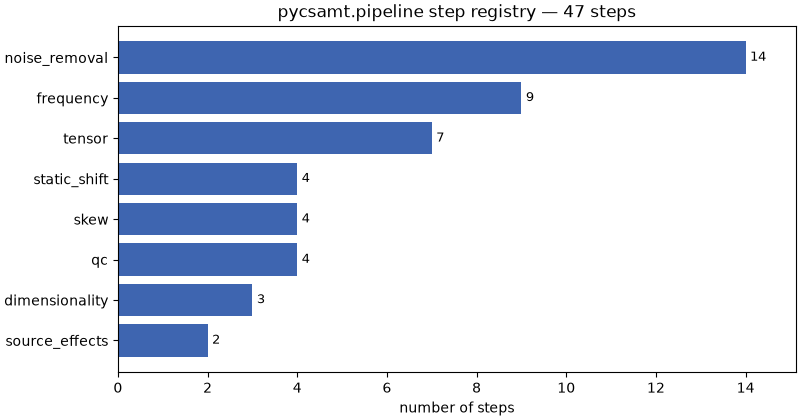
One small chart makes the shape of the toolbox obvious — where the processing effort is concentrated (noise removal and frequency handling dominate).
import matplotlib.pyplot as plt

order = sorted(counts, key=counts.get)
fig, ax = plt.subplots(figsize=(8, 4.2), constrained_layout=True)
ax.barh(order, [counts[c] for c in order], color="#3e65b0")
for i, c in enumerate(order):
    ax.text(counts[c] + 0.1, i, str(counts[c]), va="center", fontsize=9)
ax.set_xlabel("number of steps")
ax.set_title(f"pycsamt.pipeline step registry — {len(step_codes())} steps")
ax.margins(x=0.08)
Next. With the catalogue in hand, Build and run a pipeline assembles a few of these steps into a pipeline and runs it on a real survey line.
Total running time of the script: (0 minutes 0.098 seconds)