
Note
Go to the end to download the full example code.
Plan a workflow with Agent Master#
AgentMaster is the one-line front door to the whole
stack: give it a plain-language request and it classifies the workflow, then
builds and (optionally) runs the right agent chain. Its
plan() method previews that chain with
dry_run=True — it reads and writes nothing, so it is the safe way to see
what a request would do.
This example plans a multi-stage request, inspects the classified workflow and
the steps the master selected, and draws the resulting pipeline. It runs fully
offline, so the router uses its deterministic rules and every step reports
no-LLM.
Plan a multi-stage request#
The request bundles three intentions — quality control, static-shift
assessment, and a report. plan classifies it into a single workflow and
returns the ordered steps under data["steps"] together with the router’s
reasoning. A data_path is passed explicitly; because this is a
dry-run preview, the path is never opened.
from pycsamt.agents import AgentMaster
from pycsamt.api.agents import AGENT_CONFIG

request = "QC the EDI files, assess static shift, and prepare a short report"

with AGENT_CONFIG.offline():
    master = AgentMaster()
    result = master.plan(
        request,
        data_path="/data/AMT/WILLY_DATA/L22PLT",
        output_dir="results/agent_preview",
    )

# The coordinator preview (result["result"]) carries the richest per-step
# metadata — step index, agent, LLM status and description.
preview = result.get("result")
steps = (preview.get("steps") if preview else None) or []

print("status       :", result.status)
print("workflow_type:", result.get("workflow_type"))
print("reasoning    :", result.get("reasoning"))
print("cost (USD)   :", result.cost_estimate_usd)
print(f"\n{len(steps)} steps selected:")
for step in steps:
    print(
        f"  {step['step']}. {step['name']:<14} "
        f"{step['agent']:<20} LLM={step['llm']}"
    )
/opt/build/repo/pycsamt/agents/orchestrator.py:1143: UserWarning: data_path does not exist: '/data/AMT/WILLY_DATA/L22PLT'
  plan_errors = validate_workflow_plan(plan)
Workflow: orchestrated_static_shift
Steps   : 4
Config  : {
  "path": "/data/AMT/WILLY_DATA/L22PLT",
  "output_dir": "results/agent_preview",
  "request": "QC the EDI files, assess static shift, and prepare a short report"
}

────────────────────────────────────────────────────────────
   1. [load]
       Agent  : MTLoaderAgent
       LLM    : no-LLM
       Action : Load EDI files
   2. [qc]
       Agent  : DataQCAgent
       LLM    : no-LLM
       Action : Data quality control
   3. [static_shift]
       Agent  : StaticShiftAgent
       LLM    : no-LLM
       Action : Static-shift detection and AMA correction
   4. [report]
       Agent  : ReportAgent
       LLM    : no-LLM
       Action : Generate static-shift report
────────────────────────────────────────────────────────────
status       : success
workflow_type: static_shift
reasoning    : Matched keywords for workflow 'static_shift'.
cost (USD)   : 0.0

4 steps selected:
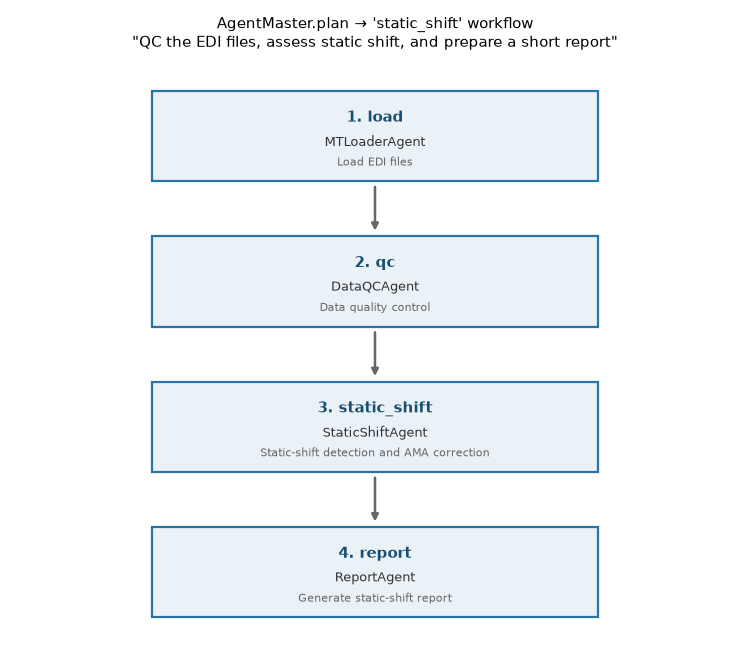
  1. load           MTLoaderAgent        LLM=no-LLM
  2. qc             DataQCAgent          LLM=no-LLM
  3. static_shift   StaticShiftAgent     LLM=no-LLM
  4. report         ReportAgent          LLM=no-LLM
Draw the selected pipeline#
The master expanded one sentence into an ordered, validated chain. Rendering the steps as a vertical pipeline keeps the four stages readable and mirrors the order in which the coordinator would run them.
import matplotlib.pyplot as plt

n = len(steps)
fig, ax = plt.subplots(figsize=(7.5, 1.35 * n + 1.2))
ax.axis("off")
ax.set_xlim(0, 1)
ax.set_ylim(0, n)

box_w, box_h, x0 = 0.62, 0.62, 0.19
for i, step in enumerate(steps):
    # top step drawn first
    y0 = n - 1 - i + (1 - box_h) / 2
    ax.add_patch(
        plt.Rectangle(
            (x0, y0),
            box_w,
            box_h,
            facecolor="#eaf2f8",
            edgecolor="#2874a6",
            linewidth=1.6,
            zorder=2,
        )
    )
    cx = x0 + box_w / 2
    ax.text(
        cx,
        y0 + box_h - 0.13,
        f"{step['step']}. {step['name']}",
        ha="center",
        va="top",
        fontsize=11,
        fontweight="bold",
        color="#1b4f72",
    )
    ax.text(
        cx,
        y0 + box_h / 2 - 0.04,
        step["agent"],
        ha="center",
        va="center",
        fontsize=9,
        color="0.2",
    )
    ax.text(
        cx,
        y0 + 0.09,
        step["description"],
        ha="center",
        va="bottom",
        fontsize=7.8,
        color="0.4",
    )
    if i < n - 1:
        # arrow points downward: bottom of this box → top of the next
        ax.annotate(
            "",
            xy=(cx, y0 - (1 - box_h) + 0.02),
            xytext=(cx, y0 - 0.02),
            arrowprops=dict(arrowstyle="-|>", color="0.4", lw=1.8),
        )

wf = result.get("workflow_type")
ax.set_title(
    f'AgentMaster.plan → {wf!r} workflow\n"{request}"', fontsize=11, pad=12
)
fig.tight_layout()
Total running time of the script: (0 minutes 0.087 seconds)