
18.13. Run Classical Inversions: Occam2D, ModEM, and MARE2DEM#
The previous tutorials build native input files for a classical engine – Prepare an Occam2D Inversion for Occam2D and Map Porphyry Mineralization From Noisy AMT for both Occam2D and ModEM. This tutorial picks up right after that point. It is deliberately engine-agnostic: the run step is the same three-part recipe for Occam2D, ModEM, and MARE2DEM –
locate or build the external binary;
build (and inspect) the exact command pyCSAMT would launch, then run it locally or hand it to a cluster scheduler;
load the finished run back into pyCSAMT once it completes.
None of the three engines ships a pre-compiled binary with pyCSAMT, and this documentation build has none either – every “run” call below is either a dry-run command string or shown commented out, exactly as in the user-guide backend pages this tutorial draws on. What actually did run to produce the numbers here are three genuinely finished, bundled sample runs, loaded at the end to compare how differently three real classical inversions can converge.
18.13.1. What You Will Learn#
After this tutorial you should be able to:
name the config, builder, runner, and result classes for each of the three classical engines and see how closely they mirror each other;
explain how each runner locates or builds its executable, and what pyCSAMT can and cannot do about a missing binary;
build a dry-run command for Occam2D, ModEM, and MARE2DEM from the same configuration object that built the input files;
decide when to run locally through pyCSAMT versus handing a prepared directory to an external job scheduler;
run Occam2D or ModEM through the
pycsamt invertCLI, and know that MARE2DEM currently requires the Python API instead;load finished runs from all three engines and read their convergence state side by side.
18.13.2. Where Each Backend Stands#
Engine |
Config |
Builder / Runner |
Result loader |
Bundled source |
MPI |
|---|---|---|---|---|---|
|
|
|
Yes – Fortran source under |
No |
|
|
|
|
No – |
Yes |
|
|
|
|
Not bundled, but |
Yes |
The three InputBuilder and InversionResult names above are genuinely
different classes that happen to share a name – always import them from
their own engine subpackage (pycsamt.models.occam2d,
pycsamt.models.modem, or pycsamt.models.mare2dem), never from a
shared top-level path.
18.13.3. Recap: Prepared Native Inputs#
This tutorial assumes native files already exist. The quickest way to get
there for each engine, reusing the same bundled L18PLT AMT line and
MARE2DEM synthetic sample documented in the engine pages:
 1>>> from pycsamt.site import Sites
 2>>> sites = Sites.from_any("data/AMT/WILLY_DATA/L18PLT")
 3
 4>>> # Occam2D -- see prepare_occam2d_inversion for the full walkthrough
 5>>> from pycsamt.models.occam2d import InputBuilder as OccamBuilder, OccamConfig
 6>>> occam_cfg = OccamConfig(
 7...     modes=["TE", "TM"],
 8...     freq_min=0.1,
 9...     freq_max=1000.0,
10...     error_floor_rho=0.05,
11...     error_floor_phase=0.5,
12...     n_layers=32,
13...     cell_size_horizontal=100.0,
14... )
15>>> occam_builder = OccamBuilder(sites, workdir="runs/willy_occam2d_run", config=occam_cfg)
16>>> occam_builder.build(title="WILLY L18PLT Occam2D run")
17>>> print(occam_builder.summary())
18InputBuilder summary
19  workdir   : runs/willy_occam2d_run
20  sites     : 28
21  freqs     : 39
22  data pts  : 4368
23  mesh      : 42 x 36 cells
24  params    : 512
25  modes     : ['TE', 'TM']
26
27>>> # ModEM -- see prepare_modem_inversion for the full mesh-building walkthrough
28>>> from pycsamt.models.modem import InputBuilder as ModEmBuilder, ModEmConfig
29>>> modem_cfg = ModEmConfig(
30...     mode="3d",
31...     component_type="Full_Impedance",
32...     initial_rho=100.0,
33...     nx=28, ny=28, nz=38,
34...     n_airlayers=5,
35...     cell_size_h=500.0,
36...     cell_size_v_top=10.0,
37...     depth_scale=1.18,
38...     n_padding_xy=8,
39...     smooth_x=0.2, smooth_y=0.2, smooth_z=0.1,
40...     n_smooth_iter=2,
41... )
42>>> modem_builder = ModEmBuilder(config=modem_cfg)
43>>> modem_files = modem_builder.build(
44...     sites,
45...     workdir="runs/willy_modem_run",
46...     data_filename=modem_cfg.data_file,
47...     model_filename="m0.ws",
48...     cov_filename=modem_cfg.covariance_file,
49...     ctrl_filename=modem_cfg.control_file,
50... )
51>>> print(sorted(modem_files))
52['control', 'covariance', 'data', 'model']
53
54>>> # MARE2DEM -- see prepare_mare2dem_inversion for the full mesh-building walkthrough
55>>> from pycsamt.models.mare2dem import InputBuilder as Mare2DEMBuilder, Mare2DEMConfig
56>>> mare_cfg = Mare2DEMConfig(
57...     initial_rho=10.0,
58...     max_iterations=120,
59...     target_rms=1.0,
60...     data_file="line12.emdata",
61...     resistivity_file="line12.resistivity",
62...     settings_file="line12.settings",
63... )
64>>> mare_builder = Mare2DEMBuilder(config=mare_cfg)
65>>> mare_files = mare_builder.build(
66...     "data/mare2dem/demo_mt_inversion/demo_mt_synth.emdata",
67...     workdir="runs/willy_mare2dem_run",
68... )
69>>> print(sorted(f.name for f in mare_files.values()))
70['line12.emdata', 'line12.resistivity', 'line12.settings']
Three unrelated backends, the same three-step shape: build a config, hand it
to an InputBuilder, get back a dictionary of written file paths.
18.13.4. Locate Or Build The Binary#
18.13.4.1. Occam2D#
OccamRunner looks for the binary in this order: an explicit
binary_path, Occam2D/Occam2D.exe inside the run directory, the
executable on PATH, then – only with auto_compile=True – the
bundled Fortran source under pycsamt/models/occam2d/_source, built with
make and a compiler such as gfortran.
1>>> from pycsamt.models.occam2d import OccamRunner
2
3>>> runner = OccamRunner(workdir="runs/willy_occam2d_run", verbose=1)
4>>> try:
5...     runner.discover_binary(auto_compile=False)
6... except FileNotFoundError as exc:
7...     print(str(exc).splitlines()[0])
8Occam2D binary not found.  Compile it manually:
Occam2D is the one engine here that pyCSAMT can attempt to build for you –
set auto_compile=True once gfortran/make are available, rather
than searching for a pre-built executable.
18.13.4.2. ModEM#
pyCSAMT never bundles or builds ModEM. ModEmRunner only searches
PATH, the run directory, and local _source/2D/_source/3D
subdirectories for a binary the user compiled elsewhere.
1>>> from pycsamt.models.modem import ModEmRunner
2
3>>> runner = ModEmRunner("runs/willy_modem_run", config=modem_cfg)
4>>> command = runner.command("m0.ws", "ModEMData.dat", "ModEM.inv", covariance="ModEM.cov")
5>>> print(command)
6Mod3DMT -I NLCG m0.ws ModEMData.dat ModEM.inv ModEM.cov
18.13.4.3. MARE2DEM#
MARE2DEM is the most involved of the three: no binary is bundled, but
SourceManager can download the source and build it, provided MPI
Fortran/C tooling and Intel MKL/ScaLAPACK/BLACS are available on the
machine.
 1>>> from pycsamt.models.mare2dem import Mare2DEMConfig, SourceManager
 2
 3>>> source_cfg = Mare2DEMConfig(source_dir="/opt/mare2dem/source")
 4>>> source = SourceManager(config=source_cfg, verbose=1)
 5>>> source.print_status()
 6MARE2DEM SourceManager status
 7────────────────────────────────────────
 8  source_dir  : /opt/mare2dem/source
 9  downloaded  : False
10  built       : False
11  binary      : (not found)
12  FC compiler : mpifort
13  CC compiler : mpicc
14  MKLROOT     : (not found — required)
15
16>>> # source.download(method="auto")
17>>> # source.build(clean_first=False)
Run print_status() before download/build on any new machine –
it is a cheap way to confirm compiler and MKL prerequisites before spending
time on a full source build.
18.13.5. Build The Command, Then Run#
Every runner exposes a command() (or equivalent dry-run) method that
returns the exact string it would execute, without starting a subprocess.
Inspect it before running anything, especially with MPI involved.
Engine |
Dry-run command example |
|---|---|
Occam2D |
|
ModEM |
|
MARE2DEM |
|
Running locally through pyCSAMT is a thin subprocess.run() wrapper
around that same command – shown here commented out, since none of these
binaries exist in this environment:
 1>>> # Occam2D
 2>>> # exit_code = OccamRunner("runs/willy_occam2d_run").run(
 3>>> #     max_iter=80, target_misfit=1.0, auto_compile=False,
 4>>> # )
 5
 6>>> # ModEM
 7>>> # result = ModEmRunner("runs/willy_modem_run", config=modem_cfg).run(
 8>>> #     "m0.ws", "ModEMData.dat", "ModEM.inv", covariance="ModEM.cov",
 9>>> #     timeout=24 * 3600, load_result=True,
10>>> # )
11
12>>> # MARE2DEM
13>>> # result = Mare2DEMRunner("runs/willy_mare2dem_run", config=mare_cfg).run(
14>>> #     mare_cfg.resistivity_stem, use_mpi=True, n_procs=16,
15>>> #     timeout=None, load_result=True,
16>>> # )
Warning
Every one of these runners is a subprocess wrapper around an external, independently developed executable. It cannot make a physically poor mesh, wrong component selection, or inconsistent coordinate system valid. Treat the printed command as a reproducibility aid, not a scientific approval stamp.
18.13.6. Running Externally Or On A Cluster#
All three engines are equally happy to be run outside Python entirely –
this is often the right call for production 3-D ModEM or MARE2DEM runs,
where realistic runtimes make the run() wrapper’s blocking
subprocess.run() call impractical.
Build and validate the native directory locally with the matching
InputBuilder.Print the dry-run command (
runner.command(...)for ModEM/MARE2DEM, the patchedStartupfile for Occam2D) and record it, together with the pyCSAMT version, compiler/MPI context, and configuration file, in the run’s provenance manifest.Copy the run directory to the target machine or cluster, and submit that same command through the job scheduler instead of through
runner.run().Once the scheduler reports completion, load the directory with the matching
InversionResult– it works identically whether the run happened locally or on a remote cluster, since it only reads files from the finished directory.
OccamRunner and Mare2DEMRunner also expose asynchronous execution
(run_async / polling via is_running and wait) for scripts that
need to launch a run and continue doing other work locally, as an
alternative to a scheduler.
18.13.7. CLI Equivalent#
The pycsamt invert command group currently wraps Occam2D and ModEM;
MARE2DEM has no CLI support yet, so use the Python API above for it.
1pycsamt invert build data/AMT/WILLY_DATA/L18PLT \
2    --solver occam2d --workdir runs/willy_occam2d_cli \
3    --modes TE,TM --freq 0.1:1000 --n-layers 32
4
5pycsamt invert run runs/willy_occam2d_cli --solver occam2d
6pycsamt invert status runs/willy_occam2d_cli --solver occam2d
7pycsamt invert results runs/willy_occam2d_cli
1pycsamt invert build data/AMT/WILLY_DATA/L18PLT \
2    --solver modem --modem-mode 3d --initial-rho 100 \
3    --workdir runs/willy_modem_cli
4
5pycsamt invert run runs/willy_modem_cli --solver modem --async
6pycsamt invert status runs/willy_modem_cli --solver modem
invert run never rebuilds input files – it only launches the solver
already sitting in the given work directory, detected from file signatures
such as Occam2DMesh or ModEMData.dat, or supplied explicitly with
--solver. See Inversion Commands for the full option reference.
18.13.8. Load And Compare Finished Runs#
Loading is where the three engines look most alike, and it is also where their real-world behavior diverges the most. Rather than fabricate a converged run for each engine, load the three genuinely finished samples already bundled with pyCSAMT and documented in the engine pages:
1>>> from pycsamt.models.occam2d import InversionResult as OccamResult
2>>> from pycsamt.models.modem import InversionResult as ModEmResult
3>>> from pycsamt.models.mare2dem import InversionResult as Mare2DEMResult
4
5>>> occam = OccamResult("data/occam2D", iteration=17)
6>>> modem = ModEmResult("data/modem/willy_27freq_watex_line02_sample")
7>>> mare = Mare2DEMResult("data/mare2dem/demo_mt_inversion")
Loading each one is nearly identical across engines; reading them back
correctly is not. occam.final_rms (0.9977) is read straight from the
.iter file the directory scan happens to find, while the table below
uses the log’s final entry (1.0131) instead – the two numbers are
independent records of the same run and are expected to differ slightly,
exactly as Occam2D explains. And
mare.model here resolves to demo.0.resistivity – the starting
half-space, not the converged iteration 6 model – because
"demo.0" sorts before "demo.6" in the directory scan; load
demo.6.resistivity explicitly with read_resistivity when the
final model is what is actually needed, per
MARE2DEM.
Engine |
Iterations |
Final RMS |
Best iteration |
Converged? |
|---|---|---|---|---|
Occam2D |
17 |
1.0131 |
16 (RMS 0.9977) |
Yes |
ModEM |
74 |
3.0572 |
73 (same as final) |
No – stalled well above target 1.0 |
MARE2DEM |
6 |
1.002 |
6 (same as final) |
Yes |
These numbers come straight from Occam2D’s
OccamLog example, ModEM’s
InversionResult/ModEmLog examples, and
MARE2DEM’s InversionResult/Mare2DEMLog
examples. The spread is the point: three real classical inversions, on
different survey geometries and engines, converged completely differently
– one cleanly, one not at all, one very quickly. Loading a result is never
itself evidence of a good inversion; only the RMS history and best iteration
are.
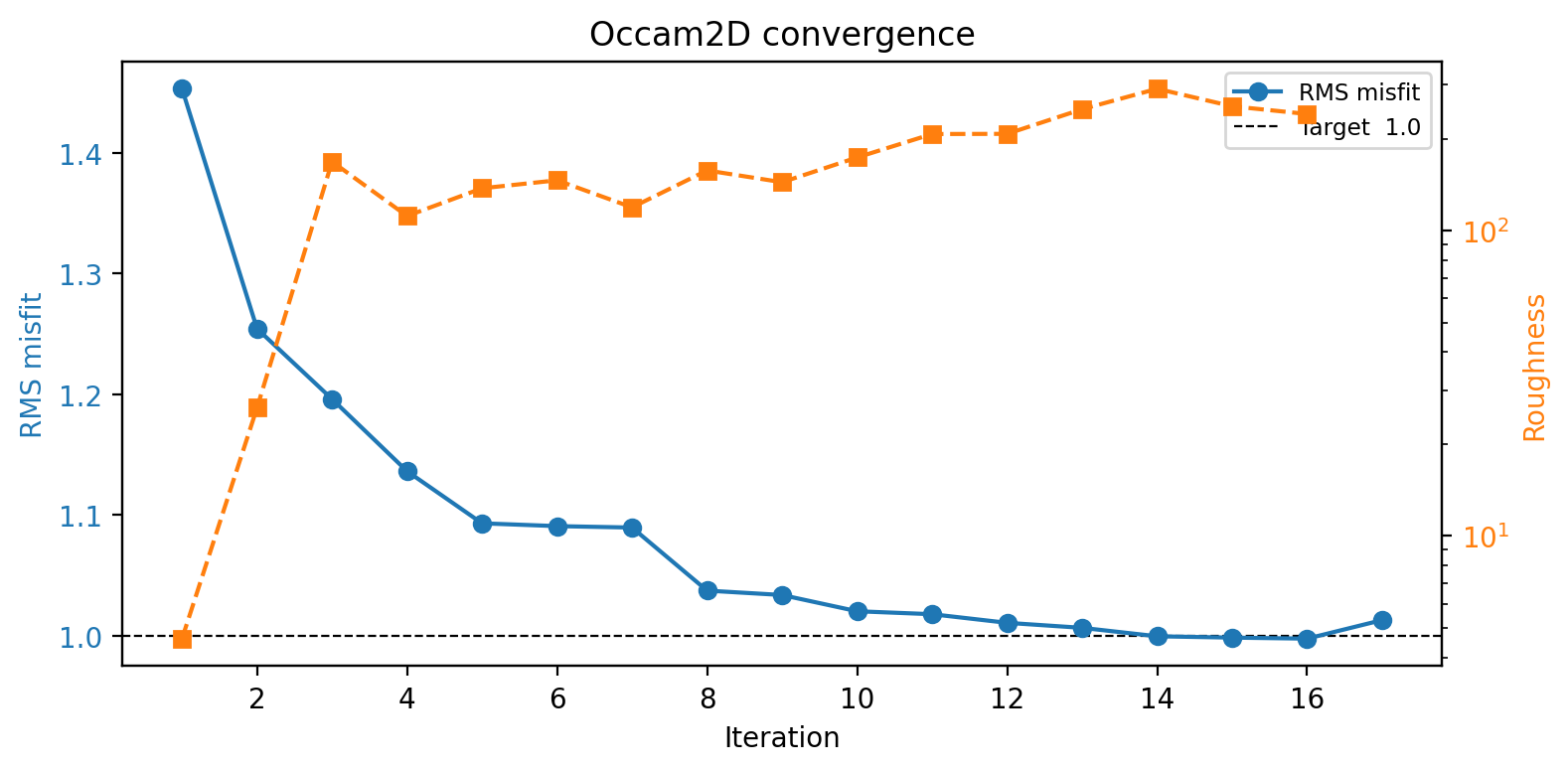
Occam2D’s bundled sample: RMS drops from 1.4528 to 1.0131 over 17 iterations and stays close to target.#
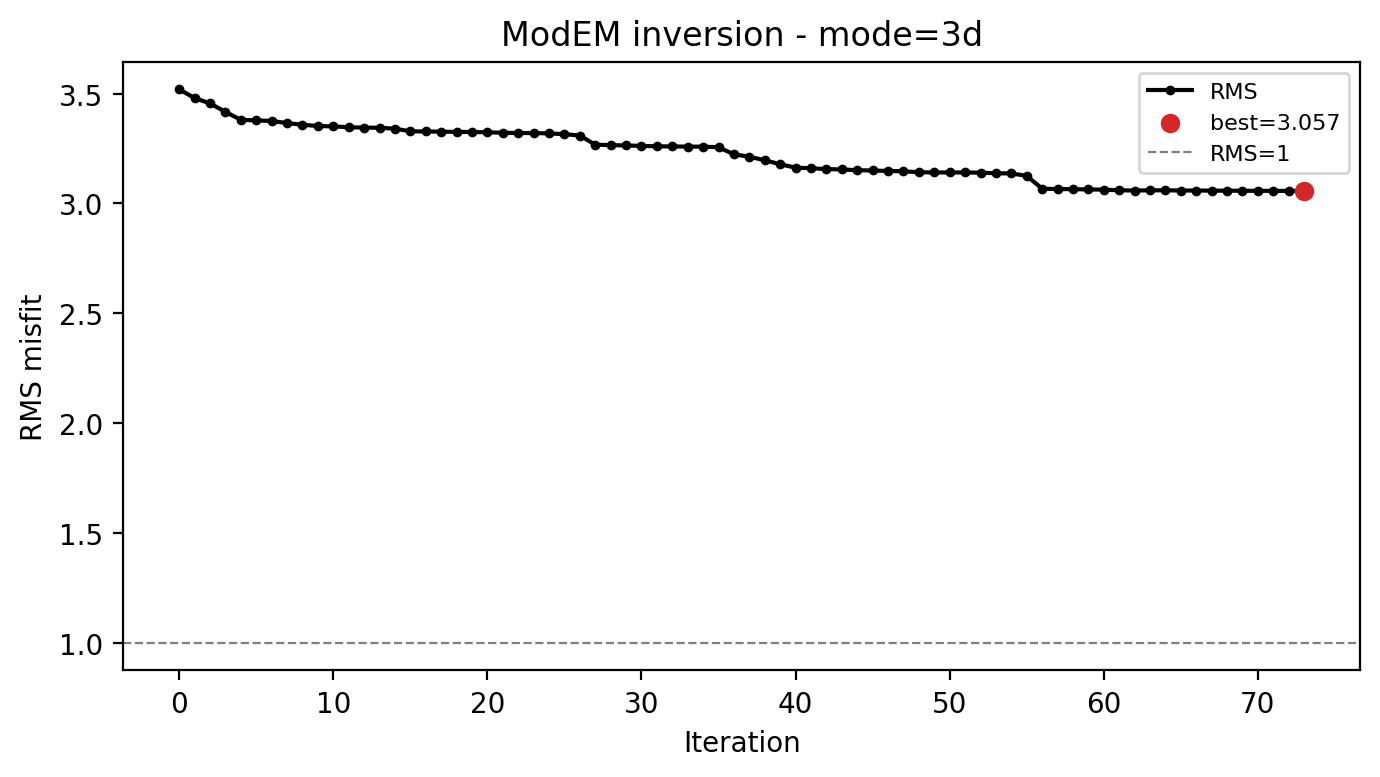
ModEM’s bundled sample: RMS falls from 3.52 to only 3.06 over 74 iterations, with two long flat stretches – the run stopped, but did not converge.#
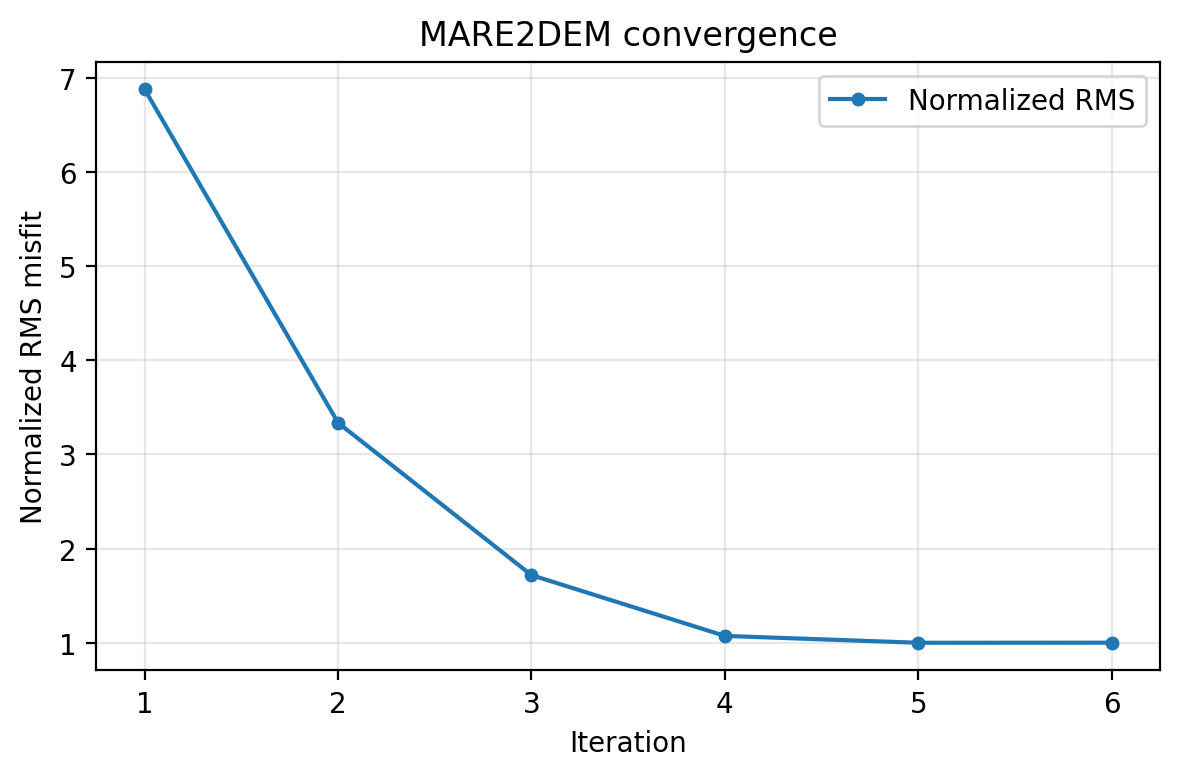
MARE2DEM’s bundled sample: RMS drops from 6.9 to 1.0 in just 6 iterations – the fastest of the three, on its own data and mesh.#
None of this ranks the engines against each other – these are three
different surveys, meshes, and data types, not a controlled comparison.
The lesson is what to check after any classical run: RMS history, best
iteration versus final iteration, and whether the run actually reached its
target, not just whether InversionResult loaded without an error.
18.13.9. Pre-Run Checklist#
Before submitting any of the three engines:
the dry-run command points to the intended executable, files, and MPI process count;
the configuration file used to build the inputs is saved next to the run directory;
station coordinates, frequency band, and component selection have been reviewed, not just accepted from defaults;
old output files from a previous experiment are not sitting in the same directory;
pyCSAMT version, compiler, and MPI/module context are recorded in the run’s provenance manifest.
The full engine-specific checklists – mesh padding, covariance smoothing, error floors, and so on – are in each engine’s own user-guide page; this list is only the part that is common to launching all three.
18.13.10. Common Mistakes#
- The runner reports the binary was not found
Expected without a compiled executable. For Occam2D, either pass
binary_pathexplicitly or setauto_compile=True. For ModEM and MARE2DEM, compile the engine externally (SourceManagercan do this for MARE2DEM) and confirm it is onPATHor in the run directory.- The CLI says the solver could not be detected
Pass
--solver occam2dor--solver modemexplicitly rather than relying on file-signature detection, especially in a directory that mixes files from more than one engine or experiment.- A finished run’s RMS never approached the target
That is a real, valid
InversionResult– the bundled ModEM sample above is exactly this case. Loading successfully is not the same as converging; check the RMS history before trusting the model.- MARE2DEM was expected to work through the CLI
It does not yet. Use
Mare2DEMConfig,InputBuilder, andMare2DEMRunnerdirectly from Python instead ofpycsamt invert.
18.13.11. See Also#
- Prepare an Occam2D Inversion
Full Occam2D preparation walkthrough.
- Prepare A ModEM Inversion
Full 3-D ModEM preparation and mesh-building walkthrough.
- Prepare A MARE2DEM Inversion
Full MARE2DEM preparation and mesh-building walkthrough.
- Map Porphyry Mineralization From Noisy AMT
A combined Occam2D/ModEM preparation case study on a real noisy AMT survey.
- Occam2D
Full Occam2D backend documentation, including plotting and QC.
- ModEM
Full ModEM backend documentation, including plotting and QC.
- MARE2DEM
Full MARE2DEM backend documentation, including source management and QC.
- Choosing A Model Backend
Deciding between Occam2D, ModEM, MARE2DEM, and AI inversion.
- Inversion Commands
Inversion CLI reference for Occam2D and ModEM.