
13.9. Site Utilities#
The site utility module contains the shared helper functions used by the
station containers, selectors, editors, profile tools, exporters, and reports.
Most users will interact with these helpers indirectly through higher-level
APIs. They are still useful when you need a small, explicit operation in a
script: identify EDI-like objects, coerce paths into an
EDICollection, read station identity and coordinates, select
frequency indices, or match station names.
Use this page when you need to:
normalize mixed inputs before passing them to site tools;
iterate safely over EDI-like objects;
read station names and coordinates in low-level adapter code;
implement copy-aware helper functions with an
inplaceflag;build frequency grid index selections for editing;
match station names with literals, wildcards, regular expressions, or callables;
convert azimuths and angle units.
The examples below use a small synthetic EDI-like class. It exposes the same
get_section("head") and Z.freq attributes that the utilities inspect,
so the printed output is reproducible without local EDI files.
>>> import copy
>>> import numpy as np
>>>
>>> class Head:
...     def __init__(self, name="S01", lat=np.nan, lon=np.nan, elev=np.nan):
...         self.dataid = name
...         self.station = name
...         self.lat = lat
...         self.long = lon
...         self.lon = lon
...         self.elev = elev
...
>>> class ZBlock:
...     def __init__(self, freq):
...         self.freq = np.asarray(freq, float)
...         self.z = np.zeros((len(freq), 2, 2), dtype=complex)
...
>>> class DemoEDI:
...     def __init__(
...         self,
...         name="S01",
...         freq=(1000.0, 100.0, 10.0, 1.0),
...         lat=np.nan,
...         lon=np.nan,
...         elev=np.nan,
...     ):
...         self.name = name
...         self.station = name
...         self.Head = Head(name, lat, lon, elev)
...         self.Z = ZBlock(freq)
...
...     def get_section(self, key):
...         if str(key).lower() == "head":
...             return self.Head
...         return None
...
...     def set_section(self, key, value):
...         if str(key).lower() == "head":
...             self.Head = value
...
...     def __copy__(self):
...         new = type(self).__new__(type(self))
...         new.__dict__ = copy.deepcopy(self.__dict__)
...         return new
...
13.9.1. Utility Map#
Group |
Helpers |
Main purpose |
|---|---|---|
Input detection |
|
Decide whether an object is a path, one EDI-like file, or a collection of EDI-like files. |
Iteration and coercion |
|
Walk safely over EDI-like objects or build an |
Station metadata |
|
Implement low-level access to station identifiers and |
Copy and mutation |
|
Centralize safe copy-versus-in-place behavior. |
Frequency helpers |
|
Read frequency vectors and turn frequency rules into integer indices. |
Name matching |
|
Match station names with literals, wildcards, regex, or callables. |
Angle helpers |
|
Normalize azimuths and convert degrees/milliradians. |
13.9.2. Input Detection#
The detection helpers are intentionally duck-typed. They are designed to work with pyCSAMT EDI classes and compatible EDI-like test or adapter objects.
>>> from pathlib import Path
>>> from pycsamt.site.utils import (
...     is_edi_collection,
...     is_edi_file,
...     is_pathlike,
... )
>>> path = Path("data/edi/S01.edi")
>>> edi = DemoEDI("A01")
>>> print(is_pathlike(path))
True
>>> print(is_edi_file(edi))
True
>>> print(is_edi_collection([edi]))
True
Detection rules:
is_pathlike()returnsTrueforstrandpathlib.Pathinputs;is_edi_file()returnsTruefor objects exposing bothget_sectionandZ;is_edi_collection()returnsTruefor anEDICollectionor an iterable whose first item looks like an EDI file;path-like strings are not treated as EDI iterables, even though strings are technically iterable in Python.
These helpers are conservative. They are best used to route input handling, not as scientific validation.
13.9.3. Safe EDI Iteration#
iter_edifiles() yields only EDI-like objects. Non-EDI elements are
skipped, and path-like inputs yield nothing.
>>> from pycsamt.site.utils import iter_edifiles, station_name
>>> edi_a = DemoEDI("A01")
>>> edi_b = DemoEDI("B02")
>>> mixed = [edi_a, object(), edi_b]
>>> for ed in iter_edifiles(mixed):
...     print(station_name(ed))
A01
B02
A single EDI-like object is yielded once:
>>> items = list(iter_edifiles(edi_a))
>>> print(len(items))
1
Use this helper when writing functions that should accept either one station or many stations.
13.9.4. Coercing To EDICollection#
as_edicollection() turns heterogeneous inputs into an
EDICollection when possible.
>>> from pycsamt.site.utils import as_edicollection
>>> from_list = as_edicollection([edi_a, edi_b])
>>> empty = as_edicollection([])
>>> print(from_list is not None)
True
>>> print(empty is None)
True
The coercion order is:
Path-like inputs, or sequences of path-like inputs, are passed to
EDICollection.from_sources.Existing
EDICollectionobjects are returned unchanged.Other inputs are scanned with
iter_edifiles(); if at least one EDI-like object is found, a newEDICollectionis built.If nothing EDI-like is found,
Noneis returned.
Path discovery options are forwarded to EDICollection.from_sources:
recursive, strict, on_dup, and verbose.
13.9.5. Station Name Resolution#
station_name() returns the best available station identifier.
The lookup order is:
ed.stationwhen it exists and is truthy;HEAD.dataidthrough the internal header accessor;object-level fallback attributes
name,site, thendataid;an empty string.
>>> from pycsamt.site.utils import station_name
>>> edi = DemoEDI("A01")
>>> name = station_name(edi)
>>> print(name)
A01
The matching and export tools use this same resolution pattern, so using
station_name in your own scripts keeps naming behavior consistent.
13.9.6. Updating Station Names#
set_station_name() updates the object-level station name and the header
dataid so they stay synchronized.
>>> from pycsamt.site.utils import set_station_name, station_name
>>> _ = set_station_name(edi, "L01_S001", inplace=True)
>>> print(station_name(edi))
L01_S001
>>> print(edi.Head.dataid)
L01_S001
Use inplace=False when you want a copy-like update.
>>> renamed = set_station_name(
...     edi,
...     "L01_S001_REVIEWED",
...     inplace=False,
... )
>>> print(station_name(renamed))
L01_S001_REVIEWED
>>> print(station_name(edi))
L01_S001
If name is omitted, the helper delegates to the core station-name policy
utility using station_id and a pyCSAMT station policy object. For simple
scripts, it is often clearer to build the desired string explicitly:
>>> renamed = set_station_name(edi, name=f"S{12:03d}", inplace=False)
>>> print(station_name(renamed))
S012
13.9.7. Metadata Changes Belong to the Metadata API#
The setters on this page are low-level building blocks for adapters and small
single-object helpers. For a survey-level rename or a coordinated change to
station names, coordinates, HEAD, and INFO, use the validated workflow
in Site Metadata. That guide also explains copy-on-write behavior, duplicate
name detection, audit tables, ordering before sequential renaming, and export
filenames.
In particular, pycsamt.site.base.Sites.map() applies a callable and
collects its return values; it does not interpret a dictionary as a station
rename table. The distinction and the appropriate rename APIs are demonstrated
in Site Metadata.
13.9.8. Coordinate Access#
get_coords() reads latitude, longitude, and elevation from the EDI
HEAD section and returns a tuple-like object with lat, lon, and
elev fields.
>>> from pycsamt.site.utils import get_coords
>>> edi = DemoEDI("S01", lat=35.125, lon=12.750, elev=1234.0)
>>> coords = get_coords(edi)
>>> print(coords.lat)
35.125
>>> print(coords.lon)
12.75
>>> print(coords.elev)
1234.0
Missing or unreadable coordinate fields return NaN values. The helper
supports the legacy header spelling long for longitude.
13.9.9. Writing Coordinates#
set_coords() writes one or more coordinate fields into the EDI header.
Values left as None are not changed.
>>> from pycsamt.site.utils import get_coords, set_coords
>>> edi = DemoEDI("S01", lat=35.125, lon=12.750, elev=1234.0)
>>> corrected = set_coords(
...     edi,
...     lat=35.200,
...     lon=12.900,
...     elev=1180.0,
...     inplace=False,
... )
>>> print(get_coords(corrected))
_Coord(lat=35.2, lon=12.9, elev=1180.0)
>>> print(get_coords(edi))
_Coord(lat=35.125, lon=12.75, elev=1234.0)
Longitude is written to both lon and long when the header allows it.
This keeps newer code and older EDI conventions aligned.
13.9.10. Copy And In-Place Semantics#
Several site tools expose an inplace flag. The two helpers below make that
pattern consistent.
maybe_copy()Attempts
copy.deepcopy(). If deep-copying fails, it returns the original object.apply_inplace()Calls a function directly on the input when
inplace=True. Otherwise it tries to copy first, then calls the function on the copy.
>>> from pycsamt.site.utils import apply_inplace, set_station_name
>>> def rename_to_reviewed(ed):
...     return set_station_name(ed, "REVIEWED", inplace=True)
>>> edi = DemoEDI("S01", lat=35.125, lon=12.750, elev=1234.0)
>>> reviewed = apply_inplace(
...     edi,
...     rename_to_reviewed,
...     inplace=False,
... )
>>> print(station_name(reviewed))
REVIEWED
>>> print(station_name(edi))
S01
>>> print(reviewed is edi)
False
This pattern is useful when writing your own small site-editing helper:
>>> from pycsamt.site.utils import apply_inplace, set_coords
>>> def force_zero_elevation(ed, *, inplace=False):
...     def update(obj):
...         return set_coords(obj, elev=0.0, inplace=True)
...     return apply_inplace(ed, update, inplace=inplace)
>>> edi = DemoEDI("S01", lat=35.125, lon=12.750, elev=1234.0)
>>> zeroed = force_zero_elevation(edi, inplace=False)
>>> print(get_coords(zeroed).elev)
0.0
>>> print(get_coords(edi).elev)
1234.0
13.9.11. Frequency Access#
get_freq() reads the frequency vector from ed.Z.freq or
ed.Z._freq and returns a one-dimensional float array sorted in ascending
order.
>>> from pycsamt.site.utils import get_freq
>>> edi = DemoEDI("F", freq=(1000.0, 100.0, 10.0, 1.0))
>>> freq = get_freq(edi)
>>> print(freq[:5])
[   1.   10.  100. 1000.]
>>> print(freq.size)
4
If no frequency vector is available, an empty array is returned. The helper is read-only: it returns a sorted copy for matching convenience, but it does not reorder the data arrays in the EDI object.
13.9.12. Frequency Matching#
freq_match() returns integer indices where frequency values match one or
more target frequencies within an absolute tolerance.
Here \(\epsilon\) is the absolute tol argument. Thus two close rows in
the next transcript satisfy (1) for the
same target without being numerically identical.
>>> import numpy as np
>>> from pycsamt.site.utils import freq_match
>>> f = np.array([1.0, 10.0, 10.0000004, 100.0])
>>> idx = freq_match(f, 10.0, tol=5e-7)
>>> print(idx.tolist())
[1, 2]
>>> idx = freq_match(f, [1.0, 100.0])
>>> print(idx.tolist())
[0, 3]
Non-finite frequency values never match. Duplicate values are all returned when they fall within the tolerance window. In set notation the returned indices are
where \(T\) is the target set and \(\epsilon\) is tol. Equation
(2) also explains why every qualifying
duplicate is retained rather than only the first match.
13.9.13. Frequency Selection#
freq_select() turns a scalar, list, tuple range, or slice into integer
indices.
>>> import numpy as np
>>> from pycsamt.site.utils import freq_select
>>> f = np.array([1.0, 10.0, 100.0, 1_000.0])
>>> low_band = freq_select(f, (1.0, 100.0))
>>> mid_band = freq_select(f, slice(10.0, 1_000.0))
>>> exact = freq_select(f, [10.0, 100.0])
>>> print(low_band.tolist())
[0, 1, 2]
>>> print(mid_band.tolist())
[1, 2, 3]
>>> print(exact.tolist())
[1, 2]
Selection rules:
slice(lo, hi)selects inclusive bounds with tolerance;(lo, hi)selects the same inclusive range;one
floatorintselects exact matches with tolerance;a sequence of floats selects exact target frequencies with tolerance.
Use this helper when building masks for
pycsamt.site.edit.select_freq() or custom frequency-indexed
transformations.
When you select from get_freq(ed), remember that get_freq returns a
sorted copy. Apply the indices to that sorted vector, or use
pycsamt.site.edit.select_freq() when you need the original arrays sliced
consistently.
13.9.14. Name Matching#
match_name() tests one candidate station name against a pattern.
Supported pattern types are:
strLiteral names, wildcard-like strings such as
"E*"and"A??", or regex-looking strings.re.PatternA compiled regular expression. The pattern’s own flags are respected.
callableA function
fn(name) -> bool.
>>> import re
>>> from pycsamt.site.utils import match_name
>>> print(match_name("E*", "E01"))
True
>>> print(match_name(re.compile(r"^X\d+$"), "X123"))
True
>>> print(match_name(lambda name: name.endswith("99"), "A99"))
True
String matching is case-insensitive. Glob-like strings are translated to regular expressions internally. Regex-looking strings are compiled with case-insensitive matching.
13.9.15. Selecting By Name#
select_by_name() applies match_name() to every EDI-like object in
an input and returns a list of matching EDI objects.
>>> from pycsamt.site.utils import select_by_name, station_name
>>> sites = [
...     DemoEDI("L01_S001"),
...     DemoEDI("L01_S002"),
...     DemoEDI("L02_S003"),
... ]
>>> selected = select_by_name(sites, "L01_*")
>>> print([station_name(ed) for ed in selected])
['L01_S001', 'L01_S002']
For a higher-level container result, use pycsamt.site.selection.by_names()
instead. select_by_name is the lightweight list-returning utility used by
lower-level scripts and helpers.
13.9.16. Angle Helpers#
wrap_azimuth() wraps an angle in degrees into the half-open interval
\([0, 360)\).
>>> from pycsamt.site.utils import wrap_azimuth
>>> print(wrap_azimuth(-10.0))
350.0
>>> print(wrap_azimuth(730.0))
10.0
deg_to_mrad() and mrad_to_deg() convert between degrees and
milliradians.
Equations (3) and (4) are inverses apart from floating- point rounding, as the round trip demonstrates:
>>> import numpy as np
>>> from pycsamt.site.utils import deg_to_mrad, mrad_to_deg
>>> angles_deg = np.array([0.0, 90.0, 180.0])
>>> angles_mrad = deg_to_mrad(angles_deg)
>>> restored = mrad_to_deg(angles_mrad)
>>> print(np.round(angles_mrad, 3).tolist())
[0.0, 1570.796, 3141.593]
>>> print(np.round(restored, 3).tolist())
[0.0, 90.0, 180.0]
These helpers accept scalars or NumPy arrays and return NumPy arrays.
13.9.17. Putting Utilities Together#
The following example stays within the utility layer: it normalizes input, selects a frequency band, and collects a named subset. Survey-level metadata changes are deliberately left to Site Metadata.
>>> from pycsamt.site.utils import (
...     freq_select,
...     get_freq,
...     iter_edifiles,
...     select_by_name,
...     station_name,
... )
>>> collection = [
...     DemoEDI("L01_S001"),
...     DemoEDI("L01_S002"),
...     DemoEDI("L01_S003"),
... ]
>>> prepared = []
>>> for ed in iter_edifiles(collection):
...     freq = get_freq(ed)
...     keep = freq_select(freq, (10.0, 1000.0))
...     ed.Z.freq = freq[keep]
...     prepared.append(ed)
>>> line_start = select_by_name(prepared, "L01_S00?")
>>> print([(station_name(ed), get_freq(ed).tolist()) for ed in line_start])
[('L01_S001', [10.0, 100.0, 1000.0]), ('L01_S002', [10.0, 100.0, 1000.0]), ('L01_S003', [10.0, 100.0, 1000.0])]
The same two decisions can be shown as a small audit figure: station names on one side, selected frequency rows on the other.
>>> import matplotlib.pyplot as plt
>>> fig, ax = plt.subplots(
...     1, 2, figsize=(8, 3.2), constrained_layout=True
... )
>>> all_names = [station_name(ed) for ed in prepared]
>>> keep_names = [station_name(ed) for ed in line_start]
>>> _ = ax[0].bar(
...     all_names,
...     [1 if name in keep_names else 0 for name in all_names],
... )
>>> _ = ax[0].set_ylim(0, 1.2)
>>> _ = ax[0].set_ylabel("selected")
>>> _ = ax[0].set_title("Name filter")
>>> freq = np.array([1.0, 10.0, 100.0, 1000.0])
>>> keep = freq_select(freq, (10.0, 1000.0))
>>> _ = ax[1].plot(
...     freq, np.ones_like(freq), marker="o", label="available"
... )
>>> _ = ax[1].scatter(
...     freq[keep], np.ones_like(keep), s=90, label="selected"
... )
>>> _ = ax[1].set_xscale("log")
>>> _ = ax[1].set_yticks([])
>>> _ = ax[1].set_xlabel("frequency (Hz)")
>>> _ = ax[1].set_title("Frequency selection")
>>> _ = ax[1].legend(frameon=False)
>>> for axis in ax:
...     axis.grid(True, alpha=0.25)
>>> fig.savefig("utilities_selection_flow.png", dpi=160)
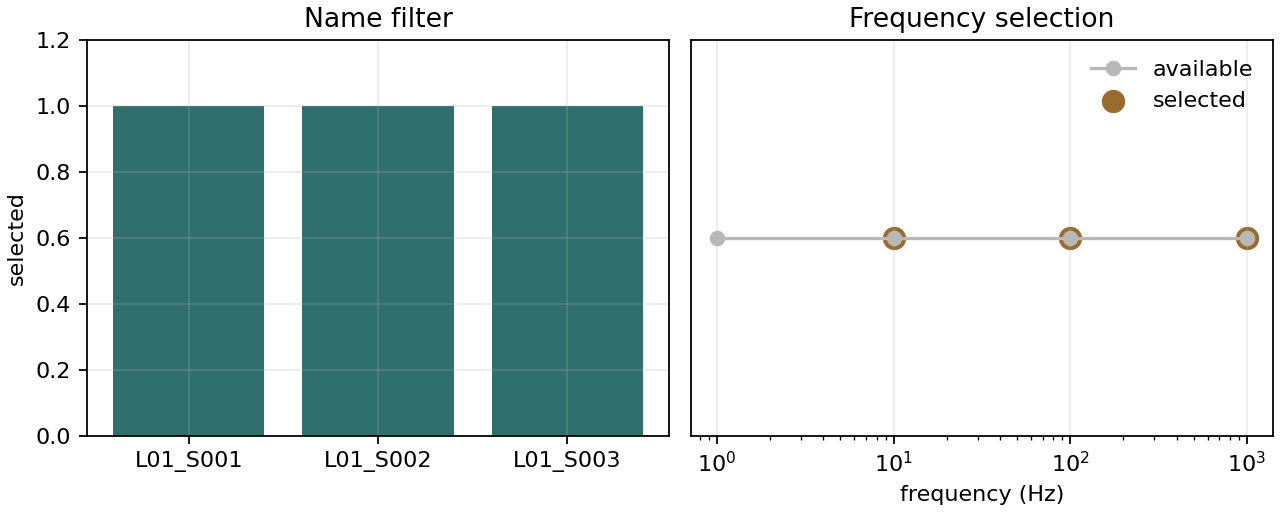
The left panel records which station identities pass the name rule; the right panel distinguishes available frequencies from the retained band.#
All three bars reach one because L01_S00? accepts exactly one trailing
character after L01_S00 and each name satisfies that structure. In the
frequency panel, the point at 1 Hz remains available but is not highlighted:
the inclusive interval begins at 10 Hz. The highlighted 10, 100, and 1000 Hz
points agree with the printed indices and make the two independent filters
auditable without suggesting that name matching changed the frequency data.
13.9.18. Common Mistakes#
- Using
is_edi_collection()on a one-shot generator The function peeks at the first item. Prefer
iter_edifiles()when you need to consume an iterable safely.- Assuming
maybe_copy()always returns a distinct object If deep-copying fails, the original object is returned. Functions that need strict copy isolation should test identity or implement a backend-specific copy path.
- Forgetting that
get_freq()sorts the returned vector The helper returns a sorted array for matching convenience, but it does not reorder the EDI object’s data arrays. Use editing tools for real row selection.
- Using
select_by_name()when you need aSitescontainer select_by_namereturns a plain list. Usepycsamt.site.selection.by_names()for aSitesresult.- Expecting
get_coords()to validate coordinates It is an accessor. Use the location tools when you need parsing, normalization, distance, projection, or topography handling.
13.9.19. Next Pages#
Site Containers for the higher-level
SiteandSiteswrappers;Site Metadata for validated renaming, coordinated metadata changes, auditing, and metadata-aware export;
Site Selection for container-returning station filters;
Site Editing for data-changing operations built on these utilities;
Location And Profiles for coordinate parsing, projection, chainage, and profiles;
Export And Reporting for delivery files and survey summaries.