
13.2. Site Metadata#
Station metadata connects an EDI response to its identity, position, survey, acquisition history, processing history, and delivery name. These values are not merely descriptive: station lookup, profile ordering, coordinate-based selection, manifests, and exported filenames all depend on them. A correction therefore needs the same care as a numerical edit.
The metadata tools provide one consistent workflow for a single
EDI-like object, a pycsamt.site.base.Site, a sequence of EDI
files, or a pycsamt.site.base.Sites collection. They can:
synchronize station identities across EDI sections;
update coordinates,
HEAD,INFO, and other named sections;consume dictionaries, sequences, callables, DataFrames, or CSV review tables;
set, remove, or transform nested values;
validate a complete batch before committing it;
produce a row-level metadata audit trail;
optionally write renamed EDI files and a manifest.
The central class is SiteMetadataEditor. The convenience functions
update_metadata(), update_metadata_all(), and rename_sites()
use the same implementation and validation rules.
13.2.1. Why Identity Synchronization Matters#
One physical station can be represented by several names: an in-memory object
attribute, HEAD.DATAID, HEAD.STATION, MTSECT.SECTID, and the output
filename. If those values diverge, a station may be selectable under one name
but exported under another. For a normalized station \(i\), the editor
enforces the identity invariant
where \(s_i\) is the resolved station identity. The filename joins
this equality when export uses template="{station}.edi". Equation
(1) is why changing only HEAD.DATAID by
hand is insufficient.
A rename table is a mapping
Before applying (2), the editor resolves every target identity and rejects empty or case-insensitive duplicate values by default. This preflight prevents two EDI files from silently competing for the same lookup key or export path.
13.2.2. Real EDI Setup#
The executable examples use three stations from the repository’s L18 AMT line. Only metadata are edited; impedance and frequency arrays remain attached to their original stations.
>>> from pathlib import Path
>>> from tempfile import TemporaryDirectory

>>> import numpy as np
>>> import pandas as pd

>>> from pycsamt.seg.edi import EDIFile
>>> from pycsamt.site import (
...     SiteMetadataEditor,
...     Sites,
...     rename_sites,
...     update_metadata,
...     update_metadata_all,
... )

>>> data_root = Path("data/AMT/WILLY_DATA")
>>> l18_paths = sorted((data_root / "L18PLT").glob("*.edi"))[:3]
>>> sites = Sites([EDIFile(path) for path in l18_paths])
>>> print([site.name for site in sites])
['18-001A', '18-002U', '18-003A']
>>> print(
...     [
...         tuple(round(value, 6) for value in site.coords)
...         for site in sites
...     ]
... )
[(32.1203, 119.128833, 99.0), (32.121133, 119.1289, 110.0), (32.122083, 119.12885, 81.0)]
The suffixes A and U are meaningful source labels, but a delivery may
require line-based sequential identities. Keeping the source collection
unchanged makes the transformation reviewable.
13.2.3. Renaming One or Many Stations#
rename_sites() accepts an explicit mapping, an order-aligned sequence,
or a callable. A mapping is the safest choice when names were approved in a
review table because its intent does not depend on collection order.
>>> rename_map = {
...     "18-001A": "L18_001",
...     "18-002U": "L18_002",
...     "18-003A": "L18_003",
... }
>>> renamed = rename_sites(sites, rename_map)
>>> print([site.name for site in sites])
['18-001A', '18-002U', '18-003A']
>>> print([site.name for site in renamed])
['L18_001', 'L18_002', 'L18_003']
>>> print(
...     [site.edi.get_section("mtsect").sectid for site in renamed]
... )
['L18_001', 'L18_002', 'L18_003']
The last output verifies the invariant in
(1), not just the visible Site.name.
For generated names, the callable receives the EDI object and its zero-based
input index:
>>> generated = rename_sites(
...     sites,
...     lambda _edi, index: f"L18_G{index + 1:03d}",
... )
>>> print([site.name for site in generated])
['L18_G001', 'L18_G002', 'L18_G003']
An aligned sequence is concise but should be used only after order has been verified explicitly:
>>> sequenced = rename_sites(sites, ["S101", "S102", "S103"])
>>> print([site.name for site in sequenced])
['S101', 'S102', 'S103']
13.2.4. Updating One Site Coherently#
update_metadata() applies one specification to one Site or EDI
object. head and info are mappings. Known INFO keys are routed to
their canonical nested containers; additional keys are preserved as
KEY=VALUE text so they survive writing.
>>> reviewed = update_metadata(
...     sites[0],
...     {
...         "name": "L18_001",
...         "head": {
...             "project": "WILLY_L18",
...             "county": "Demo",
...         },
...         "info": {
...             "processingtag": "metadata-reviewed",
...             "reviewed_by": "field-team",
...         },
...     },
... )
>>> print(reviewed.name)
L18_001
>>> print(reviewed.edi.get_section("head").project)
WILLY_L18
>>> print(reviewed.edi.get_section("info").Processing.processingtag)
metadata-reviewed
>>> print(reviewed.edi.get_section("info").info_text[-1])
REVIEWED_BY=field-team
>>> print(sites[0].name)
18-001A
The final output confirms the default copy-on-write metadata edit: the returned site changes while the source site remains untouched.
13.2.5. Coordinates and Their Validation#
Coordinates may be supplied separately or together through coords:
>>> relocated = update_metadata(
...     sites[0],
...     {"coords": (32.1205, 119.1290, 101.5)},
... )
>>> print(relocated.coords)
(32.1205, 119.129, 101.5)
A two-value tuple updates latitude and longitude while retaining elevation. A
mapping also accepts latitude, longitude, and elevation aliases.
With coordinate validation enabled, supplied values must satisfy
where \(\phi_i\), \(\lambda_i\), and \(h_i\) are latitude, longitude, and elevation. The finite-value requirement in (3) applies only to values supplied by the operation; omitted fields retain their existing values.
>>> try:
...     update_metadata(sites[0], {"lat": 91.0})
... except ValueError as exc:
...     print(type(exc).__name__)
...     print(exc)
ValueError
latitude must be finite and in [-90.0, 90.0]
Set validate_coordinates=False only when an intermediate non-geographic
coordinate convention is deliberate and a later workflow will normalize it.
13.2.6. Metadata Sources#
The editor normalizes several source forms into one station-level plan.
Source |
Resolution rule |
Best use |
|---|---|---|
Station-keyed mapping |
Case-insensitive match against current identity. |
Explicit reviewed changes. |
One specification |
Applied to every input station. |
Shared project or processing metadata. |
Sequence |
Aligned to input order; lengths must match. |
Deterministic generated batches. |
Callable |
Called with EDI and optional index. |
Rules derived from current metadata. |
DataFrame |
One row per station. |
Interactive review and joins. |
CSV path |
Read as the same tabular schema. |
Reproducible field-team handoff. |
13.2.7. Tabular Review Workflow#
A DataFrame or CSV needs one station column named station, name,
site, dataid, or id. Common aliases include new_name,
latitude, longitude, and elevation. Dotted columns such as
head.project and info.processingtag address sections directly.
>>> review_table = pd.DataFrame(
...     {
...         "station": [site.name for site in sites],
...         "new_name": ["L18_A", "L18_B", "L18_C"],
...         "elevation": [101.0, 102.0, 103.0],
...         "head.project": ["TABLE_REVIEW"] * 3,
...     }
... )
>>> editor = SiteMetadataEditor(review_table)
>>> preview = editor.plan(sites)
>>> print(
...     preview[
...         ["old_name", "new_name", "changed_fields", "status"]
...     ].to_string(index=False)
... )
old_name new_name             changed_fields  status
 18-001A    L18_A [name, elev, head.project] updated
 18-002U    L18_B [name, elev, head.project] updated
 18-003A    L18_C [name, elev, head.project] updated
>>> print([site.name for site in sites])
['18-001A', '18-002U', '18-003A']
SiteMetadataEditor.plan() executes the transformations on private copies
and returns the audit without changing sites. After review, the same editor
can apply the table:
>>> table_updated = editor.apply(sites)
>>> print([(site.name, site.coords[2]) for site in table_updated])
[('L18_A', 101.0), ('L18_B', 102.0), ('L18_C', 103.0)]
CSV input follows the identical path and ignores empty tabular cells instead
of replacing existing metadata with NaN:
>>> with TemporaryDirectory() as tmp:
...     csv_path = Path(tmp) / "metadata_review.csv"
...     review_table.to_csv(csv_path, index=False)
...     csv_updated = update_metadata_all(sites, csv_path)
...     print([site.name for site in csv_updated])
['L18_A', 'L18_B', 'L18_C']
13.2.8. Generic Field Actions#
The section-specific head and info mappings cover most work. Three
generic actions handle more complex corrections:
setAssign
path -> value.transformAssign
path -> callable. The callable receives the current value and may also accept the EDI object and input index.unsetClear one path or a sequence of paths. Station identity fields cannot be unset; rename them explicitly.
Unprefixed paths address HEAD. Explicit prefixes are head., info.,
edi., and section.<name>.. Nested paths are resolved without requiring
the caller to reproduce backend capitalization.
>>> action_editor = SiteMetadataEditor(
...     {
...         "18-001A": {
...             "set": {
...                 "head.project": "FIELD_QC",
...                 "info.processingtag": "checked",
...             },
...             "transform": {
...                 "head.elev": lambda value: value + 1.5,
...             },
...             "unset": ["head.county"],
...         }
...     },
...     missing="ignore",
... )
>>> action_updated = action_editor.apply(sites)
>>> print(action_updated[0].edi.get_section("head").project)
FIELD_QC
>>> print(
...     action_updated[0]
...     .edi.get_section("info")
...     .Processing.processingtag
... )
checked
>>> print(action_updated[0].coords[2])
100.5
>>> print(action_editor.records_[0].changed_fields)
('head.project', 'head.elev')
head.county is absent in the source, so clearing it is a no-op and does not
appear in changed_fields. This distinction keeps the audit focused on
actual state changes.
13.2.9. Editing Other EDI Sections#
Use sections when metadata belong to a named EDI section other than
HEAD or INFO. Each section name maps to its own field mapping:
>>> section_updated = update_metadata(
...     sites[0],
...     {
...         "sections": {
...             "definemeas": {"review.status": "accepted"},
...             "quality": {"score": 0.95},
...         }
...     },
... )
>>> print(
...     section_updated.edi.get_section("definemeas").review.status
... )
accepted
>>> print(section_updated.edi.get_section("quality").score)
0.95
Missing sections are created as lightweight metadata containers. A new custom
section is useful in memory, but whether a foreign EDI writer serializes that
section depends on its backend. Standard HEAD and INFO fields have the
strongest cross-tool portability.
13.2.10. Transactions and Error Policies#
A metadata transaction stages each edited EDI on an independent deep copy. For a source collection \(\mathcal{E}\) and metadata plan \(\mathcal{M}\), the default commit rule is
Thus, with on_error="raise", a failure at the final station cannot leave
the first stations changed. Equation (4) also
applies to inplace=True: object state is committed only after validation.
>>> atomic_editor = SiteMetadataEditor(
...     {
...         "18-001A": {"name": "READY"},
...         "18-002U": {"lat": 100.0},
...     },
...     missing="ignore",
... )
>>> try:
...     atomic_editor.apply(sites, inplace=True)
... except ValueError as exc:
...     print(type(exc).__name__)
ValueError
>>> print([site.name for site in sites])
['18-001A', '18-002U', '18-003A']
Set on_error="warn" or "ignore" only when partial success is intended.
Failed stations then retain their original state while successful stations are
committed. The audit marks failures with status="error" and stores the
message.
13.2.11. Validation Controls#
The editor separates unmatched source keys from invalid station operations.
missingControls update keys that match no station:
"raise","warn", or"ignore".on_errorControls station-level exceptions:
"raise","warn", or"ignore".allow_duplicatesDisables the unique-final-name constraint when
True.allow_empty_namesPermits an empty identity when
True.validatorsAdds project-specific callables. A validator may return
Falseor raise a descriptive exception.
>>> def line_18_only(edi):
...     return str(edi.name).startswith(("18-", "L18_"))
...
>>> validated = SiteMetadataEditor(
...     {"18-001A": {"name": "L18_001"}},
...     missing="ignore",
...     validators=[line_18_only],
... ).apply(sites)
>>> print(validated[0].name)
L18_001
13.2.12. Audit Semantics#
Each MetadataChange stores input index, old and new identity,
requested fields, actual changed fields, status, error, and compact before/after
snapshots. For a requested field set \(\mathcal{F}_i\), the changed set is
The no-op county removal above is excluded from \(\Delta_i\) in
(5). This makes the audit useful both for human
review and automated acceptance checks.
>>> record = action_editor.records_[0]
>>> print(record.old_name, record.new_name, record.status)
18-001A 18-001A updated
>>> print(record.requested_fields)
('head.project', 'info.processingtag', 'head.elev', 'head.county')
>>> print(record.before["head.elev"], record.after["head.elev"])
99.0 100.5
SiteMetadataEditor.audit() returns a plain DataFrame by default. Pass
api=True to force an API view or api=None to defer to the global API
configuration.
13.2.13. In-Place Editing#
Use inplace=True when callers already share the same Site or Sites
object and must observe the commit. The editor preserves the original EDI
object identity while replacing its validated state.
>>> inplace_sites = Sites([EDIFile(path) for path in l18_paths])
>>> first_edi = inplace_sites[0].edi
>>> returned = SiteMetadataEditor(rename_map).apply(
...     inplace_sites,
...     inplace=True,
... )
>>> print(returned is inplace_sites)
True
>>> print(inplace_sites[0].edi is first_edi)
True
>>> print([site.name for site in inplace_sites])
['L18_001', 'L18_002', 'L18_003']
One-shot iterators cannot be committed safely because they cannot be revisited
after staging. Use a list, tuple, Site, Sites, or EDI object for
in-place work.
13.2.14. Export and Round-Trip Verification#
SiteMetadataEditor.apply_and_write() first completes the metadata edit,
then delegates to pycsamt.site.export.write_sites(). Written paths are
stored in output_paths_.
>>> with TemporaryDirectory() as tmp:
...     root = Path(tmp)
...     delivery = SiteMetadataEditor(rename_map)
...     exported = delivery.apply_and_write(
...         sites,
...         root / "edi",
...         manifest_csv=root / "manifest.csv",
...     )
...     print([path.name for path in delivery.output_paths_])
...     manifest = pd.read_csv(root / "manifest.csv")
...     print(manifest[["station", "filename"]].to_string(index=False))
...     print(
...         [
...             EDIFile(path).get_section("head").dataid
...             for path in delivery.output_paths_
...         ]
...     )
['L18_001.edi', 'L18_002.edi', 'L18_003.edi']
station    filename
L18_001 L18_001.edi
L18_002 L18_002.edi
L18_003 L18_003.edi
['L18_001', 'L18_002', 'L18_003']
Reloading the files verifies the serialized HEAD.DATAID rather than merely
trusting the in-memory objects. For formal deliveries, also compare frequency
counts and tensor shapes before and after writing.
13.2.15. Renaming Does Not Order a Survey Line#
L22PLT is an important counterexample because its raw station names do not sort
cleanly as a profile. Case-insensitive lexical discovery starts with
22-013VF and 22-025AF, later reaches 22-10U, and ends at 22-9A.
Connecting stations in that input order produces large jumps across an otherwise
narrow north–south line.
Renaming and ordering are different transformations. Write a site as the pair \(e_i=(s_i,\mathbf{x}_i)\), where \(s_i\) is its identity and \(\mathbf{x}_i\) contains its coordinates and response data. Renaming acts pointwise:
The index \(i\) is unchanged in (6). Ordering instead applies a permutation \(\pi\):
The complete experiment uses the same 25 EDI objects in all four panels. The
top row keeps lexical input order; the bottom row calls
pycsamt.site.base.Sites.ordered() with by="chainage". The right-hand
panels then apply the same sequential naming rule, L22S001 through
L22S025, to the order already present in their corresponding left panel.
>>> l22_paths = sorted(
...     (data_root / "L22PLT").glob("*.edi"),
...     key=lambda path: path.name.casefold(),
... )
>>> l22_raw = Sites([EDIFile(path) for path in l22_paths])
>>> raw_names = [site.name for site in l22_raw]

>>> raw_name_map = {
...     name: f"L22S{index + 1:03d}"
...     for index, name in enumerate(raw_names)
... }
>>> l22_raw_renamed = rename_sites(l22_raw, raw_name_map)

>>> l22_chainage = l22_raw.ordered("chainage")
>>> chainage_names = [site.name for site in l22_chainage]
>>> chainage_name_map = {
...     name: f"L22S{index + 1:03d}"
...     for index, name in enumerate(chainage_names)
... }
>>> l22_chainage_renamed = rename_sites(
...     l22_chainage,
...     chainage_name_map,
... )

>>> print(raw_names[0], raw_names[-1])
22-013VF 22-9A
>>> print(l22_raw_renamed[0].name, l22_raw_renamed[-1].name)
L22S001 L22S025
>>> print(chainage_names[0], chainage_names[-1])
22-1BF 22-025AF
>>> print(
...     l22_chainage_renamed[0].name,
...     l22_chainage_renamed[-1].name,
... )
L22S001 L22S025
The first and last labels change after chainage ordering because the underlying sequence changed. The sequential names alone cannot reveal whether that sequence was scientifically meaningful. Coordinate equality confirms that renaming itself did not move any station:
>>> raw_xy = np.asarray([site.coords[:2] for site in l22_raw])
>>> renamed_raw_xy = np.asarray(
...     [site.coords[:2] for site in l22_raw_renamed]
... )
>>> ordered_xy = np.asarray([site.coords[:2] for site in l22_chainage])
>>> renamed_ordered_xy = np.asarray(
...     [site.coords[:2] for site in l22_chainage_renamed]
... )
>>> print(np.array_equal(raw_xy, renamed_raw_xy))
True
>>> print(np.array_equal(ordered_xy, renamed_ordered_xy))
True
>>> print(np.array_equal(raw_xy, ordered_xy))
False
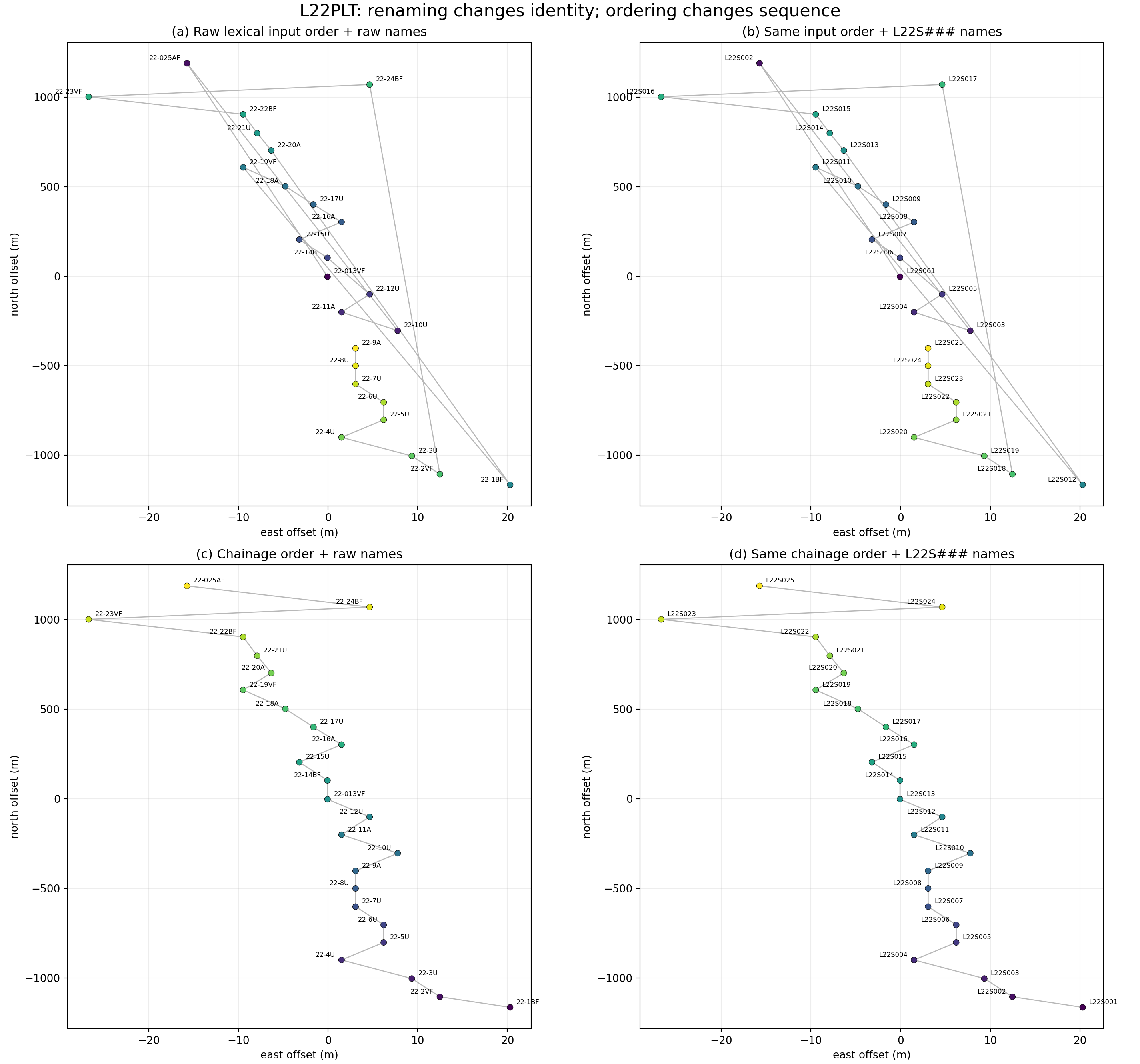
Every L22PLT station under raw lexical order and chainage order, before and
after applying sequential L22S### identities. Point color follows the
position returned by the collection.#
Panel (a) shows the raw identities and raw lexical input sequence. The grey
connections cross the profile repeatedly, most visibly through the isolated
stations near the northern end. Panel (b) has identical points, colors, and
connections. Only the text labels changed to L22S###. This is the visual
form of (6): assigning tidy sequential
names to a disordered collection makes the labels look orderly but does not
repair the sequence.
Panel (c) retains the raw names but permutes the station-coordinate pairs by chainage. The main line is now followed progressively from one end to the other; the remaining long northern connections expose genuine cross-track or endpoint geometry rather than widespread lexical-order jumps. Panel (d) keeps exactly that chainage sequence and changes only the identities. Its geometry and colors are therefore identical to panel (c), as predicted by applying (6) after (7).
The practical consequence is important: order first, rename second when a sequential identity is intended to encode position along a survey line. If the original names must remain associated with external field records, keep the explicit old-to-new mapping and the metadata audit as part of the delivery. Chainage is appropriate here because L22 is line-like, but it should not be forced blindly. Use Location And Profiles to inspect profile linearity, cross-track residuals, missing coordinates, and the reported ordering method before treating chainage as authoritative.
13.2.16. Choosing the Right Entry Point#
Need |
Entry point |
Result |
|---|---|---|
Rename one or many stations |
|
Synchronized identities. |
Update one station |
|
One copied or in-place object. |
Apply a batch once |
|
Updated |
Preview, audit, validate, or export |
Reusable editor plus records and paths. |
|
Compute arbitrary values without editing |
|
Plain list of callable results. |
13.2.17. Common Mistakes#
- Using
Sites.mapwith a rename dictionary Sites.mapaccepts a callable and returns a list. Userename_sites()for identity mappings.- Renaming before confirming station order
Sequential callable or list-based names inherit input order. Inspect or sort the profile explicitly first.
- Editing only
HEAD.DATAID This can leave object identity and
SECTIDinconsistent. Use the metadata API so (1) is maintained.- Treating
planas a cached commit planevaluates actions on copies. A laterapplyevaluates callable transformations again, so callables should be deterministic and free of external side effects.- Using
on_error="ignore"without reading the audit Partial success is deliberate under that policy. Always inspect error rows before export.
- Assuming custom sections are universally serializable
In-memory section editing is backend-independent, but foreign writers may omit non-standard sections. Reload exported files when persistence matters.
- Disabling coordinate validation too early
Out-of-range values may then enter selection, distance, projection, or map workflows. Keep validation enabled for geographic EDI coordinates.
- Expecting this editor to touch EMTF-XML metadata directly
SiteMetadataEditorand its convenience functions edit EDI sections (HEAD,INFO, and similar) specifically. Running them on an XML-nativeSitestill works – it materializes and edits that site’s EDI view, the same wayrename()does – but the change lands insite.edi, not in the richersite_meta/provenanceobjects onsite.tf. To edit those directly, work with thepycsamt.metadatadataclasses (see Metadata) throughsite.tfitself.
13.2.18. Next Steps#
Site Containers explains the
SiteandSitesobject model, including the EDI/EMTF-XML dual backend;Location And Profiles establishes a defensible station order;
Site Selection filters stations after metadata normalization;
Site Editing changes response arrays and derived quantities;
Export And Reporting covers manifests, archives, and delivery reports;
Site Utilities documents the low-level naming and coordinate helpers;
Metadata documents the richer, format-neutral metadata objects available through
tf.